Archives 2024

What Is Sequence In Premiere Pro

Sequence In Premiere Pro, digitalanivipracticeb

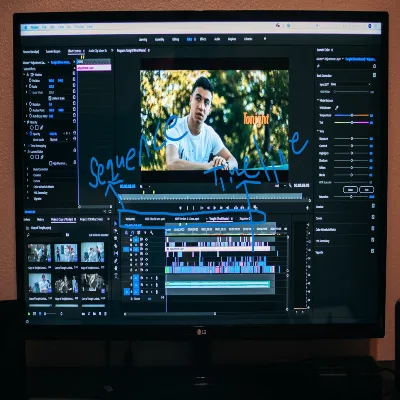
In Premiere Pro, a sequence is a timeline where you arrange and edit your video clips, audio tracks, images, and other media elements to create a cohesive video project. It’s essentially the workspace where you assemble and manipulate your content to produce your final video.

When you start a new project in Premiere Pro, you typically begin by creating one or more sequences. Each sequence can have its settings, such as resolution, frame rate, and aspect ratio. Which you can customize to match the specifications of your project or the media you’re working with.

You can add clips and other assets to your sequence, trim and rearrange them, apply effects and transitions, adjust audio levels, and perform various other editing tasks to refine your video. Premiere Pro provides a wide range of tools and features to help you manipulate your content within the sequence timeline and create professional-quality videos.

Shortcut for the Sequence Button in Premiere Pro

In Adobe Premiere Pro, there isn’t a specific keyboard shortcut for creating a new sequence. However, you can quickly create a new sequence by using the following keyboard shortcut:

  1. Press Ctrl + N (Windows) or Cmd + N (Mac) to open the New Sequence dialog box.
  2. From there, you can choose a preset or customize the sequence settings according to your project requirements.
  3. Enter a name for your sequence and click OK to create it.

This keyboard shortcut allows you to access the sequence creation process efficiently without having to navigate through menus.

How to create Sequence Premiere Pro 2024

Creating a sequence in Premiere Pro in 2024 is similar to previous versions. Here’s how you can do it:

  1. Open Premiere Pro by launching the Adobe Premiere Pro application on your computer.
  2. Start a New Project: If you’re starting a new project. Go to the “File” menu at the top left corner of the screen and select “New Project.” . Enter a call to your assignment and pick a place to store it. Click “OK” to create the project.
  3. Access New Sequence Options:
    • If you’re starting a new project, you’ll be prompted to create a new sequence when you first open Premiere Pro.
    • If you’re already working on a project, you can create a new sequence by going to the “File” menu and selecting “New” > “Sequence.”
  4. Choose Sequence Settings: In the New Sequence dialog box, you’ll have several options:
    • You can select a preset from the dropdown menu, which includes commonly used settings for different video formats.
    • Alternatively, you can customize the sequence settings by adjusting parameters such as frame size, frame rate, pixel aspect ratio, and more.
    • Specify additional settings such as tracks, timecode, and audio configuration.
  5. Name Your Sequence: Enter a name for your sequence in the Sequence Name field.
  6. Click OK: Once you’ve selected or customized your sequence settings and named your sequence. Click the OK button to create the new sequence.

After you click OK, Premiere Pro will create a new sequence based on the settings you specified, and it will appear in the Project panel. You can then start adding media to your sequence and begin editing your video.

Where is the sequence button in Premiere Pro

In Adobe Premiere Pro, there isn’t a specific “Sequence” button to create a new sequence like there is for other actions. Instead, you create a new sequence by selecting a preset or customizing the sequence settings based on your project requirements. Here’s the way to create a brand-new sequence:

  1. Go to File Menu: Click on “File” in the menu bar at the top of the Premiere Pro window.
  2. Select New Sequence: From the dropdown menu that appears when you click on “File,” choose “New” and then “Sequence.”
  3. Choose Sequence Settings: In the New Sequence dialog box that opens, you have several options:
    • You can select a preset from the Preset dropdown menu, which includes commonly used settings for different video formats.
    • Alternatively, you can customize the sequence settings by adjusting parameters such as frame size, frame rate, pixel aspect ratio, and more.
    • You can also specify additional settings such as tracks, timecode, and audio configuration.
  4. Name Your Sequence: Enter a name for your sequence in the Sequence Name field.
  5. Click OK: Once you’ve selected or customized your sequence settings and named your sequence, click the OK button to create the new sequence.

After you click OK, Premiere Pro will create a new sequence based on the settings you specified, and it will appear in the Project panel. You can then start adding media to your sequence and begin editing your video.

Details About Sequences In Premiere Pro:

  1. Types of Sequences: Premiere Pro allows you to create different types of sequences depending on your project needs. This includes sequences optimized for various formats like standard definition, high definition, and even custom resolutions. You can also create sequences tailored for specific purposes such as social media platforms or web videos.
  2. Multitrack Editing: Sequences in Premiere Pro support multitrack editing, which means you can layer multiple video and audio tracks on the timeline. This allows for complex editing workflows where you can overlay footage, add background music, incorporate sound effects, and more.
  3. Nested Sequences: Premiere Pro enables you to nest sequences within other sequences. This allows you to treat a group of clips. An entire edited sequence as a single unit, making it easier to manage and apply effects or adjustments to the nested content as a whole.
  4. Dynamic Link: Premiere Pro offers Dynamic Link integration with other Adobe Creative Cloud applications like After Effects and Audition. This allows you to seamlessly import compositions or audio tracks from these applications into your Premiere Pro sequence without rendering, preserving flexibility and streamlining your workflow.
  5. Sequence Settings: You can access and modify sequence settings at any time, even after you’ve created your sequence. This flexibility allows you to adjust parameters such as frame rate, aspect ratio, and resolution to match your project requirements or accommodate changes during the editing process.
  6. Sequence Presets: Premiere Pro provides a variety of sequence presets to streamline the creation process. These presets are pre-configured templates with optimized settings for common video formats, making it easier to start your project with the correct specifications.

Sequences serve as the foundation of your video editing workflow in Premiere Pro, providing a structured environment where you can organize, manipulate, and refine your media assets to craft compelling visual stories.

Creative Mobile App Design

Enhancing Your Blog's Visuals with UI Tools (2025), digitalanivipractice

Creative mobile app design involves the strategic use of design elements and principles to create visually appealing, engaging, and user-friendly mobile applications.

User-Centered Design:

User-centered design (UCD) is a fundamental principle in creative mobile app design that prioritizes. The needs, preferences, and behaviors of the app’s target users throughout the design process. Here’s how user-centered design is applied in the context of mobile app design:

User Research:

The UCD process begins with thorough user research to gain a deep understanding of the target audience. This research may involve conducting interviews, surveys, and usability studies. To identify user needs, pain points, goals, and behaviors. By understanding the user’s perspectives. Designers can create apps that address real user needs and provide value.

User Personas:

User personas are fictional representations of the app’s target users based on the insights gathered from user research. Designers create personas to humanize the target audience and better understand their motivations, preferences, and demographics. Personas assist designers in empathizing with customers and making layout selections that align with their wishes and goals.

Empathy Mapping:

Empathy mapping is a technique used to visualize the thoughts, feelings, and behaviors of users during their interactions with the app. Designers create empathy maps to identify opportunities for improving the user experience and address pain points or frustrations. By empathizing with users’ perspectives, designers can create more intuitive and user-friendly app designs.

Iterative Design Process:

UCD emphasizes an iterative design process where designers create prototypes, gather feedback from users through usability testing, and iterate. On the design based on user insights. This iterative approach allows designers to refine and improve the app’s design over time. Ensuring that it meets the needs and expectations of users.

User Flows and Journey Mapping:

Designers create user flows and journey maps to visualize. The steps users take to accomplish tasks within the app and understand their overall experience. User flows outline the sequence of interactions users go through to complete specific tasks. While journey maps provide a holistic view of the user’s experience from start to finish. By mapping out user journeys, designers can identify pain points and opportunities for improvement in the app’s design.

Usability Testing: Usability testing involves observing real users as they interact with prototypes or early versions of the app and gathering feedback on their experience. Usability testing helps identify usability issues, navigation challenges, and areas of confusion in the app’s design. By involving users in the testing process, designers can validate design decisions and make informed improvements to enhance the user experience.

Start via way means of information on the needs, preferences, and behaviors of your goal users. Conduct user research, create user personas, and develop empathy maps to gain insights into user motivations and pain points. Design the app’s interface and features with the user in mind, prioritizing ease of use and intuitive navigation.

Unique Brand Identity:

Creative mobile app design with a unique brand identity involves infusing. The app’s visual elements with distinct brand characteristics to create a memorable and cohesive user experience. This includes

  1. Consistent Branding: Incorporating the brand’s colors, typography, imagery, and visual style throughout the app to ensure consistency and reinforce brand recognition.
  2. Distinctive Visual Elements: Using custom illustrations, icons, animations, and graphics that reflect the brand’s personality and differentiate the app from competitors.
  3. Brand Storytelling: Leveraging visual storytelling techniques to communicate the brand’s values, mission, and unique selling points within the app’s design.
  4. Branded Interactions: Designing interactive elements, transitions, and micro-interactions that align with the brand’s tone and voice, creating a cohesive and engaging user experience.
  5. Emotional Connection: Evoking emotions and building an emotional connection with users through thoughtful design choices that resonate with the brand’s target audience.
  6. Brand Consistency: Ensuring that the app’s design elements, messaging, and overall experience are aligned with the brand’s identity across all touchpoints, including the app itself, marketing materials, and social media channels.

By integrating a unique brand identity into mobile app design, designers can create an immersive and memorable user experience that reflects the essence of the brand and strengthens its relationship with users.

Creative Visual Elements:

Creative mobile app design involves incorporating visually appealing and innovative elements that enhance user experience and engagement. Here are some creative visual elements commonly used in mobile app design:

  1. Color Palette: Choose a vibrant and cohesive color scheme that reflects your brand identity and evokes the desired emotions in users.
  2. Typography: Use creative typography to convey the app’s personality and improve readability. Experiment with different fonts, sizes, and styles to create a visual hierarchy and emphasis.
  3. Iconography: Design custom icons that are intuitive, recognizable, and visually consistent with the app’s theme. Icons should effectively communicate functionality and guide users through the app’s interface.
  4. Illustrations: Integrate unique illustrations and graphics that enhance storytelling and add visual interest to the app. Illustrations can be used for onboarding screens, empty states, or to convey complex concepts more engagingly.
  5. Animations: Incorporate subtle animations and transitions to provide feedback, guide user interactions, and create a seamless user experience. Animations can bring static elements to life and make the app feel more dynamic and interactive.
  6. Visual Feedback: Implement visual cues, such as button states, hover effects, or loading indicators, to provide feedback and communicate the app’s responsiveness to user actions.
  7. Photography: Integrate high-quality and relevant photographs that complement the app’s content and evoke the desired emotions. Photography can be used to showcase products, feature testimonials, or create visually appealing backgrounds.
  8. Whitespace: Utilize whitespace strategically to improve readability, focus users’ attention on key elements, and create a sense of balance and elegance in the app’s layout.
  9. Theming: Offer users the option to customize the app’s theme or interface elements, such as color schemes, backgrounds, or icon styles, to personalize their experience and enhance engagement.
  10. Microinteractions: Design small, delightful interactions that occur in response to user actions, such as liking a post, swiping a card, or tapping a button. Microinteractions add personality to the app and make interactions feel more intuitive and rewarding.

By incorporating these creative visual elements into mobile app design, designers can create memorable and engaging user experiences that stand out in a crowded digital landscape

What is Accessibility Testing?

Visual Design vs Graphic Design

It is a process of evaluating digital products, such as websites, web applications, mobile apps, and software. To ensure they are usable and accessible to people with disabilities. The purpose of accessibility trying out is to perceive and remediate obstacles. That can save people with disabilities from having access to and the usage of virtual content material effectively.

The 2 Categories of Accessibility Testing

It can generally be categorized into two main types

  1. Manual Testing
  2. Automated Testing
Manual Accessibility Testing:

Manual accessibility testing involves human testers who manually evaluate digital products for accessibility compliance. Testers use assistive technologies, such as screen readers, magnification software, and keyboard-only navigation. To interact with the product as users with disabilities would.

Testers inspect various aspects of the product, including navigation, content readability, color contrast, form accessibility, multimedia alternatives, and compatibility with different assistive technologies.

Manual accessibility testing often requires expertise in accessibility guidelines, assistive technology usage, and web development practices. Testers document issues, provide feedback and collaborate with developers to implement accessibility fixes.

Automated Accessibility Testing:

Automated accessibility testing involves using software tools or scripts to programmatically. Assess digital products for accessibility issues. These tools scan the product’s codebase, markup, and content to identify potential accessibility violations.

Automated accessibility testing tools typically check for common accessibility issues. Such as missing alt attributes on images, insufficient color contrast, missing form labels, and improper heading structures.

Automated testing tools can be integrated into continuous integration (CI) pipelines or used as standalone tools to perform accessibility checks throughout the development lifecycle.

Automated testing can help identify certain accessibility issues quickly and efficiently. It’s important to note that automated tools have limitations and may not catch all accessibility issues. Human evaluation through manual testing is still necessary to ensure comprehensive accessibility coverage.

Accessibility Testing Various Aspects

It involves assessing various aspects of a digital product to ensure compliance with accessibility standards and guidelines. Such as the Web Content Accessibility Guidelines (WCAG). Some key areas that are typically evaluated during accessibility testing include:

  1. Keyboard Accessibility: Ensuring that all functionalities of the digital product can be accessed and operated using only a keyboard, without the need for a mouse or touchpad. This is crucial for users who rely on keyboard navigation due to motor disabilities or other impairments.
  2. Screen Reader Compatibility: Verifying that the content and user interface elements are compatible with screen reader software, which converts text and other visual elements into speech or braille output for users with visual impairments. Testing involves assessing the logical reading order, semantic structure, and alternative text for images and other non-text content.
  3. Color Contrast and Visibility: Checking the color contrast ratios between text and background elements to ensure readability for users with low vision or color vision deficiencies. Accessibility testing also involves assessing the visibility of interactive elements, such as buttons and links, to ensure they are easily distinguishable from surrounding content.
  4. Text Alternatives for Non-Text Content: Ensuring that all non-text content, such as images, videos, and multimedia, is accompanied by text alternatives that convey the same information or functionality. This allows users with visual impairments or certain cognitive disabilities to understand and interact with the content effectively.
  5. Semantic HTML Markup: Verifying that the HTML markup of the digital product follows semantic conventions and best practices, such as using appropriate heading levels, lists, and landmarks. Semantic markup helps screen readers and other assistive technologies interpret the structure and meaning of the content accurately.
  6. Form Accessibility: Assessing the accessibility of forms, including input fields, labels, error messages, and form controls. Accessibility testing involves ensuring that forms are keyboard accessible, have clear instructions, provide meaningful error messages, and support auto-fill and auto-complete features.
  7. Navigation and Focus Management: Evaluating the ease of navigation and focus management within the digital product, including the ability to skip repetitive content, navigate to different sections, and maintain focus on interactive elements. Accessibility testing aims to ensure that users can navigate and interact with the product efficiently using assistive technologies.
  8. Compatibility with Assistive Technologies: Verifying compatibility with a wide range of assistive technologies, including screen readers, magnification software, voice recognition tools, and alternative input devices. Accessibility testing involves testing the digital product across different platforms, devices, and assistive technology configurations to ensure broad accessibility coverage.

By conducting comprehensive accessibility testing, organizations can identify and address accessibility barriers proactively. Thereby ensuring that their digital products are inclusive and accessible to all users, regardless of disability. This not only helps organizations comply with legal requirements and industry standards. But also demonstrates a commitment to diversity, equity, and inclusion in digital design and development.

About Accessibility Testing

User Testing with People with Disabilities:

User testing involves recruiting individuals with disabilities to interact with digital products and provide feedback on accessibility issues. These users offer invaluable insights into the real-world usability and accessibility of the product.

User testing sessions can uncover usability barriers, navigation challenges, and other accessibility issues. That may not be apparent through automated or manual testing alone. Feedback from users with disabilities can inform design decisions and prioritize accessibility improvements.

Regression Testing:

Regression testing involves retesting digital products after implementing accessibility fixes or making changes to ensure that existing accessibility features remain intact and new issues do not arise.

Regular regression testing is essential to maintain accessibility compliance over time, especially as products evolve, content is updated, and new features are introduced.

Compliance with Standards and Guidelines:

It aims to ensure compliance with established accessibility standards and guidelines, such as the Web Content Accessibility Guidelines (WCAG) published by the World Wide Web Consortium (W3C).

WCAG provides a set of internationally recognized guidelines for creating accessible web content, applications, and digital documents. Compliance with WCAG ensures that digital products are usable by individuals with disabilities and aligns with legal requirements in many countries.

Reporting and Remediation:

It generates reports that document identified issues, prioritize accessibility improvements, and track progress toward compliance.

Reports typically include detailed descriptions of accessibility issues, severity ratings, suggested remediation techniques, and references to relevant accessibility guidelines.

Remediation involves implementing fixes to address identified accessibility issues, such as updating markup, improving keyboard navigation, adding alternative text to images, or enhancing color contrast.

Ongoing Monitoring and Maintenance:

It is an ongoing process, and digital products should be continually monitored and maintained to ensure accessibility compliance.

Organizations should establish processes for ongoing accessibility monitoring, periodic audits, and continuous improvement to address evolving accessibility needs and requirements.

By incorporating these additional considerations into accessibility testing practices, organizations can enhance their commitment to accessibility and create digital experiences that are inclusive, usable, and accessible to all users.

What is Visual Design

Creating a Responsive Grid: A 2025 Guide for Designers and Developers, digitalanivipractice

Visual design is a discipline within the field of design that focuses on aesthetics and presentation. Visual elements in a product or communication piece. It encompasses the arrangement and styling of various design elements, such as color, typography, imagery, layout, and visual hierarchy. To create an engaging and cohesive visual experience for the audience.

In essence, visual design aims to communicate information, evoke emotions, and establish brand identity through the strategic use of visual elements. It plays a critical role in shaping the overall look and feel of a product, website, application, advertisement, or any other design project.

Key aspects of visual design include:

Color

Typography

Imagery

Layout

Visual Hierarchy

Consistency

Color:

Color plays a fundamental role in visual design, influencing how people perceive and interact with a design. Here’s an explanation of how color functions in visual design:

Emotional Impact:
Colors evoke emotions and moods. For example, warm colors like red, orange, and yellow are often associated with energy, passion, and warmth. While cool colors like blue and green evoke feelings of calmness and tranquility. Understanding the psychological effects of different colors allows designers to choose colors that resonate with the intended audience and convey the desired mood or message.

Visual Hierarchy: Color can be used to establish a visual hierarchy within a design, guiding the viewer’s attention and emphasizing important elements. Bright, saturated colors generally tend to draw extra interest than muted or desaturated colors. Designers can leverage this principle to highlight key calls to action, important information, or focal points within a layout.

Brand Identity: Color performs a vital function in logo identification and recognition. Consistent use of colors across branding materials, such as logos, websites, and marketing collateral. Helps reinforce brand recognition and association. Designers work closely with brand guidelines to ensure that color choices align with the brand’s values, personality, and positioning.

Accessibility: Color contrast and accessibility are important considerations in visual design, particularly for digital products and interfaces. High contrast between text and background colors improves readability and ensures that content is accessible to users with visual impairments. Designers must adhere to accessibility guidelines, such as the Web Content Accessibility Guidelines (WCAG), to ensure that color choices do not hinder usability for all users.

Cultural Significance: Colors carry cultural meanings and associations that can vary across different regions and societies. Designers need to be mindful of cultural sensitivities and preferences when selecting colors for global or multicultural audiences. Conducting research and understanding cultural contexts can help designers avoid inadvertently conveying unintended messages through color choices.

Aesthetic Appeal: Finally, color is a powerful tool for enhancing the aesthetic appeal of a design. Harmonious color palettes create visually pleasing compositions while contrasting colors add visual interest and dynamism. Designers often use color theory principles, such as complementary, analogous, or monochromatic color schemes, to create balanced and visually appealing designs.

Typography

Typography refers to the art and technique of arranging typefaces (fonts), font sizes, spacing, and others. Typographic elements to make written language legible, readable, and visually appealing. In visual design, typography plays a crucial role in shaping the overall look and feel of a design. Influencing how information is communicated and perceived by the audience. Here’s an explanation of typography in visual design:

Font Selection:

Choosing the right typeface(s) is essential for setting the tone and personality of a design. Different typefaces convey different emotions and messages. Serif fonts, with their decorative strokes (serifs), often convey a sense of tradition, elegance, or formality, while sans-serif fonts, with their clean and modern appearance. Are often perceived as more contemporary, approachable, and easy to read. Display fonts are used for decorative purposes and are best suited for headlines or branding elements, while body text fonts are optimized for readability in longer passages of text.

Hierarchy: Typography helps establish a visual hierarchy within a design, guiding the viewer’s attention and emphasizing important information. Designers use variations in font size, weight (boldness), style (italic), and color to differentiate headings, subheadings, body text, and other content elements. By establishing a clear hierarchy, typography helps users quickly understand the structure and organization of content.

Readability and Legibility: Typography directly impacts the readability and legibility of text. Which are essential for ensuring that users can easily consume information. Factors such as font size, line spacing (leading), line length, and contrast between text and background colors influence readability. Designers must strike a balance between aesthetic considerations and practical concerns to create designs that are both visually appealing and easy to read.

Alignment and Formatting: Typography also involves decisions about text alignment (left-aligned, right-aligned, centered, or justified) and formatting (paragraph spacing, indentation, lists, etc.). Consistent alignment and formatting help create a cohesive and organized layout, enhancing the overall visual appeal and readability of the design.

Brand Identity: Typography plays a crucial role in defining and reinforcing brand identity. Consistent use of typography across branding materials, such as logos, websites, and marketing collateral, helps establish brand recognition and association. Designers often customize or create bespoke typefaces to reflect the unique personality and values of a brand.

Accessibility: Typography also has implications for accessibility, particularly for users with visual impairments. Designers must consider factors such as font size, contrast, and text spacing to ensure that content is accessible and legible to all users. Adhering to accessibility guidelines, such as the Web Content Accessibility Guidelines (WCAG), helps ensure that typography choices do not create barriers to access.

In summary, typography is a fundamental aspect of visual design, with the power to convey meaning, establish hierarchy, enhance readability, reinforce branding, and create memorable and impactful designs. By understanding the principles of typography and making thoughtful typography choices, designers can create designs that effectively communicate information and engage the audience.

Ram Setu Underwater Image

Ram Setu, digitalanivipracticeb

To capture photos of the Ram Setu underwater image, you would typically require specialized equipment and expertise in underwater photography. Here are the general steps involved:

Prepare Equipment:

To prepare for underwater photography, you’ll need specialized equipment to ensure your camera is protected and capable of capturing high-quality images beneath the water’s surface. Here’s a checklist of essential gear:

Underwater Camera or Housing:

Invest in an underwater camera specifically designed for underwater photography, or use waterproof housing to protect your regular camera. Make sure the housing is compatible with your camera model and provides access to essential controls.

Lens:

Choose a lens appropriate for underwater photography, such as a wide-angle lens for capturing expansive scenes or a macro lens for close-up shots of marine life and details.

Strobe or Underwater Flash:

Use external strobes or underwater flashes to illuminate your subjects and counteract the loss of color and contrast at depth. Position the strobes strategically to avoid backscatter and achieve even lighting.

Buoyancy Control Device (BCD):

Maintain neutral buoyancy underwater with a BCD to help you stay level and stable while capturing photos. Proper buoyancy control is essential for composing shots and minimizing disturbances to the marine environment.

Dive Lights:

Carry dive lights to enhance visibility and illuminate dark areas, caves, or crevices where natural light may be limited. LED dive lights are lightweight, compact, and offer adjustable brightness levels.

Dive Mask and Snorkel:

Ensure you have a comfortable and properly fitting dive mask and snorkel for clear vision and ease of breathing while underwater. Opt for a low-profile mask with a wide field of view and a flexible snorkel for efficient surface breathing.

Dive Computer or Timing Device:

Monitor your dive duration, depth, and decompression status with a dive computer or timing device. Stay within safe diving limits and plan your photo sessions accordingly to avoid decompression sickness.

Underwater Housing Maintenance Kit:

Pack essential tools and spare parts for maintaining your underwater housing, such as O-ring lubricant, spare O-rings, and a housing cleaning brush. Regular maintenance helps prevent leaks and ensures the integrity of your housing seals.

Backup Camera and Memory Cards:

Carry a backup camera and multiple memory cards to avoid missing out on photo opportunities due to technical issues or storage limitations. Store memory cards in waterproof cases or pouches to protect them from water damage.

Safety Equipment:

Bring essential safety equipment, including a dive knife or cutting tool, signaling device (e.g., whistle or surface marker buoy), and first aid kit. Familiarize yourself with emergency procedures and communicate effectively with your dive buddy or dive team.

Plan the Dive:

Research the location of the Ram Setu and plan your dive accordingly. Consider factors such as water depth, currents, visibility, and safety measures. It’s essential to have the proper certifications and experience for diving in the area.

Planning the dive for underwater photography is crucial for a successful shoot. Here’s how to do it:

Choose the Location:

Research and select a suitable underwater location based on the type of shots you want to capture. Consider factors such as water clarity, marine life, and accessibility.

Check Weather Conditions:

Monitor weather forecasts to ensure safe diving conditions. Avoid shooting during storms or strong currents, as they can affect visibility and safety.

Assess Dive Site Conditions:

Before diving, assess the dive site conditions, including water temperature, depth, and currents. Familiarize yourself with potential hazards such as underwater obstacles or marine life.

Plan Dive Route:

Plan your dive route to cover areas of interest and maximize photo opportunities. Identify key points of interest such as coral reefs, underwater rock formations, or marine wildlife habitats.

Determine Dive Duration:

Calculate the duration of your dive based on air supply, depth, and planned activities. Allow sufficient time for photography while ensuring the safety and conservation of air reserves.

Coordinate with Dive Buddy:

If diving with a buddy, communicate your photography objectives and coordinate dive plans accordingly. Establish signals and dive protocols to ensure safety and effective communication underwater.

Prepare Camera Gear:

Check and prepare your camera gear, including underwater housing, lenses, strobes or lights, and other accessories. Ensure all equipment is properly maintained and functioning before the dive.

Practice Buoyancy Control:

Practice buoyancy control techniques to maintain stability and avoid disturbing marine life or damaging coral reefs. Mastering buoyancy will help you achieve steady shots and conserve energy during the dive.

Respect Marine Environment:

Prioritize conservation and responsible diving practices to minimize impact on the marine environment. Avoid touching or disturbing marine life, and adhere to local diving regulations and guidelines.

Safety First:

Prioritize safety at all times during the dive. Stay within your limits, monitor the air supply, and be prepared to abort the dive if conditions become unsafe. Always dive with a buddy and follow established dive protocols.

By planning the dive effectively, you can maximize your chances of capturing stunning underwater photos while ensuring the safety and conservation of the marine environment. Ram Setu Underwater Image

Remember to check and test all equipment before your dive, and practice good buoyancy control and underwater photography techniques to capture stunning images safely and responsibly. Ram Setu Underwater Image

Cinematic Videography 2024

Cinematic Videography 2024, digitalanivipracticeb

In this article, I will provide you with information about a specific topic.

Cinematic videography 2024. Is an art form that elevates ordinary footage into visually stunning and emotionally captivating narratives. It combines technical skill with creative vision to produce videos that resemble the aesthetic quality of films. Characterized by dynamic camera movements, carefully composed shots and attention. To lighting and color grading, cinematic videography aims to evoke emotions, immerse viewers in the story, and create a memorable viewing experience. From breathtaking landscapes to intimate moments, cinematic videography transforms everyday scenes into cinematic masterpieces, making it a powerful tool for storytelling, advertising, and visual communication.

Cinematic videography often involves the use of cinematic techniques such as depth of field, slow motion, and dramatic lighting. To create visually beautiful and emotionally impactful videos. It focuses on storytelling through visuals, sound, and editing. Aiming to engage the audience on a deeper level. Cinematic videographers carefully plan each shot, paying attention to composition, framing, and camera movement. To create dynamic and compelling sequences. Through skilled editing and post-production techniques. They enhance the footage to convey mood, atmosphere, and narrative coherence. Cinematic videography is about capturing moments in a way that transcends reality, leaving a lasting impression on the viewer. Cinematic videography 2024

How do you know when you need Cinematic videography

You may consider cinematic videography for your project when you want to evoke emotions. Create a visually stunning experience, or tell a compelling story through your video content. Here are some indicators that you may need cinematic videography:

Emphasizing storytelling: If your project involves conveying a narrative or message that requires a creative and engaging visual approach, cinematic videography can help bring your story to life.

Creating a cinematic atmosphere: When you aim to evoke a specific mood or atmosphere, such as drama, romance, or suspense. Cinematic techniques like lighting, camera movement, and editing can enhance the overall aesthetic and impact of your video.

Showcasing products or services: If you want to showcase your products or services in a visually captivating way that goes beyond standard promotional videos. Cinematic videography can help you create compelling and immersive content.

Highlighting special events or occasions: For weddings, corporate events, or other special occasions where you want to capture the magic and emotion of the moment. Cinematic videography can provide a more cinematic and memorable experience for your audience.

Elevating brand identity: If you’re looking to elevate your brand’s image and stand out from the competition. Cinematic videography can help you create visually striking content that resonates with your target audience and reinforces your brand identity.

Cinematic videography is important for you and your brand for several reasons:

  1. Capturing Attention: Cinematic videography employs creative techniques such as dynamic camera movements, dramatic lighting, and immersive storytelling to captivate the audience’s attention. This helps your brand stand out in a crowded digital landscape where capturing and retaining viewers’ attention is essential.
  2. Conveying Emotion: Through cinematic videography, you can evoke powerful emotions and create a deeper connection with your audience. By leveraging cinematic techniques, such as compelling narratives, expressive visuals, and emotive sound design. You can effectively communicate your brand’s values, mission, and story.
  3. Enhancing Brand Perception: High-quality cinematic videos reflect professionalism and attention to detail. Enhancing the perception of your brand as premium, trustworthy, and innovative. Whether showcasing products, services, or brand stories, cinematic videography elevates the overall brand image and leaves a lasting impression on viewers.
  4. Increasing Engagement: Cinematic videos have the potential to generate higher engagement rates compared to traditional videos. The immersive nature of cinematic storytelling encourages viewers to watch for longer durations, share the content with others, and interact with your brand across various channels.
  5. Setting Your Brand Apart: In a competitive market, cinematic videography can help your brand differentiate itself from competitors and carve out a unique identity. By investing in visually stunning and emotionally resonant videos, you can position your brand as a leader in its industry and leave a memorable impression on your audience.

Overall, cinematic videography is an invaluable tool for building brand awareness, fostering emotional connections, and driving audience engagement. By leveraging the power of cinematic storytelling, you can effectively communicate your brand’s message and leave a lasting impact on viewers, ultimately contributing to the success and growth of your brand. Cinematic Videography 2024

Photography and Videography

YouTube Script Writing (2025) , digitalaivipracticeb

Photography and Videography 2024. In this article I am going to tell you about Photograpy and Videography 2024.

Photography

Photography is the artwork and exercise of taking pictures moments, emotions, and scenes via the lens of a camera. It involves composing images, adjusting lighting, and capturing subjects in various settings to create visually compelling photographs. Photographers use their creativity, technical skills, and understanding of light to convey stories, evoke emotions, and preserve memories. Whether capturing portraits, landscapes, or events. Photography enables individuals to freeze moments in time and share them with others, serving as a powerful medium for self-expression, communication, and storytelling.

Videography

Videography, on the other hand, extends the concept of photography by capturing not just still images but moving pictures and sound. Videographers use cameras, microphones, and other equipment to record live events, interviews, documentaries, and narratives. They employ techniques such as framing, editing, and audio mixing to craft compelling visual stories that engage viewers on multiple levels. Videography adds dimensionality to storytelling, allowing for the conveyance of emotions, actions, and narratives in a dynamic and immersive manner. It is widely used in industries ranging from entertainment and advertising to journalism and education. Serving as a versatile tool for communication, documentation, and artistic expression.

Why photography and videography are important for you and for your brand

Photography and videography play crucial roles in shaping perceptions, building connections, and conveying messages for individuals and brands alike.

For individuals, photography and videography serve as powerful tools for capturing and preserving memories, documenting milestones, and expressing creativity. Whether it’s a wedding, graduation, or vacation, photographs and videos. Enable individuals to relive special moments and share their experiences with others. Moreover, they offer opportunities for self-expression. Allowing individuals to showcase their talents, perspectives, and unique visions through visual storytelling.

For individuals

For individuals, photography and videography provide a means of capturing and preserving memories. Allowing them to document important events, milestones, and experiences. Whether it’s a family gathering, a scenic landscape, or a personal achievement, photographs and videos. Enable individuals to relive cherished moments. And share them with others, fostering connections and creating lasting impressions.

For Brands

For brands, photography and videography are essential components of marketing and branding strategies. High-quality images and videos can enhance brand visibility, credibility, and appeal, attracting and engaging target audiences more effectively than text alone. They enable brands to showcase their products, services, and values in a visually compelling and memorable way. Helping to differentiate them from competitors and leave a lasting impression on consumers. Additionally, visual content is highly shareable and can help increase brand awareness and reach across social media platforms and digital channels. Photography and Videography 2024

In the realm of business and branding, photography and videography are indispensable tools for conveying messages, promoting products and services, and building a strong visual identity. High-quality imagery and videos can enhance the appeal and credibility of a brand, effectively showcasing its offerings and values to target audiences. From captivating product shots to engaging promotional videos, visual content plays a pivotal role in attracting and retaining customers, driving sales, and establishing brand recognition and loyalty. Photography and Videography 2024

Moreover, in today’s digital age, where visual content dominates social media feeds and online platforms. The importance of photography and videography for individuals and brands alike cannot be overstated. Compelling visuals have the power to captivate audiences, evoke emotions, and inspire action. Making them indispensable assets in the realm of marketing, storytelling, and communication.

Difference between photography and videography

Photography and videography are both visual mediums used to capture images. But they differ in several key aspects:

Medium:

Photography involves capturing still images, while videography involves capturing moving images along with sound.

Time:

Photography freezes a single moment in time, allowing viewers to focus on a single frame, whereas. Videography captures a sequence of moments, providing a continuous flow of action and narrative.

Composition:

In photography, composition is crucial as photographers must carefully frame each shot to convey the desired message or evoke a specific emotion. In videography, composition is dynamic, as filmmakers must consider movement, pacing, and transitions between shots to tell a cohesive story.

Lighting:

Lighting plays a crucial role in product photography, determining how well your products are showcased. Whether you’re using natural light or studio lighting, ensuring proper illumination is essential to highlight the true characteristics of your items. Experiment with various angles and compositions to capture your products’ distinct features effectively. Moreover, consider the background and props used, ensuring they align with your brand’s aesthetic and contribute to a unified visual presentation.

Equipment:

While some equipment, such as cameras and lenses, may overlap between photography and videography. Videographers often require additional tools such as microphones, stabilizers, and lighting equipment to capture high-quality audio and smooth motion.

Editing:

Both photography and videography involve post-production editing to enhance images or footage, but the techniques and software used may vary. Video editing typically involves assembling clips, adding transitions, incorporating sound effects, and adjusting the pacing to create a cohesive narrative. Whereas photo editing focuses on color correction, retouching, and enhancing visual elements within a single frame.

Viewer Experience:

Photography allows viewers to interpret and linger on a single image, absorbing its details and nuances at their own pace. In contrast, videography guides viewers through a series of scenes, controlling their attention and shaping their emotional response through the use of pacing, music, and visual storytelling techniques.

Storytelling:

Storytelling is a powerful tool used across various mediums to convey messages, evoke emotions, and engage audiences. In photography and videography, storytelling involves capturing moments and crafting narratives through visual elements such as composition, lighting, color, and framing. Whether it’s a single image or a sequence of shots, storytelling adds depth and meaning to the visual content, allowing viewers to connect with the subject matter on a deeper level. By weaving compelling stories into your photography and videography, you can create immersive experiences that resonate with your audience and leave a lasting impression.

Conclusion

Overall, photography and videography are important for individuals and brands because they have the power to evoke emotions, convey messages, and make lasting impressions. Whether capturing life’s moments or promoting products and services, visual content plays a central role in shaping perceptions and fostering connections in today’s visually-driven world.

Both are vital tools for capturing moments, conveying messages, and building connections in both personal and professional contexts. Whether it’s through family albums, social media posts, or marketing campaigns, visual content plays a central role in shaping perceptions, fostering engagement, and leaving a lasting impact on audiences.

Photography and Videography share similarities as visual mediums, they each offer unique opportunities for artistic expression, storytelling, and communication. Photography and Videography 2024

Why Do We Need Real Estate Videos in 2024

YouTube Script Writing (2025) , digitalaivipracticeb

Real estate videos serve several crucial purposes in the modern property market

Visual Representation:

Real estate videos provide potential buyers with a comprehensive visual representation of properties, allowing them to better understand the layout, design, and features of a property compared to static images or descriptions alone.

Engagement:

Videos are surprisingly enticing and might seize viewers’ interest extra efficaciously than textual content or photos alone. By showcasing properties through videos, real estate agents can keep potential buyers engaged for longer periods, increasing the likelihood of them exploring the property further or scheduling a viewing.

Increased Reach:

With the widespread availability of online platforms and social media. Real estate videos have the potential to reach a broader audience than traditional marketing methods. They can be easily shared across various digital channels, allowing agents to attract potential buyers from different geographic locations.

Improved Communication:

Videos allow real estate agents to communicate key information about properties more effectively. Through video tours, agents can highlight specific features, provide context about the neighborhood, and address frequently asked questions. All of which contribute to a better understanding of potential buyers.

Enhanced Branding:

By consistently producing high-quality real estate videos, agents can establish themselves as experts in their field and build trust with potential clients. Well-produced videos reflect professionalism and attention to detail, enhancing the agent’s brand and reputation in the market.

Competitive Advantage:

In today’s competitive real estate market, agents who leverage video marketing have a distinct advantage over those who rely solely on traditional methods. Real estate videos help agents stand out from the competition, attract more leads, and ultimately close more deals.

Emotional Connection:

Videos can evoke emotions and create a sense of connection with viewers, allowing them to imagine themselves living on the property and envisioning their future there.

Time Efficiency:

For both real estate agents and potential buyers, videos save time by providing a comprehensive overview of a property’s features and layout without the need for physical visits to multiple properties.

Accessibility:

Real estate videos can be accessed anytime, anywhere, making them convenient for busy individuals who may not have the flexibility to attend in-person property viewings during regular business hours.

Demonstration of Expertise:

By showcasing their knowledge of properties, neighborhoods, and market trends through informative videos, real estate agents can establish themselves as trusted advisors and experts in their field.

Feedback and Analytics:

Videos enable agents to gather valuable feedback from viewers and track analytics such as views, engagement metrics, and conversion rates, allowing for data-driven decision-making and optimization of marketing strategies.

Versatility:

Real estate videos come in various formats, including property tours, neighborhood guides, client testimonials, and educational content. Providing agents with diverse opportunities to showcase their listings and expertise. Why Do We Need Real Estate Videos in 2024

Real estate videos play a vital role in modern property. Marketing by providing engaging visual content, reaching a wider audience, improving communication, enhancing branding, and giving agents a competitive edge in the market. By leveraging real estate videos effectively, agents can differentiate themselves in a competitive market, attract more qualified leads, and ultimately achieve greater success in closing deals and growing their business. Why Do We Need Real Estate Videos in 2024

Who is the target audience for real estate Videos

The target audience for real estate videos includes:
Prospective Home Buyers:

Individuals or families in the market for a new home who are interested in viewing properties and assessing their suitability.

Property Investors:

Investors looking to purchase residential or commercial properties for rental income, capital appreciation, or other investment purposes. Investors use real estate videos to evaluate potential investment opportunities and assess the return on investment of different properties. Videos allow investors to conduct virtual property tours, analyze market trends, and compare properties more effectively. Ultimately helping them make smarter investment decisions.

Home Sellers:

Property owners who are considering selling their homes and are seeking assistance from real estate agents to market their properties effectively.

Real Estate Agents and Brokers:

Professionals in the real estate industry who use videos to showcase their listings. Highlight their expertise and attract clients. Videos help real estate agents differentiate themselves in a competitive market by offering an engaging and visually compelling way to market properties. By incorporating videos into their listings, agents can attract more clients, increase their visibility, and build their reputation as trusted advisors in the industry.

Relocating Individuals or Families:

Individuals or families relocating to a new area who are searching for suitable properties to purchase or rent.

Local Businesses and Organizations:

Businesses and organizations interested in commercial real estate for office space, retail stores, restaurants, or other purposes.

Architects and Developers:

Professionals involved in property development and construction. Who use videos to showcase new developments, architectural designs, and construction progress.

Interior Designers and Staging Professionals:

Professionals who specialize in interior design and home staging services. Targeting clients who want to enhance the visual appeal of their properties.

Educational Institutions:

Schools, colleges, and universities are interested in residential properties for student housing or faculty accommodation.

Government Agencies:

Municipalities, housing authorities, and urban planning departments are interested in promoting urban development projects, affordable housing initiatives, or community revitalization efforts.

Property Sellers:

Real estate videos provide an effective way for property sellers to showcase their homes or commercial properties to potential buyers. These videos highlight the property’s features, amenities, and overall appeal, attracting more interested buyers and potentially leading to faster sales.

Property Buyers:

For prospective buyers, real estate videos offer a convenient way to preview properties from the comfort of their homes. These videos provide a comprehensive view of the property’s layout, design, and condition, helping buyers make more informed decisions about which properties to visit in person.

Developers and Builders: Real estate developers and builders leverage videos to showcase their projects and attract potential buyers or investors. These videos highlight the unique features, architectural designs, and amenities of new developments, generating interest and excitement among prospective buyers.

Interior Designers and Staging Professionals:

Professionals in interior design and home staging use real estate videos to showcase their work and demonstrate the transformative effects of their services. By presenting before-and-after footage of staged properties, designers can attract new clients and demonstrate the value they bring to the selling process.

Local Communities:

Real estate videos can also benefit local communities by promoting neighborhood amenities, attractions, and lifestyle features. These videos help attract new residents, businesses, and investors to the area, contributing to its economic growth and vitality.

Overall, real estate videos serve as powerful marketing tools that enable stakeholders to effectively showcase properties, attract potential buyers or tenants, and drive business growth in the competitive real estate market.

Real estate videos can cater to a diverse audience with varying needs and interests related to property buying, selling, investing, or development. By tailoring video content to address the specific preferences and requirements of these audience segments, real estate professionals can effectively engage with their target audience and achieve their marketing objectives. Why Do We Need Real Estate Videos in 2024

“Top corporate video production companies in India.”

Cinematic Videography 2024, digitalanivipracticeb

“Top corporate video production companies in India.”

Communication Craft:

Communication Craft is renowned for its corporate video production services. From scripting to shooting to graphics, they handle every aspect of video production. Additionally, they offer marketing services to promote your videos effectively.

Dreamfoot:

Dreamfoot specializes in corporate filmmaking and helps businesses achieve their objectives through creative and meaningful storytelling. They have a unique approach to creating corporate video content that resonates with the audience.

Urbanblink:

Urbanblink, based in Mumbai, boasts extensive experience in creating corporate videos to enhance business growth. With over 150 projects under their belt, they offer competitive pricing for their corporate filmmaking services.

Honeycomb:

Honeycomb is among the top corporate video production companies in India, with expertise in creating captivating videos using a blend of live-shot footage and graphics. They have offices in Bangalore, Hyderabad, and Mumbai.

Reverse Thought:

Reverse Thought is a promising corporate video production company in India. They collaborate with experienced professionals, including screenwriters, directors, photographers, and camera experts, to deliver high-quality video content. Their expertise includes creating live-motion effects to enhance the viewer experience and boost online presence.

Namesake:

Namesake is a leading corporate filmmaker based in Hyderabad, India. They specialize in creating captivating corporate films with creative and unique ideas tailored to impress the B2B audience. Their portfolio includes successful projects with clients such as Hotel Formula 1, Zipin Narayan Health, and many other satisfied customers.

The Jigsaw:

The Jigsaw is a prominent corporate video production company located in Mumbai. With an impressive client roster that includes renowned brands like Adidas, Abbott, and Bajaj. Jigsaw is known for delivering exceptional results. They offer a range of corporate video services, from advertising films to company policy films, and boast excellent client testimonials that attest to their expertise.

Zakemedios:

Zakemedios is a corporate video production company based in Delhi, India. In addition to creating compelling videos, Zakemedios specializes in tracking the return on investment (ROI) of their clients’ video campaigns. They offer comprehensive video strategies designed to enhance business growth and success.

Corporate Video On:

Corporate Video On is a prominent corporate video production company located in Chennai, India. They focus on creating high-quality corporate and commercial videos to help businesses grow their brands and achieve their objectives. From storytelling to scripting to shooting, Corporate Video On handles every aspect of video production to deliver outstanding results.

Visual Connections:

Visual Connections is among the top corporate video production companies, offering a wide range of services to clients. With an impressive clientele that includes major companies like Google, Microsoft, and Uber, Visual Connections manages the complete development cycle of corporate videos, ensuring exceptional quality and effectiveness in their deliverables.

Corporate Videos: Frequently Asked Questions

What are corporate real estate videos?

Corporate real estate videos are promotional videos created by businesses or real estate agencies to showcase commercial properties, residential developments, or real estate services. These videos highlight the features, amenities, location, and value proposition of the properties to attract potential buyers, investors, or tenants.

What types of properties can be featured in corporate real estate videos?

Corporate real estate videos can feature a wide range of properties, including office buildings, retail spaces, industrial facilities, apartment complexes, condominiums, single-family homes, and vacant land for development.

What are the benefits of using corporate real estate videos?

Corporate real estate videos offer several benefits, including:

Enhanced property visibility and exposure.

Engaging visual content that captures the attention of potential buyers or tenants.

Effective storytelling to showcase property features and benefits.

Increased online engagement and social media shares.

Improved brand reputation and credibility.

Higher conversion rates and faster property sales or leasing.

How long should a corporate real estate video be?

The optimal length of a corporate real estate video depends on the platform where it will be shared and the target audience. In general, shorter videos tend to perform better on social media platforms like Instagram and Facebook, while longer videos may be suitable for property listings on websites or virtual tours.

What factors ought to be covered in a company’s actual property video?

Key elements to include in a corporate real estate video may include:

Exterior and interior shots of the property.

Highlighted features and amenities.

Location shots and neighborhood highlights.

Testimonials or interviews from property owners, tenants, or real estate agents.

Call-to-action prompts encourage viewers to schedule a showing, contact an agent, or visit the property website.

How can I ensure high-quality production for my corporate real estate video?

To ensure high-quality production for your corporate real estate video, consider hiring a professional videographer or production company with experience in real estate videography. Additionally, invest in quality equipment, plan the shoot carefully, and focus on capturing captivating visuals and compelling storytelling.

These FAQs can serve as a helpful resource for individuals or businesses interested in creating corporate real estate videos to promote properties and attract potential buyers or tenants.

Why Do We Need Corporate Videos?

Editing Multiple Blog Videos in Batches(2025), digitalanivipracticeb

Corporate videos serve multiple purposes and can provide numerous benefits to businesses. Here are some reasons why you need corporate videos:

Brand Awareness:

It helps to increase brand visibility and recognition. They introduce your emblem to a much wider target market and create a long-lasting impression.

Engagement:

Videos are exceedingly enticing and may captivate audiences more than textual content or snapshots alone. Corporate videos help to keep viewers interested and entertained, increasing their engagement with your brand.

Storytelling:

Videos allow you to tell your brand’s story compellingly and memorably. You can showcase your company’s history, values, and culture, helping to build emotional connections with your audience.

Product Demonstrations:

An effective way to demonstrate your products or services in action. They provide visual examples of how your offerings solve problems or meet customer needs.

Customer Testimonials:

Video testimonials from satisfied customers add credibility to your brand and help to build trust with potential customers. They provide social proof of your products or services’ effectiveness and reliability.

Training and Education:

It can be used for internal training purposes, helping employees learn new skills or processes more effectively. They can also be used to educate customers about your products or services and how to use them.

SEO Benefits:

Video content material can enhance your website’s seek engine optimization (SEO) with the aid of using growing stay time, decreasing soar rates, and attracting backlinks. This can assist enhance your website’s visibility in seek engine effects pages.

Social Media Engagement:

Videos perform well on social media platforms and are more likely to be shared by users. Corporate videos can help increase your social media engagement and reach a wider audience.

Event Promotion:

If your company hosts events or conferences, it can be used to promote these events and generate interest and attendance.

Competitive Advantage:

In today’s competitive business landscape, having high-quality corporate videos can set your brand apart from competitors. They demonstrate professionalism and innovation, giving you a competitive edge.

Who is the target audience for Corporate Videos

The target audience for corporate videos can vary depending on the specific goals and objectives of the business. However, common target audiences for corporate videos include:

Potential Customers:

It often aims to attract and engage potential customers by showcasing products, services, and brand values. These videos may highlight the benefits of using a company’s offerings and address customer pain points.

Existing Customers:

it can also target existing customers to strengthen brand loyalty, encourage repeat purchases, and promote upselling or cross-selling opportunities. These videos may provide valuable information, tutorials, or updates about products and services.

Investors and Stakeholders:

Businesses may create corporate videos aimed at investors, shareholders, and other stakeholders to communicate financial performance, company achievements, and future goals. These videos may include annual reports, investor presentations, and executive messages.

Employees:

These are often used for internal communication purposes to educate, inform, and motivate employees. These videos may cover topics such as company policies, training programs, employee recognition, and corporate culture.

Industry Partners and Suppliers:

Some corporate videos target industry partners, suppliers, and collaborators to strengthen relationships and foster collaboration. These videos may highlight the benefits of partnership, showcase successful projects, and promote mutual interests.

Media and Press:

It can also target media outlets, journalists, and press contacts to generate publicity and coverage for the company. These videos may include press releases, media kits, product launches, and company announcements.

General Public:

In some cases, corporate videos may target the general public to raise brand awareness, enhance reputation, and promote corporate social responsibility initiatives. These videos may focus on community involvement, environmental sustainability, and charitable activities.

Overall, corporate videos are a valuable tool for building brand awareness, engaging audiences, showcasing products or services, and achieving various business goals.

Optimized with PageSpeed Ninja