“Customer journey maps in UX

UI Animation 2025: In 5 Stage, digitalanivipracticeb

Customer journey maps in UX, and why are they important?”

Customer Journey Maps are visual representations of the steps and experiences. That a customer goes through when interacting with a product, service, or brand. These maps document the customer’s journey from initial awareness and consideration. To the final purchase and beyond, including post-purchase support and loyalty. They are used to understand and analyze the customer experience, identify pain points and opportunities for improvement, and align. Internal teams around a common understanding of the customer’s needs and goals.

It matters because it provides valuable insights into the customer’s perspective. Helping businesses empathize with their customers and design better experiences. Here are some reasons why Customer Journey Maps are important:

Understanding the Customer Experience:

Customer Journey Maps allow businesses to gain a holistic understanding of the customer experience. By mapping out every touchpoint and interaction across various channels and stages of the journey.

Identifying Pain Points:

By visualizing the customer journey, businesses can identify pain points and areas of friction. That may negatively impact the customer experience. This insight enables them to prioritize improvements and address issues that may be hindering customer satisfaction.

Improving Customer Satisfaction:

Customer Journey Maps help businesses identify opportunities to enhance the customer experience, leading to increased satisfaction, loyalty, and retention.

Aligning Internal Teams:

Customer Journey Maps serve as a shared reference point for cross-functional teams, aligning everyone around a common understanding of the customer’s needs and goals. This alignment fosters collaboration and ensures that efforts are focused on delivering a consistent and cohesive experience.

Driving Innovation:

By uncovering gaps and opportunities in the customer journey, businesses can identify areas for innovation and differentiation. Customer Journey Maps inspire new ideas and initiatives that can help businesses stay ahead of the competition and meet evolving customer expectations.

Measuring and Tracking Progress:

This provides a baseline for measuring and tracking improvements in the customer experience over time. Businesses can use metrics and feedback to evaluate the effectiveness of their initiatives and make data-driven decisions to continuously optimize the customer journey.

Identify Opportunities for Differentiation:

This highlights opportunities for differentiation by identifying unique touchpoints or experiences that can set a business apart from competitors and create memorable moments for customers.

Support Decision-Making:

They provide valuable insights that support decision-making across various departments, including marketing, product development, customer service, and sales, ensuring that initiatives are aligned with the overall customer experience strategy.

Empower Continuous Improvement:

This empowers organizations to continuously monitor, evaluate, and improve the customer experience by identifying areas for optimization and innovation, driving ongoing growth and success.

Overall, Customer Journey Maps are valuable tools for businesses seeking to better understand their customers, improve the customer experience, and drive business growth. By putting the customer at the center of their strategy, businesses can create more meaningful and memorable experiences that build long-lasting relationships and drive sustainable success. By leveraging Customer Journey Maps effectively, businesses can gain a competitive edge, foster customer loyalty, and drive sustainable growth by delivering exceptional experiences that meet and exceed customer expectations at every stage of their journey. Customer journey maps are valuable tools for businesses seeking to better understand their customers, identify pain points, and create more seamless and enjoyable experiences that drive customer satisfaction and loyalty. They provide a visual framework for analyzing and optimizing the customer journey, ultimately leading to improved business outcomes and growth. “What are customer journey maps in UX, and why are they important?”
7 essential UX design principles 2024

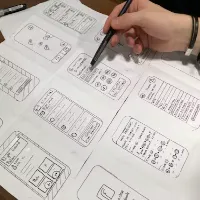
Low Fidelity Wireframes Figma digitalanovipracticeb

7 essential UX design principles 2024

7 essential UX design principles 2024. Mastering the art of user experience (UX) design involves adhering to fundamental principles that prioritize the needs and preferences of users. These principles guide designers in creating products and services that effectively address user problems while ensuring ease of use and enjoyment.

Here are seven essential UX design principles that every designer should be familiar with:

User-Centered Design:

Focus on understanding the needs, goals, and behaviors of users throughout the design process. By placing users at the center of decision-making, designers can create solutions that resonate with their intended audience. It’s an integral part of the UX process, beginning with thorough user research to pinpoint the problem to be addressed and to gain insight into the target audience. This commitment to user-centricity continues through the design process, culminating in user testing to evaluate how effectively the product aligns with user needs.

When embarking on a new UX project. It’s essential to uphold the principle of user-centricity, ensuring that every decision made is in the best interest of the users. While also considering the objectives of the business. Striking a balance between user needs and business goals is key to creating a successful and impactful user experience.

Consistency:

Maintain consistency in design elements such as layout, navigation, terminology, and visual style across all aspects of the product or service. Consistency helps users develop familiarity with the interface and enhances usability.

Consistency in design also involves meeting the user’s expectations regarding the type of product being developed. For instance, if you’re designing a flight booking app. Users will have preconceived notions about how such apps typically function. Based on their past experiences with similar applications. While it’s not necessary to mimic competitors’ designs. There’s value in adhering to established conventions.

By aligning with user expectations, you ensure that your product is intuitive and easy to use. Minimizing the learning curve for users. This approach is crucial for delivering a seamless user experience that fosters user satisfaction and engagement.

Accessibility:

Ensure that the product or service is accessible to users of all abilities, including those with disabilities. Design with accessibility in mind by providing alternatives for content consumption, clear navigation paths, and compatibility with assistive technologies. An instance of designing for accessibility involves employing high color contrast to guarantee that text remains legible for users with visual impairments. To witness accessible design principles in action, explore the following websites that have effectively implemented accessibility features.


Hierarchy:

Hierarchy is a fundamental UX design principle that significantly influences. The user’s navigation experience within a product determines its ease or complexity. It encompasses both information architecture and the visual hierarchy of individual pages or screens. In essence, hierarchy dictates the prominence and accessibility of various elements within the product.

Information architecture pertains to the broader structure and organization of the website or app, represented by its sitemap. It outlines how users navigate between pages or screens and ensures logical flow and organization throughout the product. On the other hand, visual hierarchy focuses on the arrangement and presentation of elements within specific pages or screens. It emphasizes making important elements more prominent and easier to find, guiding users’ attention and interaction effectively.

Feedback and Response:

Provide timely and relevant feedback to users to acknowledge their actions and guide them through the interface. Incorporate visual cues, animations, and notifications to keep users informed about system status and interactions.

Flexibility and Control:

Empower users with flexibility and control over their interactions by offering customizable settings, preferences, and options. Allow users to tailor the experience to their preferences and adjust settings according to their needs.

Iterative Improvement:

Embrace an iterative layout system that includes non-stop testing, feedback, and refinement. Iterate designs based on user insights, usability testing, and analytics to identify and address usability issues and enhance the overall user experience.

By adhering to these fundamental UX design principles, designers can create products and services that are intuitive, engaging, and effective in meeting user needs. Keeping these principles in mind throughout the design process ensures that the final product delivers a superior user experience and drives user satisfaction and loyalty. 7 essential UX design principles 2024

UX Laws 2024

UI Animation 2025: In 5 Stage, digitalanivipracticeb

In UX design, “UX laws 2024” are principles, guidelines, or heuristics that serve as fundamental rules to follow when designing user interfaces and experiences. These laws are derived from research, observations, and best practices in the field of user experience design. While they are not strict laws in a legal sense, they are widely accepted as foundational principles that help designers create effective and user-friendly interfaces. Some common UX laws include:

Hick’s Law:

This law states that the time it takes for a person to make a decision increases with the number of options available. Designers use this principle to simplify choices and reduce cognitive overload for users. To reduce decision time during critical response times, limit the number of choices available. However, avoid oversimplification that leads to abstraction. Instead, break down complex tasks into smaller, more manageable steps to lessen cognitive load. Employ progressive onboarding techniques to ease the cognitive burden for new users.

Fitts’s Law:

Fitts’s Law states that the time required to transport to a goal region is a feature of the space to the goal and the dimensions of the goal. Designers apply this law to optimize the placement and size of interactive elements, such as buttons and links, to make them easier to click or tap.

The primary implication of Fitts’s law is straightforward: increase target size. According to Fitts’s law, users will execute clicks, taps, or hovers more quickly on larger targets. Moreover, error rates decrease as target sizes increase. Typically, guidelines for target size are established by analyzing error rates across different target sizes and identifying the point at which the error rate stabilizes.

Miller’s Law:

Miller’s Law suggests that the average person can only keep seven (plus or minus two) items in their working memory at once. Designers consider this limitation when organizing information and content to avoid overwhelming users with too much information at once.

Jakob’s Law:

Jakob’s Law states that users are more comfortable and prefer interfaces that are familiar to them. Designers leverage this principle by adhering to established design patterns and conventions to create intuitive and user-friendly interfaces.

Utilizing established mental models allows for the creation of enhanced user experiences, enabling users to concentrate on their tasks rather than learning new models.

Gestalt Principles:

Gestalt principles are a set of laws that describe how humans perceive visual elements as organized wholes. These principles include proximity, similarity, closure, continuity, and figure-ground. Designers use Gestalt principles to create layouts and visual hierarchies that facilitate understanding and comprehension.

Zeigarnik Effect:

The Zeigarnik Effect suggests that people remember incomplete or interrupted tasks better than completed ones. Designers apply this principle by using progress indicators or saving user input automatically to encourage engagement and completion of tasks.

Peak-End Rule:

The Peak-End Rule states that people judge experiences based on the most intense point (the peak) and the end of the experience. Designers focus on creating memorable peaks and positive endings in user interactions to leave a lasting impression.

These are just a few examples of UX laws that guide designers in creating better user experiences. While not absolute rules, they provide valuable insights and guidelines for designing interfaces that are intuitive, efficient, and enjoyable for users. UX Laws 2024

Empathy Mapping 2024

Empathy Mapping in UX, digitalanivipracticeb

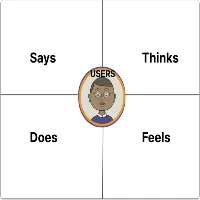
Empathy Mapping 2024. Empathy maps typically consist of four quadrants: Says, Thinks, Does, and Feels, with the user or persona positioned in the center. These maps offer a comprehensive view of the user’s characteristics and experiences, capturing their thoughts, actions, emotions, and verbal expressions. It’s important to note that empathy maps are not organized chronologically or sequentially but provide a holistic snapshot of the user’s perspective. Empathy Mapping 2024

In the “Says” quadrant, you’ll find direct quotes from the user obtained during interviews or usability studies. These quotes are ideally verbatim and provide insight into the user’s thoughts and preferences. For example:

Says
  • “I’m loyal to Delta because I’ve never had a bad experience.”
  • “I’m looking for something dependable.”
  • “I prefer using Apple products because they’re user-friendly.”
  • “I find the navigation menu confusing and hard to use.”
  • “I often share my experiences with friends on social media.”
  • “I wish there was a faster way to complete this task.”
  • “I feel overwhelmed by the number of options available.”
  • “I love the simplicity of this app.”
  • “I’m frustrated with the checkout process—it’s too complicated.”
  • “I always check reviews before making a purchase.”
  • “I wish there were more customization options.”
  • “I find the customer support very helpful and responsive.”
Thinks

In the “Thinks” quadrant, we delve into the user’s internal thoughts and considerations during the experience. This section reflects on what occupies the user’s mind and what truly matters to them. Sometimes, it may overlap with what the user vocalizes in the “Says” quadrant, but it often uncovers thoughts the user may not openly express. It’s essential to understand why users may hesitate to share certain thoughts—whether due to uncertainty, self-consciousness, politeness, or fear of judgment. For example:

  • “This is frustrating.”
  • “Am I missing something? Why is this so difficult?”
  • “I wonder if there’s a better way to do this.”
  • “Is this feature really necessary?”
  • “I hope I’m not the only one struggling with this.”
  • “I wish there were more clear instructions.”
  • “I’m concerned about the security of my data.”
  • “I’m not sure if I trust this website with my credit card information.”
  • “I wish there was a faster way to complete this task.”
  • “I wonder if there are any hidden fees.”
  • “I hope I’m making the right decision.”
  • “I’m curious about how this product compares to competitors.”
Does

In the “Does” quadrant, we focus on the user’s observable actions and behaviors during the experience. This section highlights what the user physically does and how they approach tasks or activities. It captures concrete actions based on research observations. For example:

  • “Refreshes the page multiple times.”
  • “Browses different websites to compare prices.”
  • “Clicks on the ‘Add to Cart’ button without hesitation.”
  • “Scroll through product reviews before making a purchase decision.”
  • “Navigates back and forth between different sections of the website.”
  • “Enters search queries using specific keywords to find desired information.”
  • “Share product links with friends on social media for their opinions.”
  • “Adds items to the wishlist for future consideration.”
  • “Uses the filter options to narrow down search results.”
  • “Subscribes to the newsletter for updates and promotions.”
  • “Leaves feedback or reviews after completing a transaction.”
  • “Shares personal experiences and recommendations in online forums.”
Feels

In the “Feels” quadrant, we explore the user’s emotional state and how they feel about the experience. This section provides insights into the user’s emotional responses, concerns, and excitement. It’s important to consider what worries the user, what excites them, and their overall emotional experience. For example:

  • Impatient: “Frustrated by slow page loading times.”
  • Confused: “Overwhelmed by contradictory prices.”
  • Anxious: “Concerned about the security of personal information.”
  • Indecisive: “Feeling overwhelmed by too many options.”
  • Satisfied: “Happy with the smooth checkout process.”
  • Disappointed: “Unhappy with the lack of product variety.”
  • Relieved: “Glad to find clear and straightforward instructions.”
  • Overwhelmed: “Feeling stressed by complex navigation.”
  • Excited: “Eager to explore new features and functionalities.”
  • Skeptical: “Doubtful about the reliability of product reviews.”
  • Hopeful: “Optimistic about finding a solution to their problem.”
  • Frustrated: “Annoyed by unexpected errors during the checkout process.”

By incorporating these additional considerations into your empathy mapping process, you can create more impactful and insightful representations of the user’s experience, leading to more effective and user-centered design solutions. Empathy Mapping 2024

Empathy mapping UX 2024

Empathy Mapping in Design Thinking: A Guide to Human-Centered Innovation (2025) , digitalanivipracticeb
Empathy mapping UX 2024

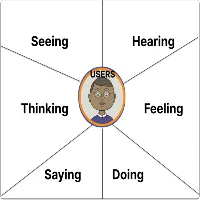
Empathy mapping in UX design is a technique used to gain a deeper understanding of users’ emotions, motivations, and behaviors by putting oneself in their shoes. It involves creating a visual representation of the user’s experience and mindset.

Focusing on what they see, hear, think, feel, say, and do. Here’s how empathy mapping works in UX:

Define the User Persona: Start by identifying the user persona or segment you want to empathize with. This persona represents a fictional but realistic representation of your target user, including their demographics, goals, needs, and pain points.

Create the Empathy Map: Draw a large canvas or use a digital tool to create a grid with six quadrants representing the following aspects:

Seeing: What does the user see in their environment? What catches their attention visually?

Hearing: What does the user hear in their surroundings? What conversations or sounds are present?

Thinking: What thoughts go through the user’s mind? What worries, concerns, or aspirations do they have?

Feeling: What emotions does the user experience? How do they feel about their current situation or task?

Saying: What words or phrases does the user use to express themselves? What do they communicate verbally or in writing?

Doing: What actions does the user take? How do they behave or interact with their environment?

Collect Insights: Gather insights about the user’s experience by conducting research, interviews, observations, or usability testing. Use qualitative data such as quotes, observations, and anecdotes to inform each quadrant of the empathy map.
Fill in the Quadrants:

Populate each quadrant of the empathy map with relevant observations, insights, and quotes that capture the user’s experience. Use sticky notes, sketches, or symbols to represent each observation.

Identify Patterns and Opportunities:

Analyze the completed empathy map to identify patterns, themes, and opportunities for improving the user experience. Look for common pain points, unmet needs, and emotional triggers that can inform design decisions.

Brainstorm Solutions:

Use the insights from the empathy map to brainstorm potential design solutions that address the user’s needs and emotions. Consider how you can design experiences that resonate with the user’s mindset and enhance their overall satisfaction.

Iterate and Refine: Continuously iterate and refine the empathy map based on new insights, feedback, and testing. Update the map as you learn more about the user’s experience and refine your understanding of their needs and motivations.

Collaborative Approach: Empathy mapping is most effective when done collaboratively with cross-functional teams, including designers, researchers, product managers, and stakeholders. Collaborative sessions allow for diverse perspectives and insights, leading to a more comprehensive understanding of the user’s experience.

Include Diverse Perspectives: When creating empathy maps, consider the diversity of your target audience. Include insights from users with different backgrounds, experiences, and needs to ensure that the map reflects a broad range of perspectives.

Focus on Empathy, Not Assumptions: Empathy mapping is about understanding the user’s experience from their perspective, not making assumptions based on your own biases or preferences. Approach the process with an open mind and a genuine desire to empathize with the user’s emotions and motivations.

Use Visuals Effectively: Visual elements such as icons, symbols, colors, and images can enhance the clarity and impact of empathy maps. Use visuals to represent key insights and emotions, making the map more engaging and memorable for stakeholders.

Iterate and Iterate: Empathy mapping is an iterative process that evolves as you gather more insights and feedback. Continuously revisit and refine the empathy map based on new research findings, user feedback, and changes in user behavior.

Consider Context and Environment: Pay attention to the context and environment in which users interact with your product or service. Consider how factors such as location, time of day, device used, and social surroundings influence the user’s experience and emotions.

Test and Validate: Validate the insights from the empathy map through user testing and validation. Use usability testing, interviews, surveys, and other research methods to verify that your assumptions about the user’s experience are accurate and representative.

Integrate with User Journey Mapping: Integrate empathy mapping with user journey mapping to create a more holistic understanding of the user’s experience. Use empathy maps to inform specific touchpoints and stages of the user journey, identifying opportunities for improvement and optimization.

Empathy as a Mindset: Beyond empathy mapping exercises, cultivate empathy as a mindset within your design team and organization. Encourage team members to regularly engage with users, listen to their feedback, and empathize with their needs and perspectives throughout the design process.

Empathy mapping is a valuable tool in UX design for fostering empathy, uncovering user insights, and informing design decisions that prioritize the user’s needs and emotions. By creating empathy maps, designers can develop more empathetic and user-centered solutions that resonate with their target audience. Empathy mapping UX 2024

Technology User Persona in UX 2024

10 Usability Heuristics for Bloggers and UX Designers in 2025 digitalanivipracticeb

Technology user personas in UX design refer to fictional representations of specific user segments within the context of technology products, services, or digital experiences. These personas are created based on research and data about real users who interact with technology. Such as websites, mobile apps, software applications, or digital platforms.

Here are some key components and considerations for technology user personas in UX design:
Multi-Platform Usage:

User personas may encompass users who interact with technology across multiple platforms and devices. This includes considerations for seamless experiences across desktop, mobile, tablet, and other digital platforms. As well as transitions between different devices.

Technological Proficiency:

User personas should outline the level of technological proficiency and familiarity with digital tools and platforms. This includes factors such as experience with computers, smartphones, tablets, internet usage, and familiarity with specific software or applications.

Device Preferences:

User personas may include information about the devices and platforms preferred by the target users. Such as desktop computers, laptops, smartphones, or tablets. Understanding device preferences helps designers optimize the user experience for different screen sizes and form factors.

Behaviors and Usage Patterns:

User personas describe the typical behaviors, usage patterns, and interactions of users with technology products or digital experiences. This includes how often users engage with technology, what tasks they perform, and how they navigate through digital interfaces.

Goals and Objectives:

User personas outline the specific goals, objectives, and motivations that drive users to interact with technology products or digital platforms. This includes both functional goals (e.g., completing a task, finding information) and emotional goals (e.g., feeling entertained, connected, or empowered).

Challenges and Pain Points:

User personas identify the challenges, pain points, frustrations, and obstacles that users may encounter while using technology products or digital experiences. Understanding these pain points helps designers address user needs and improve the user experience.

User Environment:

User personas should consider the context in which users interact with technology, such as their physical environment, time constraints, distractions, and any external factors that may influence their behavior or preferences.

Accessibility and Inclusivity:

User personas should account for accessibility considerations, ensuring that technology products and digital experiences are usable and accessible to users with disabilities or diverse needs. Designers should consider factors such as visual impairments, motor disabilities, and cognitive limitations when creating user personas.

Personalization and Customization:

User personas enable designers to personalize and customize the user experience to meet the specific needs and preferences of different user segments. This may involve offering personalized recommendations, adaptive interfaces, or customizable settings based on user preferences.

Ethical and Privacy Considerations:

User personas should take into account ethical and privacy considerations related to the collection and use of user data in technology products and digital experiences. Designers should respect user privacy rights and ensure transparency, consent, and data security in their designs. Technology User Persona in UX 2024

Overall, technology user personas play a crucial role in UX design by providing designers with insights into the needs, behaviors, preferences, and motivations of target users within the context of technology products and digital experiences. By creating user personas, designers can develop user-centered design solutions that effectively meet the needs and expectations of their target audience. Technology User Persona in UX 2024

Why User Persona in UX Design

11 Elements Of Design 2025: Elevating Visual Communication .digitalanivipracticeb

User personas are a crucial tool in UX (User Experience) design. Because they help designers and stakeholders understand and empathize with the target audience for a product or service. Why User Persona in UX Design.

Here’s why user personas are important in UX design:

Understanding the Target Audience:

User personas provide a detailed representation of the target audience, including their demographics, behaviors, needs, goals, and pain points. By creating personas, designers gain insights into who their users are, and what motivates them. How they interact with the product or service.

Empathy and User-Centric Design:

User personas help designers empathize with users by putting themselves in their shoes. By humanizing the target audience through personas. Designers can better understand their perspectives, preferences, and challenges. Which informs user-centric design decisions.

Guiding Design Decisions:

User personas serve as a reference point for guiding design decisions throughout the UX design process. Designers can use personas to evaluate design ideas and prioritize features. Ensure that the user’s needs and goals are addressed effectively.

Aligning Stakeholders:

User personas facilitate communication and alignment among stakeholders, including designers, developers, product managers, marketers, and executives. By providing a shared understanding of the target audience, personas help stakeholders collaborate effectively and make informed decisions that support the user’s experience.

Tailoring User Experiences:

With user personas, designers can tailor user experiences to meet the specific needs and preferences of different user segments. By designing for personas, rather than generic users, designers can create more relevant, engaging, and personalized experiences that resonate with the target audience.

Identifying Opportunities and Gaps:

User personas enable designers to identify opportunities for innovation and improvement by highlighting unmet needs, pain points, and areas of friction in the user journey. By addressing these opportunities and filling gaps in the user experience, designers can enhance the overall usability and satisfaction of the product or service.

Measuring Success:

User personas provide a framework for evaluating the success of a design solution by defining clear criteria for measuring user satisfaction, usability, and performance. By aligning key performance indicators (KPIs) with the goals and objectives of user personas, designers can assess the effectiveness of their design solutions and make data-driven improvements over time.

Risk Reduction:

By grounding design decisions in user research and insights, personas help mitigate the risk of developing products or features that fail to meet user needs or expectations. Designing with user personas in mind increases the likelihood of creating successful and impactful solutions.

Iterative Improvement:

User personas support an iterative design process by providing a framework for testing and refinement. Designers can validate their assumptions and hypotheses against the personas through user testing and feedback, allowing for continuous improvement and optimization of the user experience.

Personalization Opportunities:

Personas enable designers to tailor user experiences to the specific needs and preferences of different user segments. By understanding the unique characteristics of each persona, designers can implement personalized features and content that enhance engagement and satisfaction.

Communication Tool:

User personas serve as a communication tool for conveying user insights and design decisions to stakeholders and team members. They help tell the story of the target audience and justify design choices based on user needs and goals.

Overall, user personas are an essential tool in UX design for understanding users, guiding design decisions, fostering empathy, and creating user-centered experiences that meet the needs and expectations of the target audience.

In summary, user personas contribute to design success by guiding the development of targeted solutions, fostering empathy and understanding, aligning teams, reducing risk, supporting iterative improvement, enabling personalization, and facilitating communication throughout the design process. Why User Persona in UX Design

What is the User Persona in UX 2024?

In UX (User Experience) design, a user persona is a fictional representation of a specific user segment based on research and data about real users. User personas are created to embody the characteristics, behaviors, needs, goals, and pain points of typical users. Who will interact with a product, service, or website? Here are the key components of a user persona:

User personas
Demographics:

User personas typically include demographic information such as age, gender, occupation, income level, education, and location. These details help designers understand the background and context of the user.

Behaviors:

User personas describe the typical behaviors and actions of the user, including how they interact with the product or service. What devices and platforms do they use, and their level of technical proficiency?

Needs and Goals:

User personas outline the specific needs, goals, motivations, and expectations of the user. This includes both functional needs (e.g., finding information, completing a task) and emotional needs (e.g., feeling confident, empowered, satisfied).

Pain Points and Challenges:

User personas identify the pain points, challenges, frustrations, and obstacles that users may encounter while interacting with the product or service. Understanding these pain points helps designers address user needs and improve the user experience.

Personality and Attitudes:

User personas often include information about the user’s personality traits, attitudes, values, and preferences. This helps designers empathize with users and create experiences that resonate with their mindset and outlook.

User Quotes and Scenarios:

User personas may include quotes, anecdotes, or scenarios that illustrate typical user behaviors, needs, and pain points. These examples provide context and bring the persona to life for designers and stakeholders.

Targeted Design Solutions:

User personas help designers develop targeted design solutions that address the specific needs, preferences, and pain points of the identified user segments. By focusing on the characteristics and goals of each persona, designers can create more relevant and effective user experiences.

Empathy and Understanding:

Personas foster empathy and understanding among design teams by humanizing the target users. By visualizing the personas as real individuals with distinct needs and motivations, designers can better empathize with their users and make design decisions that resonate with their experiences.

Alignment Across Teams:

User personas serve as a common reference point for cross-functional teams involved in the design process, including designers, developers, marketers, and stakeholders. They ensure alignment and consensus by providing a shared understanding of the target audience and their requirements.

User personas are created through a combination of qualitative and quantitative research methods, including user interviews, surveys, observations, and data analysis. Once created, personas serve as a reference point for guiding design decisions, prioritizing features, and ensuring that the user’s needs are at the forefront of the design process. They help designers empathize with users, align stakeholders, and create a user center. What is the User Persona in UX 2024?

User personas simplify the design process by providing clear guidance and direction. They streamline complexity, offering designers a focused understanding of their target users. By embodying the characteristics, needs, and behaviors of the intended audience, personas serve as a compass, ensuring that design decisions align with user preferences and goals. Ultimately, user personas play a pivotal role in achieving the overarching objective of creating a positive and impactful user experience tailored to the needs of the target user.red experiences that meet the needs and expectations of the target audience. What is the User Persona in UX 2024?

User Research in UX 2nd 2024

Creating a Responsive Grid: A 2025 Guide for Designers and Developers, digitalanivipractice

User Research in UX 2nd 2024. A user interview is a method of UX research where a researcher engages in a one-on-one conversation with a target audience member to gather insights about a specific topic of interest, such as wishlist items, pain points, behaviors, and habits. Unlike focus groups that involve multiple users simultaneously, user interviews focus on individual interactions.

1. Understand the Research Goals:

  • Clarify Objectives: Clearly define the objectives of the research to ensure the questionnaire addresses the specific information needed.

2. Organize Questions into Themes:

  • Identify Themes: Group questions into themes or topics related to the research goals, such as current user behaviors, pain points, and wishlist items.

3. Create a Mix of Question Types:

  • Open-Ended Questions: Encourage participants to provide detailed and nuanced responses.
  • Closed-Ended Questions: Include a mix of closed-ended questions for factual information and to establish a baseline.
  • Multiple-choice questions: Offer predefined options when appropriate to streamline data analysis.

4. Sequence Questions Strategically:

  • Start Broad, End Specific: Begin with broad, general questions to ease participants into the conversation before delving into more specific topics.
  • Logical Flow: Ensure a logical flow of questions to guide participants through their experiences and thought processes.

5. Avoid Biased or Leading Questions:

  • Neutral Language: Use neutral language to avoid biasing participants’ responses.
  • Avoid Leading Questions: Frame questions in a way that doesn’t lead participants toward a particular answer.

6. Consider Depth and Probing:

  • Probe for Details: Include probing questions to delve deeper into participants’ responses and uncover underlying motivations.
  • Depth vs. Breadth: Strike a balance between depth (detailed insights) and breadth (covering a range of topics) based on the research goals.

7. Pilot Test the Questionnaire:

  • Test for Clarity: Conduct a pilot test with a small group of participants to ensure clarity and relevance of questions.
  • Refine as Needed: Based on feedback from the pilot test, refine the questionnaire to improve clarity and effectiveness.

Examples of Well-Structured Questions:

Current User Behavior:

  • How do you typically select products when shopping online?
  • What process do you follow when making online purchases?

Pain Points:

  • Can you describe any difficulties or limitations you face while shopping online?
  • What challenges do you encounter during the online shopping process?

Wishlist:

  • What additional facilities or features would enhance your online shopping experience?
  • What improvements do you wish to see in the online shopping process?

Google Forms is a free tool that simplifies the process of collecting information through surveys and feedback forms. It requires only a Google account to create forms, making it accessible to a wide range of users. With Google Forms, you can incorporate various question types, from open-ended responses to checkboxes and ratings. This versatility enables the creation of:

  • Online registration forms for event participants.
  • Voting systems for polls and elections.
  • Questionnaires for job applicants to gather necessary information.
  • Online research surveys to collect data from respondents.
  • Project brief forms to outline project details and requirements.
  • Feedback paperwork for amassing patron reviews and suggestions.

Google Forms provides a versatile and user-friendly platform for creating and administering surveys, feedback forms, and questionnaires across various domains and purposes. Its integration with other Google Workspace apps, customization options, and accessibility features make it a valuable tool for individuals, teams, and organizations alike.

Crafting a well-designed questionnaire ensures that user interviews yield valuable insights that can inform UX design decisions effectively. User Research in UX 2nd 2024

User Research in UX For Mobile App 2024

UI Animation 2025: In 5 Stage, digitalanivipracticeb

User Research in UX For Mobile App 2024. User research is a fundamental component of UX (User Experience) design, aimed at understanding the needs, behaviors, and preferences of users. It involves gathering insights directly from users to inform the design process and create products or services that meet their needs effectively.

A user interview is a method of UX research where a researcher engages in a one-on-one conversation with a target audience member to gather insights about a specific topic of interest, such as wishlist items, pain points, behaviors, and habits. Unlike focus groups that involve multiple users simultaneously, user interviews focus on individual interactions. User Research in UX For Mobile App 2024

Purpose and Benefits:

  • Insight Generation: User interviews provide valuable insights into users’ feelings, opinions, and perceptions about a site, application, product, or process.
  • Identifying Needs: They help identify what content is memorable, and important, and areas for improvement.
  • Enhancing User Experience: By understanding users’ wants, needs, and problems, interviews aid in creating better experiences for the target audience.
  • Uncovering Nuances: User interviews uncover nuances or directions that were previously unknown, contributing to the refinement of personas, user journeys, and feature ideas.
  • Contextual Understanding: They enhance contextual inquiry studies by combining observation with detailed descriptions of tools, software, processes, and user perceptions.
  • Usability Testing Feedback: User interviews can be conducted at the end of usability tests to collect verbal responses related to observed behaviors.

Strategy for Conducting User Interviews:

  • Define Research Goals: Clearly define research goals to understand what information is being sought, such as current user behaviors, pain points, and wishlist items.
  • Craft Interview Questions: Develop well-crafted interview questions that are relevant to the research goals and encourage open-ended responses.
  • Participant Setup: Arrange for a researcher (interviewer), a note-taker (recorder), and a participant (user).
  • Minimize Distractions: Avoid taking notes during the interview to minimize distractions and ensure full engagement with the participant.
  • Remote vs. In-Person: User interviews can be conducted either remotely or in person, with pros and cons to each approach. Remote interviews can be facilitated using video conferencing tools like Zoom or Skype.

Types of Research Methods:

  1. Interview – Small Audience: One-on-one interviews for obtaining qualitative information from a small audience.
  2. Field Studies – Medium Audience: Observing and questioning users in their environments to obtain qualitative insights from a medium-sized audience.
  3. Surveys – Large Audience: Gathering information from a large and diverse group of users through quantitative or qualitative surveys, depending on the research goals.

Types of Surveys:

  • Quantitative Surveys: Provide quantitative data by asking close-ended questions that can be answered using checkboxes or radio buttons.
  • Qualitative Surveys: Seek open-ended responses, such as comments, feedback, and suggestions, to gather qualitative insights.

Understanding User Needs:

  • Objective: Gain a deep understanding of users’ goals, motivations, and pain points.
  • Methods: Interviews, surveys, focus groups, and contextual inquiries.

Behavioral Observation:

  • Objective: Observe how users interact with products or services in real-world contexts.
  • Methods: Usability testing, field studies, and diary studies.

Persona Development:

  • Objective: Create fictional representations of target users based on research findings.
  • Methods: Data analysis, user interviews, and synthesis workshops.

User interviews are an essential tool in UX research, providing rich qualitative data that informs design decisions and improves the overall user experience.

User research is an iterative process that should be integrated into every stage of the design process to ensure that products or services are user-centered and aligned with user needs and expectations.

Optimized with PageSpeed Ninja