“Learn how to crop video in Premiere Pro with this updated 2026 beginner’s guide. Master the Effects Panel, adjust aspect ratios, and fix framing issues in seconds!
- Step 1: Go to Effects Panel –> Search for Crop.
- Step 2: Drag & drop the Crop effect onto your video clip in the Timeline.
- Step 3: Open Effect Controls –> Adjust Left, Right, Top, or Bottom %.
Footage Import:
- Open Premiere Pro and start a new project or open an old one.
- To import your video footage into the project, drag and drop it into the project panel or choose File > Import.
Here is how to drag a video clip from the project panel to the timeline in Adobe Premiere Pro:
- Open your project: Make sure that your project is open in Adobe Premiere Pro.
- Locate the clip: You intend to edit the clip that has been imported into the Project Panel. The Project Panel containing the video clip you wish to use is located on the left-hand side of your screen.
- Drag the Clip: Highlight the video clip in the Project Panel, press and hold the mouse button, then drag it/this clip to the timeline situated at the screen’s bottom.
- “Release the mouse button to drop the clip onto the timeline.” Drop it on any video track depending on your editing needs (usually V1, V2, etc.).
- Adjust the Position: Once you have your clip there, move it leftwards or rightwards so that it starts exactly where you want. Additionally, you can drag the edges of the clip to adjust its length.”
When you reorder clips on the timeline, it is a way of initiating editing of the video.
Crop Effect
After dragging the “Crop” effect onto your video clip in the timeline, you can adjust the cropping settings by taking the following steps:
- To open the Effect Control Panel, you need to click on your video clip that is already selected in the timeline, after which you will have access to this panel. This particular panel is usually found at the top of the timeline for most software programs.
- You may also reach it by selecting Window>Effect Controls from the dropdown list situated near the top of the screen.
- Locate the Crop Setting: In the Effect Controls panel, you should search for Crop Settings applied to this clip. For this effect, it will show Left, Right, Top, and Bottom options.
Adjust The Crop
- Left Side: Values Move the percentage value up to crop more on the left-hand side of the video.
- Right side: Push the percentage up on the right side to crop more from that direction.
- Top: Lift the percentage to crop more videos from above.
- Bottom: Increase the value at the bottom part by raising it higher from below, thereby cropping off excess parts of the visual image.
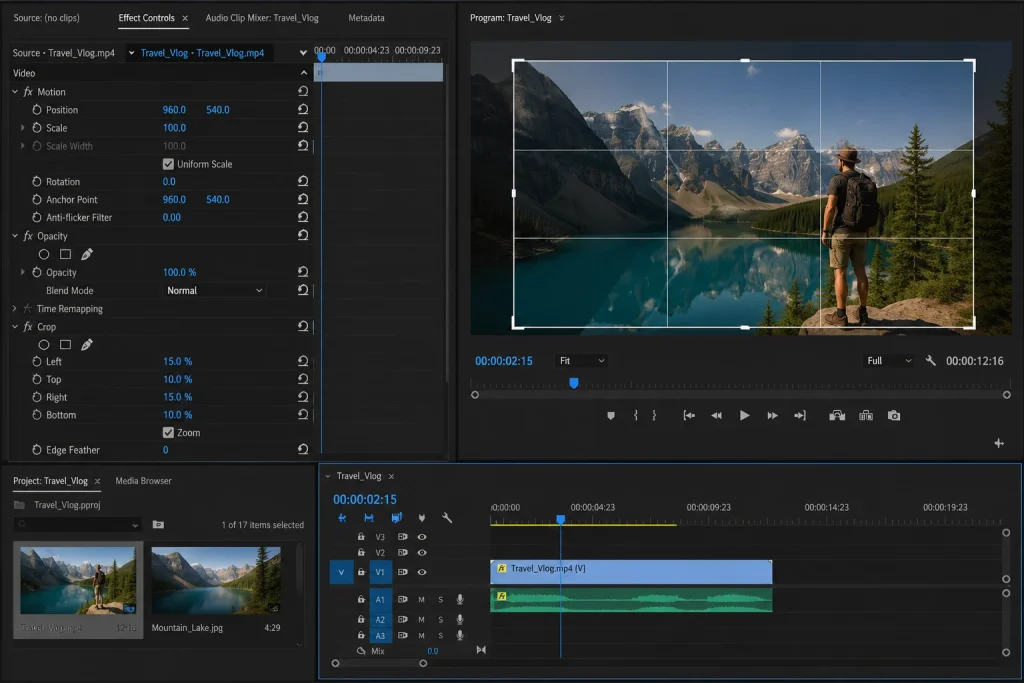
Crop by drawing a box around your choice of what part you want to remove using this tool.
- Review Changes: Preview how your video changes when you modify its crop values while you still have a chance to do so. The cropping will render your footage immediately, so you can tell how it affects your video’s look at that instant.
- Customize your Crop: Keep adjusting these parameters until you achieve the desired framing. In case one wants to animate it over time, they may as well keyframe the crop settings.
- Sequence: After altering the sequence to crop, make sure you render it to check if everything works well. Finally, to export the video to be produced with the new apply cropping, choose “File” > “Export” > “Media”.
Scale and Position:
Cropping the video might impact how it appears in the frame by changing its size or where it sits.
Motion Settings:
- When cropping a video affects its size or position within the frame, it’s important that one scales and positions it appropriately for correct composition.
- To achieve this: Access the Motion Settings. In the timeline, select your video clip and move to the Effect Controls panel. In the Motion section are settings regarding Scale as well as Position.
Scaling your video.
The scale control alters how big your video segment will be.
- To magnify the video clip, raise the Scale.
- To reduce the size of the video clip, reduce the Scale.
- Click and drag the value up and down, alternatively, type in a definite percentage for precision.”
Make adjustments to the position
- The Position property controls the horizontal (X) and vertical (Y) location of your video within the frame.
- The first number is the horizontal location (left-right) and the second number is the vertical location (up-down).
- Use these values by clicking or typing in specific coordinates to move your video or move the video clip directly on the Program Monitor window where you want.
Check out the changes:
- As you scale and adjust the position, pay attention to the Program Monitor so that you can easily see if the changes you make are relevant to your composition.
- Through this, you can see the real-time framing of the video clip.
Animate the Scale or Position with Keyframes (Optional)
If you want to change the size or location of the object at different moments in time, simply by scaling or translating, you can easily insert keyframes.
- No more worries- all you need is simply to click on the hand-like icon found before the scale and position options associated with the stopwatch.
- Scroll the playhead along the timeline, changing parameters as required to achieve animation.
Preview and Fine-Tune:
- Play the video in the program monitor to preview your changes.
- Fine-tune the crop values if necessary to achieve the desired look.
Rendering and Exporting
- Please render the sequence after you have made all changes to ensure smooth playback.
- After your adjustments, please use File> Export> Media to choose the desired export settings for your final video.
Additional Tips:
- Keyframes: Keyframes in the Effect Controls panel can be used to create dynamic cropping effects by animating the crop over time.
- Masking: In the Opacity section of the Effect Controls panel, you may want to use masking tools for more intricate cropping shapes.
Following these steps, you will be able to crop your video footage effectively in Adobe Premiere Pro and enhance your video editing projects. How To Crop Video in Premiere Pro
Frequently Asked Questions
To crop a video in Adobe Premiere Pro, simply choose your clip, then go into the effects panel, type crop into the search box, and drag the cropping effect onto your video clip. After doing that, find “Effect Controls” and adjust the following values: left, right, top, and bottom cutting values.
Does cropping affect the quality of the video in Premiere Pro?
Yes. Just cropping does not remove video quality; excessive cropping may produce a blurry image when scaled up. It is best to use very high-resolution videos, such as 1080P or 4K or even higher, when doing a lot of cropping.
What is the difference between cropping and trimming a video?
Cropping areas of the frame that are not wanted, trimming removes unwanted parts from the start of the video or the end of the video, cropping alters the visible portion of the video image, and trimming changes the amount of time the video exists.
How do I crop a video for YouTube Shorts, Instagram Reels, or TikTok?
You will want to create a 9×16 vertical ratio (1080×1920px) when doing this. You can use the crop effect or adjust your video clip position and scale to fit within the vertical frame while keeping your main subject visible.
Yes, Adobe Premiere Pro offers basic tools for cropping along with a simple drag-and-drop interface.
🌟 What to Read Next? (Our Premium Heritage & Design Series)
Veda Decoded: प्राचीन ज्ञान और सनातन धर्म में उनका महत्व
Ancient Color Psychology: How Bharat’s Sacred Colors Shape Modern Visual UX
Vedic Sound Science: How Mantra Vibrations Shape Digital Grids

How to Reverse a Video in Premiere Pro - Digital AniViPractice
[…] this guide, you’ll discover how to reverse a video in Premiere Pro effectively. We’ll explore the steps to achieve this effect and discuss the significant benefits […]