🧠 Empathy Mapping in UX: A Guide to Empathetic Design for 2025
A 2025 guide to designing with empathy. In an age of AI, automation, and ever-quickening pace of digital interactions, great design comes from the ability to acknowledge your users as real people, not just data points. Empathy mapping allows you to do just that.
It doesn’t matter if you’re designing a blog, an app, a product page, or a content strategy. Empathy mapping is a way to put yourself in the user’s shoes, using their perspectives to see the world in a way that enables you to create meaningful and relevant experiences.
In this 2025 guide, we’ll explore what empathy mapping is, why it’s so valuable in UX design, and how to create an empathy map that can improve user engagement, user trust, and ultimately user conversions.
What Is Empathy Mapping?
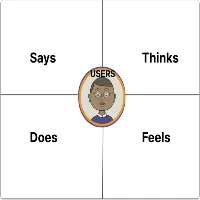
Empathy mapping is a collaborative UX tool used to visualize a user’s thinking, feeling, saying, and doing about a product or experience.
Developed by Dave Gray, popularized by Agile and Design Thinking teams. Empathy mapping prompts you to dig deeper than demographic or behavioral analysis, with emotion, motivation, frustrations, and expectations being the critical ingredients to design user-first experiences.
🧩 The 4 Core Quadrants of an Empathy Map
An empathy map’s four core quadrants typically consist of:
| Quadrant | What it Captures |
| Says | What users say out loud as part of their interviews or feedback |
| Thinks | what users think, but do not say (fears, hopes) |
| Does | Observable things users do (scroll, search, click) |
| Feels | Users emotional state or response (frustrated, confused, excited) |
Some empathy maps are expanded and include:
- Pains – What are their frustrations or blockers?
- Gains – What outcomes or benefits are they wanting?
🧠 Why Empathy Mapping Matters in UX Design.
Users today are inundated with choices. If your design does not address their real needs and emotions, they will bounce quickly. Empathy maps allow you to:
- Dive deeper than surface personas.
- Understand the context for the user’s decisions.
- Design for emotional triggers and mental models.
- Create content, layouts, and CTAs that feel contextual, relevant, and trustworthy.
In short, empathy maps help make your UX human.
🛠️ How to Build an Empathy Map (Step-by-Step)
1. Identify Your Target User.
- Begin by describing a specific user persona or audience segment.
- Example: “Content creators on a freelance basis with audiences aged 25–35 that are growing their audiences through blogs and YouTube.”
- You can have more than one empathy map for different segments.
2. Gather Real User Data
Don’t assume — get the facts by using:
- User interviews,
- Surveys and polls,
- Support tickets or chat logs,
- Google Analytics (session duration, bounce rate)
- Social media comments or community forums
3. Pick a Tool (Figma, Miro, or Notion).
- Select your tool to visually lay out the quadrants.
- Figma and Miro already have empathy map templates built in and drag-and-drop capabilities.
4. Fill in the Quadrants
Using the information you gathered in your research, fill in the map:
| 🗣 Says: “It takes so long to load the blog posts.” “I have no idea where to start with editing my videos.” | 💭 Thinks: “I am wasting time just looking for tools.” “Other creators are more successful than I.” |
| 🧍♀️ Does: They scroll quickly through blog pages. They click away after 10 seconds. They only watch the first 20 seconds of tutorial videos | ❤️ Feels: Frustrated, overwhelmed, curious, and motivated |
Include Pains and Gains if you want more detail:
- Pain: “Can’t find beginner-friendly design tools.
- Gain: “Wants quick wins so that they can feel confident making money online”
5 Review and Align Your UX Decisions
Now, recall the empathy map, and answer the following:
- What content should I create for this user?
- How should I organize my blog or product page?
- What tone or visuals will have the best impact?
- Where are the friction points in their journey?
Empathy maps don’t simply inspire. They also drive real UX and content decisions.
📍 Empathy mapping in practice: Real-World UX Examples
🎨 UX Blog Home Page
- This user feels confused by the technical jargon in the content.
- Solution: Instead of “Interaction Models”, use plain language like “Design Tips.”
📹 Video Editing Tool
- User says, “I want fast results, and I don’t want to learn complex tools.”
- Solution: Redesign the onboarding experience as a 2-minute video, not a 10-step form.
🛒 E-commerce Checkout
- The user feels anxious about payment security.
- Solution: Add trust badges, customer testimonial reviews, and a live chat option.
words
📈 SEO and Empathy Mapping: What’s The Relationship?
When you empathize when designing, you:
- Lower bounce rate (users find what they are looking for)
- Increase time-on-site (better engagement)
- Increase conversion (more people sign up, purchase, share)
- Create keyword-rich content based on what users ask/say.
For instance, if a user says, “I hate wasting time on slow blogs,” you have SEO gold. That is a perfect long-tail keyword to use in a blog title like:
👉 “How to Make Your Blog Load Faster (Even If You Don’t Code)”
🧠 Bonus: Empathy Mapping Prompts You Can
Use Today. You can do these during interviews or internal brainstorming with each other.
| Quadrant | Ask These |
| Says | What do users say during onboarding, comments, and reviews? |
| Thinks | What do they worry about? What are their goals? |
| Does | What actions do they perform before and after visiting your blog or app? |
| Feels | What emotions are they expressing (with their face and/or through their actions)? |
🔧 Tools to Develop Empathy Maps (Free & Paid)
- Figma – Drag and drop templates, easy collaboration.
- Miro – Whiteboard-style tool that works well for teams.
- Notion – Great for simple documentation
- Xtensio – Persona + empathy map creator
- Canva – Excellent visual templates for more novice mapping
Final Remarks: Design for Feelings, Not Just Clicks.
Empathy Mapping = Better User Experiences = Better Results.
When you think about the users’ thoughts, frustrations, and emotions, you’re not designing for “traffic.” You’re designing for real emotions.
The possibilities?
- ✔️ More meaningful engagement
- ✔️ Higher trust
- ✔️ Better conversion rates
- ✔️ Happy, loyal users
Frequently Ask Questation
An empathy map is a visual tool used in UX to help understand a user’s thoughts, feelings, actions, and motivations. Empathy maps help designers and content creators truly understand the perspective of the user and create user-centered, emotionally engaging experiences.
An empathy map typically consists of 4 quadrants:
Says – statements that users make verbally or in feedback
Thinks – internalized thoughts, fears, beliefs, or hopes
Does – observable actions and behaviors
Feels – emotional reactions and responses.
Some empathy maps may include Pains and Gains for more insights and depth.
Empathy maps help shift teams away from analytics and toward designing emotions, which aligns usability, engagement, content relevance, and user satisfaction, thus ultimately improving conversions and holding on to those users longer.
A persona encompasses a fictional character based on user data, incorporating user demographics, interests, goals, and behaviors, whereas an empathy map helps paint a more holistic and deeper emotional and psychological context by looking beyond just pure statistics and interactions to focus on how users feel, think, and react.