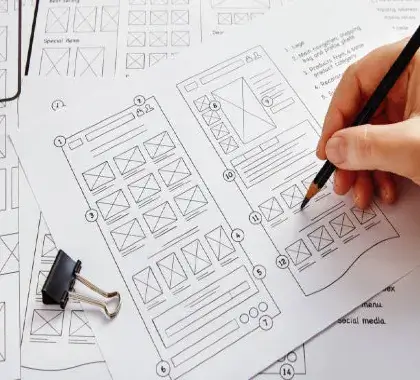
What are Wireframes in UX Design in 2027?
“Wireframes in UX design in 2027 serve as foundational blueprints—ranging from AI-assisted low-fidelity layouts to interactive prototypes—that map out structural hierarchy, user flows, and core content placement before visual styling begins.
The Evolution of Wireframing in 2027:
Creating wireframes has transitioned into a hybrid process where designers leverage AI assistance and collaborative tools (like Figma) to rapidly sketch, test, and validate structural digital layouts.
Do you want to turn your ideas into coherent, clickable layouts? Wireframes will help you to start the user experience process.
📌 Introduction:
Why Wireframes in 2027?
In the rapidly evolving digital landscape of 2025, the idea of creating user-centered websites and apps should begin with wireframes. Before the flashy colors, animations, or typography, UX designers sketch out a skeleton, which is wireframing. It does not matter if you are designing a blog, e-commerce shop, or mobile application. Wireframing can help you test ideas, work out issues early, and avoid wasting time and money on development.
🎨 What is a Wireframe in UX?
A wireframe is best described as a low-fidelity layout that visually represents the arrangement of parts for a web or app screen. Within the confines of a wireframe, you’re usually working on:
- Content Hierarchy
- User Flows
- Essential UI Elements (Such as buttons, forms, nav bars).
You can think of it as the basic sketch of your design. Wireframes are not meant to be pretty—they exist to solve problems.
🧠 Why Are Wireframes Valuable in UX Design?
- 1. Clarity: Wireframes remove distractions like colors and branding so stakeholders can more clearly focus on the layout of the component, the structure of the content, and how the user will interact with it.
- 2. Collaboration: They align designers, developers, and product owners. Before a single line of code is written, everyone knows what they are working towards.
- 3. User Testing: You can test and validate early ideas with real users. For example, does the homepage allow users to get to where they want to go?
- 4. Faster Iterations: It’s easier to make a change and iterate on a Wireframe than it is to re-code a feature after the fact.
- 5. Understand User Needs: Base your wireframe structure on thorough user research, journey mapping, and information architecture.
- 6. Low-Fidelity to High-Fidelity: Start with quick, rough sketches or digital low-fi blocks to lock in content placement, then move to interactive prototypes.
- 7. Focus on Usability & Layout: Prioritize clean visual hierarchy, navigation flow, and accessibility over colors and graphics.
- Test and Iterate: Gather user feedback on the structural flow early in the design cycle to prevent costly changes during development.
📱 Types of Wireframes in 2027
| Type | Details | Tools Used |
| Low Fidelity | Basic grayscale layout, no images or color | Paper, Balsamiq |
| Mid Fidelity | Requires more structure and contains text and icons | Figma, Adobe XD |
| High Fidelity | Design looks very close to the final output. | Figma, Sketch |
💡 Pro Tip:
As seen in 2027, many teams begin with low-fidelity and scale within tools like Figma to create interactive prototypes.
🧭 Wireframes vs. Mockups vs. Prototypes
| Term | Focal | Area Level of Detail | Purpose |
| Wireframe | Layout & structure | Low | Planning UX |
| Mockup | Visual design & aesthetics | High | Showing look/feel |
| Prototype | Interactions & behavior | Interactive | Test flows |
💡 Real-World Example: Wireframing a Blog Homepage.
Say you have a blog about UX (like Digital Anivi Practice) and want to redesign the homepage.
Your Wireframe Might Include:
- Header with logo and navigation,
- Featured article section,
- Sidebar with recent posts,
- Footer with newsletter signup or details.
👉 You can sketch this out on paper, or use something like Figma to drag & drop layout blocks.
🔥 The Best Tools
| Tool | Best for | Free Plan |
| Figma | Collaborative design | ✅ |
| Balsamiq | Fast low-fidelity UX | ✅ |
| Whimsical | Flowcharts & wireframes | ✅ |
| Adobe XD | Prototyping & wireframes | ✅ |
| Pen & Paper | Fast sketching always | 😄 |
📌 SEO Benefits of Wireframes for Blogs –
Blog Post Wireframes can help bloggers; here’s how:
- ✅ Enhance UX = Decrease Bounce Rate: If you know you are wireframing the layout of your content, you know that users should be able to traverse the content block, the post flow of the post should make logical sense, and they are going to be able to reduce distractions.
- ✅ Strategically Place CTAs: You can think about where to place the “Subscribe” Button, affiliate links, or share icons before you even add anything in post writing.
- ✅ Easier Design Cycle Time: You can wireframe your layout to plan blog updates or your mobile-first designs without messing with your theme and confusing the user.
👣 Steps for UX Wireframe Creation.
- Set a goal: “Get more blog subscribers.
- Sketch out the primary screens or webpages (the homepage, about page, the layout of posts). Wireframe (use a wireframe program; you’ll want low fidelity for starters).
- Test the user flow (can the user get to the important stuff?) Iterate – evolve the user design based on your testing.
- Once you have validated the layout, you can move to the hi-fi design
💬 Pro Tip: Wireframe with real content!
Don’t just use “Lorem ipsum” – make it keynote with real headlines, real navigation items, real call to action text. It makes the wireframes usable and more realistic.
⚡ Wireframing Trends:
- AI-assisted wireframes (like with Figma AI suggesting the layout blocks),
- Voice UX wireframes (voice search, voice assistants),
- Wireframe-to-code automation by Anima or Framer
- Unified wireframes that show accessibility hints within the wireframe
📦 Bonus: Bloggers Wireframe
Do you want a done-for-you blog homepage wireframe in Figma?
✅ It includes:
- A featured post slider,
- A sticky navigation bar,
- A sidebar with categories.
- A footer with links & a signup form.
Master Professional UI/UX Design & Digital Workflows!
Want to master modern wireframing, UI/UX design systems, and digital marketing strategies to build user-friendly products and boost your career?
🧩 Conclusion
Wireframing is the unsung hero of good UX in 2027. Whether you are a solo blogger or product designer, wireframing before designing saves time, helps focus, and makes the user journey better.
Don’t just skip the skeleton – build intelligent first before building organized.
Frequently Ask Questions
Wireframes are low-fidelity representations that show the basic structure of the content on a webpage or app screen. Wireframes deal with content placement, user flow, and functionality without addressing more nuanced design elements like color and typography
Wireframes are necessary in 2027 because they help teams save time, encourage collaboration, and create a better digital product for the users. Wireframes allow teams to validate ideas sooner and make sure they don’t invest time creating designs and pages that are costly mistakes.
While wireframes demonstrate a layout and structure (low-fidelity), mockups look at a design (high-fidelity), and prototypes showcase interactivity and user flow (typically clickable)!
Popular wireframing tools in 2027 include Figma, Balsamiq, Adobe XD, Whimsical, and pen & paper for quick sketches. Figma is still the best collaborative wireframing and prototyping option.
Absolutely! Bloggers can utilize wireframes to create homepages, optimize for mobile-responsive designs and screen size, and to position CTAs to improve SEO, engagement, and conversion rates.