What is UX in Everyday Life?
“UX in everyday life refers to how people interact with physical and digital products around them in 2027—from smartphone apps and smart home devices to ATM machines and traffic systems—where seamless usability, intuitive design, and AI-driven personalization dictate daily user satisfaction.”
Have you ever gotten frustrated with an app that you find confusing, or have you ever been pleasantly surprised by how effortlessly you navigate through an online checkout portal? That’s User Experience (UX) at work in one of two ways—either enhancing or inhibiting your journey.
But UX isn’t necessarily about a web page or a mobile app. It’s everywhere— in physical objects, in public systems, and in gadgets found in your house. A few of the most impactful UX designs are often overlooked because they just work.
In this article, I will explore 7 examples of UX designs we use almost every day. This makes our daily routine more convenient, safer, and more intuitive, often unbeknownst to us.
What Is UX in Real Life?
User Experience (UX) is how people experience products, services, or systems, and how those experiences make them feel. Good UX is intuitive, calming, and satisfying. Poor UX is difficult, slow, or irritating.
In real life, UX design appears in tools and environments where ease of use, safety, or speed is important. The best real-life UX resolves a challenge without instructions, training, or a second thought.
7 UX Design Examples That You Can Find in Daily Life
Smart Devices & AI Integration
- Beyond Traditional Interfaces: In 2027, everyday UX extends far beyond physical buttons or basic mobile applications, evolving into an ecosystem driven by advanced voice commands, touchless gesture controls, and predictive AI.
- Proactive Personalization: Modern digital experiences anticipate user needs automatically, shifting user interaction from manual navigation to seamless, context-aware artificial intelligence.
User-Centric Design Relevance in Daily Life
- Physical and Digital Touchpoints: Everyday examples—ranging from intuitive door handles and microwave interfaces to streamlined UPI payment apps—demonstrate how impactful user experience is.
- Friction vs. Flow: A well-designed UX removes friction to make daily tasks effortless, whereas poor design creates unnecessary hurdles, proving that user-centric principles directly dictate modern convenience and user satisfaction.
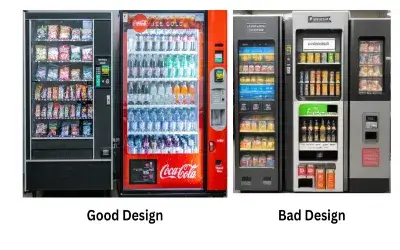
Vending Machines:
- Vending machines have made it very simple for the customer to use the machine.
- Because the vending machine provides a self-service site, with all the instructions in visual aids, plus clearly labeled buttons.
- It is almost effortless for a customer to make an order with the machine.
- The instructions to follow are a product slot image, a visual image of inserting coins or cash or using their calling card, and Approximate push buttons.
Additionally, the vending machine almost always provides a visual or auditory response, indicating Whether a selection has been made and, in the case of a successful purchase, confirming the transaction.
🚦 Traffic Lights and Crosswalks
When an Extravagant User Experience can show holes in services:
- UX principles are inseparable from how we navigate our world. Traffic lights are used.
- Universally interpreted color-coding (Red = stop; Green = go) symbols,
- like a walk sign or a hand symbol, document sounds for people with visual impairments.
- Crosswalks often include timers and flashing or vibrating alerts, making them accessible.
✅ UX focus: Safety nearly always involves design that includes the greatest variety of user groups by making it accessible for those with disabilities.
🚪 Door Handles and Push Plates
Objects we see and use every day, door handles and push plates, illustrate how form can communicate a function.
- A pull handle almost suggests pulling.
- The flat push plate invites you to push.
When doors are designed to coincide with our actual (not ideal) instincts, the user can’t be confused. A door that requires pushing but that has a pull handle is an example of a UX failure- otherwise known as a “Norman Door.”
✅ UX Focus: Physical cues align concepts based on the user’s expectations, which lessen the chances of error.
🎟️ Ticketing Kiosks in Public Transport (MTR, Metro)
Ticketing kiosks in metro systems (such as MTR) are streamlined for speed to make it easy to get a ticket and quickly get on the train. Some features of ticketing kiosks:
- Big buttons,
- Multiple languages,
- Visual instructions along with step-by-step instructions,
- Clear flow for payment and ticket collection, Auditory and visual confirmation.
Therefore, the process feels seamless and guided, even for first-time users and travelers from other countries.
✅ UX Highlight: Decreased friction from entering transit to decreased friction for self-service in complicated situations or environments.
🚰 Automatic Taps and Dryers
Automatic taps and hand dryers in public bathrooms ensure minimal touch and maximized hygiene. The experience is:
- Contactless and intuitive
- Usually activated by a natural hand motion.
- Sometimes has LED indicators for personal use.
The basic tap and dryer have evolved a lot because early designs had lag issues with the tap and hand dryer; now, common designs such as the tap allow for a true instant-on, which is perceived as more reliable.
✅ UX Highlight: Hygienic, efficient, and user-friendly interaction will only be elevated for high-volume situations, ie, women’s washrooms.
☕ Coffee Makers
Popular drip or pod coffee machines emphasize:
- Simple buttons (e.g., Brew, Strength, Size),
- Water identification and monitoring level.
- Start or one-touch operation.
- Usually comes with a pre-programmed timer or auto-start.
It only takes a few seconds to brew a cup of coffee, and the user does not need to read a user manual.
✅ UX Highlight: Streamlined functionality for an everyday experience with a low learning curve.
🍿 Interacting with Microwave Ovens
Microwave ovens are yet another common household appliance that provides an undeniably good UX:
- Pre-set buttons for recurring common actions (Popcorn, Reheat, Defrost),
- Intuitive icons for food groupings,
- Scroll wheel dials and touchpads to set the time,
- Visual progress indicator bars or beeps provide an individual with feedback on what is happening.
These elements lessen guesswork and increase consistency, even for a first-time user.
✅ UX takeaway: Smart preset functionality and streamlined controls for a variety of common tasks.
💡 Why These Examples Are Important
Each of these real-world examples incorporates the core UX principles:
- Clarity: Users understand what to do.
- Efficiency: Minimal steps to complete tasks.
- Feedback: Something visual or auditory confirms their actions.
- Accessibility: All users are considered, including those with impairments.
- Error prevention: Attempts to make it hard for users to do the wrong thing
“Want to dive deeper into practical UI/UX design and build real-world case studies? Explore my structured courses and mentorship services on Topmate to elevate your design journey!”
🎯 Final Thoughts: UX is Everywhere.
Great UX is often unnoticed— because it works!
From a ticket machine to just about any device in the kitchen, these items are thoughtfully designed to assist you every step of the way—no manual needed, no frustration, and no hesitation or lack of confidence. That is the sheer power of real-world UX design.
As communicators, bloggers, or conscientious designers, we can learn from these examples for our own digital experiences. The best design makes people feel smart, not confused.
Frequently Ask Questions
In addition to the common experiences mentioned above, which are limited to static designs, various examples can be encountered in real life, such as a vending machine, a traffic light, parking signage, and even the positioning of items in a grocery shop. These are illustrative examples showing the what and how of UX design in everyday life to facilitate uncomplicated and time-effective processes such as buying a quick snack, waiting to cross the road, searching for a car, or even going around a supermarket.
Why is it important to have good UX design outside of websites and apps?
UX is familiar and essential to people outside the scope of technology. It dictates how people engage with the items that they face in the surrounding environment. In this regard, better experiences can be brought about where safety, productivity, and contentment levels are enhanced in performing daily chores. For instance, designed properly, the buttons of an elevator with clear signs will ease the challenge of shifting from one floor to another, while a user-friendly shopping cart will give relief to a shopper in the course of doing their shopping.
What are Examples of UX in non-digital objects?
Audio-visual communication. Banks, restaurants, libraries, hospitals, and airport terminals are just a few examples of public spaces with varying degrees of design and architecture. It is easy to see that every ATM and even the public toilet sign bears the stamp of some kind of UX Evolution. Good design in use goes beyond just appliances and gadgets; any object in any given environment should be designed in such a way that it will function naturally with use.

What Are Mockups - Digital AniViPractice
[…] its interactive features. These models play a critical role in the development process. They enable designers and project owners to see how the final product would look. Helping them determine its appearance […]