A Vlog in 2025? A Beginner’s Guide to Earning Profits

What is a Vlog. digitalanivipracticeb

In this article, I am going to tell you about a vlog

In 2025, vlogging is much more than recording your daily life. It’s an effective way to develop an online identity, build an audience, and it can make way for monetization of your interests. This complete guide for vlogs will help you understand what a vlog is, how to make a vlog, and how to create content that stands out in a crowded space, whether you’re using a smartphone or you are developing a YouTube series.

What is a Vlog?

.A vlog or a video blog is a type of content where creators document their lives, knowledge, or stories via video. Vlogs are often posted on apps like YouTube or Instagram Reels or posted directly in a blog.

Example: Daily life vlogging, travel vlogging, cooking tutorials, “day in the life” style content

✨ Vlog vs Blog: The Differences:

Vlog Blog
Video format Written format
Higher emotional/visual impact High detail and searchable
Engagement is faster Good for SEO and longer form

In 2025, indie vlog + blog combinations win — the vlog gets attention while the blog enhances background SEO opportunities.

🎥 Type of Vlogs in the Year 2025

  • Travel Vlogs – adventures, guides, travel hacks
  • Lifestyle Vlogs – morning routines, daily diaries
  • Educational Vlogs – tutorials, how-tos, educational videos
  • Review Vlogs – tech unboxing, beauty reviews,
  • Niche Vlogs – fitness, minimalism, parenthood.

🧰 Essential Vlogging Equipment for 2025:

You don’t need a ton of expensive equipment. Here is a beginner kit:

  • Smartphone with a good camera (iPhone, Pixel, Samsung),
  • CapCut or Canva for editing,
  • Tripod or phone stabilizer
  • Ring light for indoor recording
  • Mic (like Boya or Rode)

✂️ How to Edit Vlogs (including mobile)

Editing is what elevates your vlog to professional quality:

  • Use CapCut or VN Editor for short-form.
  • Use Canva Pro for overlays, titles, and thumbnails
  • For desktop: DaVinci Resolve, Premiere Pro, or Final Cut Pro
  • Tip: Add B-roll, subtitles, and music for better audience retention

🌐 Where to Publish Vlogs

  • YouTube – best for long-form video content
  • Instagram Reels / Facebook – best for short-form video storytelling
  • Your Blog – Embedding your video within text for more SEO is key.
  • Link: See how to edit your blog videos.

📈 How to Maximize Your Vlog Audience Reach:

  • Utilize SEO-friendly titles and thumbnails.
  • Be consistent with your posts (1-2x a week).
  • Repurpose your vlogs into Reels, Shorts, and Pinterest Pins.
  • Interact with your audience in the comments and collaborations with other creators.
  • Embed a video into your blog, with an optimized description

💰 How to Monetize Your Vlog in 2025:

  • YouTube ad and AdSense
  • Affiliate links in your description, your blog, etc.
  • Brand collaboration
  • Selling digital products or taking an online course.
  • Through your tech lead magnets, you can get an email list from the vlog-to-blog.

Bonus: Consider using your vlog as a way to introduce selling the UI-UX or video editing course on your website!

🚫 Vlogging Mistakes to Avoid:

  • Bad audio (always do sound checks),
  • Shaky video (tripod or stabilization),
  • Inadequate lighting
  • No hook in the first 5 seconds,
  • Lack of CTA (subscribe, comment, etc.)

🔚 Conclusion:

Why Vlogging is the Future. Vlogs facilitate great storytelling and trust-building; they are the most immersive method for doing so. Smartphones, free editing software, and platforms like YouTube or Instagram make it possible for any person to vlog

In 2025, grow an online presence, brand, or business.

Frequently Ask Questation

What is a vlog?

A video format in which you share your life, skills, or stories. Usually found on YouTube or your blog.


How do I start vlogging in 2025?

Use your phone, edit on CapCut or Canva, and publish consistently.


What is the best platform for vlogging?

YouTube for long form. Instagram, TikTok, and blogs for short-form and embedded content.


Can I make money from vlogging?

Yes! From ads, affiliate marketing, brand deals, and selling courses.


Do I need expensive equipment to vlog?

No, a smartphone, some basic lighting, and free editing are all you need to get started

UX in EveryDay Life? 7 UX in Real Life Example.

UX in EveryDay Life. digitalanivipracticeb

UX in Everyday Life? 7 UX in Real Life Examples.

Have you ever gotten frustrated with an app that you find confusing, or have you ever been pleasantly surprised by how effortlessly you navigate through an online checkout portal? That’s User Experience (UX) at work in one of two ways—either enhancing or inhibiting your journey.

But UX isn’t necessarily about a web page or a mobile app. It’s everywhere— in physical objects, in public systems, and in gadgets found in your house. A few of the most impactful UX designs are often overlooked because they just work.

In this article, I will explore 7 examples of UX designs we use almost every day. Which makes our daily routine more convenient, safer, and more intuitive, often unbeknownst to us.

What Is UX in Real Life?

User Experience (UX) is how people experience products, services, or systems, and how those experiences make them feel. Good UX is intuitive, taming, and satisfying. Poor UX is difficult, slow, or irritating.

In real life, UX design appears in tools and environments where ease of use, safety, or speed is important. The best real-life UX resolves a challenge without instructions, training, or a second thought.

7 UX Design Examples That You Can Find in Daily Life

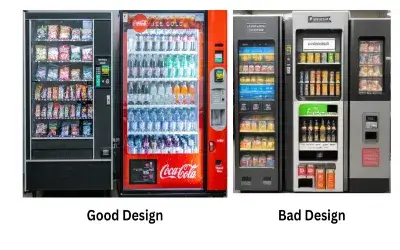
Vending Machines:
  • Vending machines have made it very simple for the customer to use the machine.
  • Because the vending machine provides a self-service site, with all the instructions in visual aid, plus clearly labeled buttons.
  • It is almost effortless for a customer to make an order with the machine.
  • The instructions to follow are a product slot image, a visual image of inserting coins or cash or using their calling card, and Approximate push buttons.

Additionally, the vending machine almost always provides a visual or auditory response, indicating. Whether a selection has been made and, in the case of a successful purchase, confirming the transaction.

🚦 Traffic Lights and Crosswalks

When an Extravagant User Experience can show holes in services:

  • UX principles are inseparable from how we navigate our world. Traffic lights are used.
  • Universally interpreted color-coding (Red = stop; Green = go) symbols,
  • like a walk sign or a hand symbol, document sounds for people with sight impairments.
  • Crosswalks often include timers and flashing or vibrating alerts, making them accessible.

✅ UX focus: Safety nearly always involves design that includes the greatest variety of user groups by making it accessible for those with disabilities.

🚪 Door Handles and Push Plates

Objects we see and use every day, door handles and push plates, illustrate how form can communicate a function.

  • A pull handle almost suggests pulling.
  • The flat push plate invites you to push.

When doors are designed to coincide with our actual (not ideal) instincts, the user can’t be confused. A door that requires pushing but that has a pull handle is an example of a UX failure- otherwise known as a “Norman Door.”

✅ UX Focus: Physical cues align concepts based on the user’s expectations, which lessen the chances of error.

🎟️ Ticketing Kiosks in Public Transport (MTR, Metro)

Ticketing kiosks in metro systems (such as MTR) are streamlined for speed to make it easy to get a ticket and quickly get on the train. Some features of ticketing kiosks:

  • Big buttons,
  • Multiple languages,
  • Visual instructions along with step-by-step instructions,
  • Clear flow for payment and ticket collection, Auditory and visual confirmation.

Therefore, the process feels seamless and guided, even for first-time users and travelers from other countries.

✅ UX Highlight: Decreased friction from entering transit to decreased friction for self-service in busy situations or environments.

🚰 Automatic Taps and Dryers

Automatic taps and hand dryers in public bathrooms assure minimal touch and maximized hygiene. The experience is:

  • Contactless and intuitive
  • Usually activated by a natural hand motion.
  • Sometimes has LED indicators for personal use.

The basic tap and dryer have evolved a lot because early designs had lag issues with the tap and hand dryer; now, common designs such as the tap allow for a true instant on, which is perceived are more reliable.

UX Highlight: Hygienic, efficient, and user-friendly interaction will only be elevated for high volume situations, ie, women’s washroom.

☕ Coffee Makers

Popular drip or pod coffee machines emphasize:

  • Simple buttons (e.g., Brew, Strength, Size),
  • Water identification and monitoring level.
  • Started or one-touch operation.
  • Usually comes with a pre-programmed timer or auto-start.

It only takes a few seconds to brew a cup of coffee, and the user does not need to read a user manual.

UX Highlight: Streamlined functionality for an everyday experience with a low learning curve.

🍿 Interacting with Microwave Ovens

Microwave ovens are yet another common household appliance that provides an undeniably good UX:

  • Pre-set buttons for recurring common actions (Popcorn, Reheat, Defrost),
  • Intuitive icons for food groupings,
  • Scroll wheel dials and touchpads to set the time,
  • Visual progress indicator bars or beeps provide an individual with feedback on what is happening.

These elements lessen guesswork and increase consistency, even for a first-time user.

UX takeaway: Smart preset functionality and streamlined controls for a variety of common tasks.

💡 Why These Examples Are Important

Each of these real-world examples incorporates the core UX principles:

  • Clarity: Users understand what to do.
  • Efficiency: Minimal steps to complete tasks.
  • Feedback: Something visual or auditory confirms their actions.
  • Accessibility: All users are considered, including those with impairments.
  • Error prevention: Attempts to make it hard for users to do the wrong thing
🎯 Final Thoughts: UX is Everywhere.

Great UX is often unnoticed— because it works!

From a ticket machine to just about any device in the kitchen, these items are thoughtfully designed to assist you every step of the way—no manual needed, no frustration, and no hesitation or lack of confidence. That is the sheer power of real-world UX design.

As communicators, bloggers, or conscientious designers, we can learn from these examples for our own digital experiences. The best design makes people feel smart, not confused.

Frequently Ask Questions

How is UX present in the physical environment?

In addition to the common experiences mentioned above, which are limited to static designs, various examples can be encountered in real life, such as a vending machine, a traffic light, parking signage, and even the positioning of items in a grocery shop. These are illustrative examples showing the what and how of UX design in everyday life to facilitate uncomplicated and time-effective processes such as buying a quick snack, waiting to cross the road, searching for a car, or even going around a supermarket.


Why is it important to have good UX design outside of websites and apps?

UX is familiar and essential to people outside the scope of technology. It dictates how people engage with the items that they face in the surrounding environment. In this regard, better experiences can be brought about where safety, productivity, and contentment levels are enhanced in performing daily chores. For instance, designed properly, the buttons of an elevator with clear signs will ease the challenge of shifting from one floor to another, while a user-friendly shopping cart will give relief to a shopper in the course of doing their shopping.


What are Examples of UX in non-digital objects?

Audio-visual communication. Banks, restaurants, libraries, hospitals, and airport terminals are just a few examples of public spaces with varying degrees of design and architecture. It is easy to see that every ATM and even the public toilet sign bears the stamp of some kind of UX Evolution. Good design in use goes beyond just appliances and gadgets; any object in any given environment should be designed in such a way that it will function naturally with use.

What is UX Design and Is UI UX a good career 2025

What is UX Design and Is UI UX a good career 2025

What is UX Design, and Is UI UX a good career in 2025

Let’s understand what UX Design is, whether UI UX is a good career in 2025

Introduction (Revised)

“Wondering whether UI/UX design is worth it in 2025? With the expansion of AI tools, remote jobs, and all things digital, you’ll likely have a ton of demand for this tech creative job more than ever. Let’s unpack what UX design is, what skills you will need, and if this is the right career for you.”

UX stands for User Experience, or UX is an abbreviation for User Experience. It is a broad field encompassing all aspects of an end user’s interaction with a product, system, or service. UX design aims to develop a product that is useful and easy to use while successfully engaging the user in a pleasurable and sustaining experience.

Here are a few key aspects of UX:

User-Centered Design:
  • Right from the beginning, UX design focuses on the intended audience and their needs. User research, user personas, and finding ways to communicate with the users are required
Usability:
  • Till the design development process, great emphasis is put on the usability of. The design ensures the product is not only easy to use but also easy to navigate. This includes things like how simple the interface is. How straight the paths are. And how much stress the users are subjected to.
Information Architecture:
  • This deals with the way information is presented and the way it is structured to assist the users in getting what they are looking for. This includes building spider diagrams and developing a usable hierarchy of pages.
Interaction Design:
  • The designers that will be involved in the project will deal with the different elements that will be interacting with the user for instance buttons, forms, and menus.
  • They make sure that these elements are easy to use and help enhance the overall experience of the user in a seamless and timely manner.
Visual Design:
  • Although mostly regarded as part and parcel of UI (User Interface) design, visual design also finds its place here.
  • This includes but is not limited to color palettes, fonts, and pictures that help in creating the aesthetic appeal of the product.
Accessibility:
  • Making sure that the created product is usable by physically challenged users becomes a major focus in UX.
  • In this case, you have to follow a set of guidelines and make changes concerning the user in question.
User Testing:
  • User Testing: Similar to the case with usability testing,
  • UX designers also have to gather (or estimate) empirical data by conducting user tests on the given site. This helps in pinpointing the areas of usability issues and improvement in the design.
Iterative Design:
  • Designing for UX is not a one-off effort. Designers are always in constant feedback mode, improving and re-testing the product to perfect the user experience.

User Satisfaction: The end product of any UX design process is products that users interact with and enjoy using, and users’ contentment is said to be fulfilled. Contented users tend to be the most loyal customers and will also market the product to other potential users.

Is UX a good career in 2024

UX (User Experience) is considered a promising and rapidly growing field, and this trend will likely continue into 2024. Here are some reasons why it can be considered a good career:

Increasing Demand:
  • The demand for UX professionals has been consistently growing as businesses recognize the importance of delivering positive user experiences.
  • As companies strive to stay competitive, they invest in creating products and services that users find easy to use and enjoyable.
Diverse Opportunities:
  • UX spans various industries, including technology, healthcare, finance, and e-commerce. This diversity allows professionals to explore different sectors and apply their skills to a wide range of projects.
  • Remote Work Opportunities: The COVID-19 pandemic has improved the recognition of far-flung work.
  • UX professionals often have the flexibility to work remotely, providing them with more job opportunities and a better work-life balance.

Continuous Innovation:

  • The tech industry is dynamic, with constant advancements and new technologies.
  • UX professionals are at the forefront of innovation, working on emerging technologies such as augmented reality, virtual reality, and voice interfaces.
Competitive Salaries:
  • Skilled UX professionals are often well-compensated for their expertise.
  • Salaries can range primarily based on elements that include experience, location, and the particular industry.
Collaborative Environment:
  • Its design involves collaboration with cross-functional teams, including developers, product managers, and marketers.
  • This collaborative approach allows professionals to work in diverse and dynamic teams.
Growing Influence:
  • The role of UX in decision-making processes has been increasing. UX professionals often contribute to strategic decisions, and some even hold leadership positions within organizations.

Job Satisfaction: Creating positive user experiences and seeing the impact of your work on the end-users can be highly rewarding. UX professionals often find satisfaction in knowing that they contribute to making products more user-friendly and enjoyable.

Continuous Learning: IT is a field that encourages continuous learning. As technology evolves, It is professionals have the opportunity to stay updated on the latest trends, tools, and methodologies.

Global Demand: The skills of UX professionals are in demand globally. This provides the opportunity for professionals to work for international companies or as freelancers serving clients from different parts of the world.

It is, however, worth noting that the job market and the dynamics of the industry are subject to transformations. It is prudent to keep the pulse on the prevailing trends and skill set enhancement from time to time. And be flexible to the trends of that industry. Also, try to look for other materials that are more current regarding the current position of the UX job market in 2024 and beyond.

Frequently Ask Questions

What is user experience design?

UX design, or user experience design. It is an aspect of design that involves developing meaningful interactions with products, websites, or applications in a seamless way for end users. It encompasses all aspects of research, prototyping, usability testing, and user-friendly interface design.


Is UI UX a good career in 2025?

Yes, UI/UX design is a very rewarding profession in 2025, and it is likely to be even more so shortly. All industries, such as e-commerce, healthcare, and entertainment. Have realized that they need more user-centric digital experiences than just selling products to customers. With the advancement of technology, it has been found that UI/UX professionals. Hold the key to improving usability and customer satisfaction.


Which skills are required for a UI/UX career?

Some of the core skills consist of conducting user research, wireframing, prototyping, visual designing, usability testing, an empathetic approach, and the use of tools such as Figma, Adobe XD, and Sketch


Which industries will hire UI/UX designers in 2025?

Some of the other industries that would employ in-house UI/UX designers in 2025 would include technology, healthcare, gaming, e-commerce, and AI.


How do I start a career as a UI designer and UX designer?

Getting started with UI/Ux design involves studying. The fundamentals of the study through online courses, sharpening one’s portfolio, mastering design tools, and looking for either an internship or entry-level positions in the industry

UX-UI Design
Optimized with PageSpeed Ninja