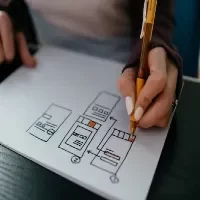
Experience Mapping in UX Design 2024

UI Animation 2025: In 5 Stage, digitalanivipracticeb

Experience Mapping in UX Design 2024. In UX design, experience mapping is a powerful tool used to visualize and understand the user’s journey with a product or service. It provides a detailed representation of the user’s interactions, emotions, and perceptions at various touchpoints throughout their experience. Here’s a guide on experience mapping in UX design:

1. Define the Scope:

  • Identify User Journey Stages: Break down the user experience into key stages, from initial awareness to post-engagement.
  • Example Stages: Discovery, Onboarding, Usage, Problem Resolution, and Loyalty.

2. User Persona Integration:

  • Incorporate Personas: Align the experience map with user personas to understand diverse user needs and behaviors.
  • Detail Persona Characteristics: Include information such as goals, pain points, and motivations for each persona.

3. Gather Data:

  • Collect User Insights: Use data from user research, interviews, analytics, and customer feedback to inform the mapping process.
  • Include Emotional Data: Consider user emotions and sentiments at different stages.

4. Identify Touchpoints:

  • Map Channels and Platforms: Highlight touchpoints where users interact with the product or service (e.g., website, mobile app, social media, customer support).
  • Include Offline Touchpoints: If applicable, consider physical touchpoints or offline interactions.

5. Detail User Actions:

  • Document User Interactions: Identify specific actions users take at each stage of the journey.
  • Highlight Pain Points: Note areas where users may encounter difficulties or frustrations.

6. Emotional Journey:

  • Integrate Emotions: Include a spectrum of user emotions throughout the journey, from delight to frustration.
  • Note Positive and Negative Moments: Identify moments that create positive or negative emotional responses.

7. Opportunities and Pain Points:

  • Highlight Opportunities: Identify areas where the user experience can be enhanced or where new features could be introduced.
  • Pinpoint Pain Points: Identify obstacles or challenges that could impact user satisfaction.

8. Cross-Channel Consistency:

  • Ensure Consistency: Check for consistency across various channels and platforms to provide a seamless experience.
  • Address Discrepancies: Note any discrepancies that might cause confusion or disrupt the user journey.

9. Collaborative Workshops:

  • Facilitate Workshops: Conduct collaborative workshops involving cross-functional teams to create the experience map.
  • Encourage Stakeholder Involvement: Include input from various stakeholders to gain diverse perspectives.

10. Visual Representation:

  • Create Visual Maps: Develop visual representations of the user journey, utilizing charts, diagrams, or infographics.
  • Ensure Accessibility: Design maps that are easily understandable and accessible to team members.

11. Iterative Process:

  • Iterate Based on Feedback: Continuously update the experience map based on user testing, feedback, and changes in the product or service.
  • Evolve with the Product: Ensure the map evolves along with any updates or iterations of the product.

12. Pain Points and Friction:

  • Identify Pain Points: Specifically, highlight moments of friction or difficulty for users.
  • Quantify Severity: Assign a level of severity to pain points based on their impact on the user experience.

13. User Goals and Motivations:

  • Define User Goals: Clearly outline the goals users aim to achieve at each stage.
  • Understand Motivations: Identify the motivations driving users to interact with the product or service.

14. Multichannel Experiences:

  • Consider Multichannel Interactions: Explore how users move seamlessly across different channels during their journey.
  • Address Multichannel Challenges: Identify challenges or opportunities in maintaining consistency.

15. Real-Time Interactions:

  • Incorporate Real-Time Interactions: Consider how the user journey adapts to real-time interactions or dynamic changes.
  • Responsive Design: Ensure the design accommodates real-time user needs and responses.

16. Lifecycle Mapping:

  • Extend Beyond Conversion: Map the entire lifecycle, including post-purchase stages.
  • Retention and Advocacy: Explore how to maintain engagement and turn users into advocates.

17. Mobile and Responsive Considerations:

  • Prioritize Mobile Interactions: Address the unique considerations of the mobile user experience.
  • Responsive Design: Ensure consistency in experience across various screen sizes.

18. Touchpoint Innovation:

  • Explore Innovative Touchpoints: Consider introducing new and innovative touchpoints.
  • Technology Integration: Explore how emerging technologies can enhance touchpoints.

19. Service Blueprint Integration:

  • Combine with Service Blueprinting: Integrate experience mapping with service blueprints for a comprehensive view.
  • Operational Processes: Understand how internal processes impact the user experience.

20. Validate with User Testing:

  • Conduct User Testing: Validate the experience map through usability testing.
  • Iterative Improvements: Use testing insights for iterative improvements to the map and the overall UX.

21. Analytics and Metrics:

  • Incorporate Analytics Data: Utilize analytics metrics to quantify user behavior at different stages.
  • Conversion Rates and KPIs: Monitor key performance indicators (KPIs) relevant to the user journey.

22. Accessibility and Inclusive Design:

  • Prioritize Accessibility: Ensure the experience map considers accessibility for users with diverse needs.
  • Inclusive Design: Design with inclusivity in mind to accommodate a wide range of users.

23. Competitive Benchmarking:

  • Include Competitor Insights: Integrate insights from competitive analysis into the experience map.
  • Benchmarking Metrics: Compare the user experience against competitors’ benchmarks.

24. Post-Interaction Surveys:

  • Implement Surveys: Use post-interaction surveys to gather direct user feedback.
  • User Sentiment Analysis: Analyze sentiment to gauge overall user satisfaction.

25. Storytelling and Narratives:

  • Tell User Stories: Use storytelling to narrate the user’s journey and experiences.
  • Engage Stakeholders: Make the experience map a compelling tool for engaging stakeholders.

Experience mapping in UX design is not a one-time activity but an ongoing process. It evolves alongside the product, incorporating feedback, data, and changes in user behavior to ensure a continually improved and user-centric experience. Experience mapping in UX design is a dynamic and iterative process that evolves alongside the product or service. It provides valuable insights for designers, product managers, and stakeholders to make informed decisions that enhance the overall user experience. Experience Mapping in UX Design 2024
What is Competitor Research & Analysis in UX Design 2024?

What is Competitor Research & Analysis in UX design. digitalanivipracticeb

What is Competitor Research & Analysis in UX Design 2024?

Competitor research and analysis in UX design involves studying and evaluating the digital products and experiences offered by competitors in the same industry or market. The primary goal is to gain insights that can inform and enhance the design of your product. This process is crucial in understanding. The competitive landscape, identifying strengths and weaknesses, and finding opportunities for improvement. Here’s a breakdown of the key components:

In the identification of competitors, there are two primary categories:

Definition: Direct competitors are companies that sell or market identical or very similar products to yours.

Role in Decision-Making: Customers often assess both your product and those of your direct competitors when making purchasing decisions.

Definition: Indirect competitors are businesses offering slightly different products or services but targeting the same customer group to satisfy a similar need.

Role in Decision-Making: Considered substitutes, and indirect competitors vie for the attention of the same customer base.

  • Objective: Identify and list competitors in the same industry or market segment.
  • Activities:
    • Research direct competitors as well as potential disruptors in the market.
    • Consider both well-established and emerging players.
  • Objective: Define criteria for evaluating competitors’ products and experiences.
  • Activities:
    • Decide on factors such as user experience, usability, features, visual design, performance, and overall customer satisfaction.
  • Objective: Collect comprehensive information about competitors’ digital products.
  • Activities:
    • Explore competitors’ websites, mobile apps, or other digital platforms.
    • Analyze the structure, layout, navigation, and overall user interface.
  • Objective: Conduct a SWOT analysis (Strengths, Weaknesses, Opportunities, Threats) for each competitor.
  • Activities:
    • Identify what each competitor excels at (strengths) and where they may fall short (weaknesses).
    • Look for opportunities for improvement and potential threats in the market.

7. User Feedback:

  • Objective: Understand user sentiments and feedback about competitors’ products.
  • Activities:
    • Read user reviews on app stores, social media, and other review platforms.
    • Identify common pain points and areas where users express satisfaction.

8. Differentiation Strategies:

  • Objective: Identify how competitors differentiate themselves in the market.
  • Activities:
    • Explore unique features, design elements, or value propositions.
    • Assess how competitors position themselves in the market.

9. Benchmarking:

  • Objective: Benchmark your product or design against competitors.
  • Activities:
    • Compare specific aspects of your design with those of competitors.
    • Identify areas where you can innovate or improve based on competitor strengths.

10. Industry Trends:

  • Objective: Stay informed about current trends in UX design within the industry.
  • Activities:
    • Research and analyze industry publications, conferences, and thought leadership.
    • Understand how competitors are adapting to or leading in these trends.

11. Document Findings:

  • Objective: Compile detailed documentation of the competitor analysis.
  • Activities:
    • Summarize key findings, including visual examples, data, and user feedback.
    • Organize information for easy reference and sharing within the team.

12. Present Recommendations:

Competitor research and analysis are ongoing processes. Regularly monitoring competitors helps ensure that your product remains competitive and that your design decisions are informed by the evolving landscape of user expectations and industry trends.

14. Cross-Channel Consistency:

  • Objective: Assess the consistency of the user experience across different channels.
  • Activities:
    • Examine how competitors maintain a consistent brand and UX across websites, apps, and other touchpoints.
    • Identify strategies for cross-channel integration.

15. Regulatory Compliance:

  • Objective: Check how competitors adhere to regulatory requirements.
  • Activities:
    • Ensure that competitors meet legal standards, especially in industries with specific compliance requirements (e.g., finance, healthcare).

This comprehensive analysis extends beyond your immediate business rivals, encompassing both direct and indirect competitors. By understanding the landscape in which your product operates. You can gain valuable insights into the market. Enabling you to strategically position your offering and refine your product strategy. What is Competitor Research & Analysis in UX Design 2024?

What does a UX Designer do?

What does a UX Designer do? digitalanivipracticeb

UX, or User Experience, is a multidisciplinary field focused on enhancing the overall experience that a user has with a product, system, or service. The goal of UX design is to create meaningful, enjoyable, and efficient interactions between users and digital or physical interfaces. UX professionals employ various methodologies and techniques to understand user needs, behaviors, and preferences, ultimately aiming to improve the usability, accessibility, and satisfaction of a product or service.

Here’s a breakdown of what UX professionals do:

User Research:

Researching to understand the target audience.

Gathering insights through methods like interviews, surveys, and observations.

Persona Development:

Creating user personas to represent different segments of the target audience.

Personas help in designing for specific user needs and behaviors.

Information Architecture:

Organizing and structuring information to facilitate effective navigation and understanding.

Creating sitemaps and user flows to plan the user’s journey through the product.

Wireframing and Prototyping:

Developing low-constancy wireframes to define the simple shape and layout.

Creating interactive prototypes to visualize and take a look at layout concepts.

Usability Testing:

Planning and conducting usability testing sessions to get direct feedback from users.

Analyzing results and iterating on designs based on user input.

Interaction Design:

Defining how users interact with the product through the design of buttons, forms, and other interactive elements.

Creating micro-interactions and animations to beautify the person’s experience.

Visual Design:

Designing the visual elements of the interface, including colors, typography, and imagery.

Ensuring a visually appealing and cohesive design.

Accessibility:

Ensuring that the product is out there for customers with disabilities.

Following accessibility guidelines to create an inclusive design.

Collaboration:

Collaborating with cross-practical teams, along with developers, product managers, and marketers.

Ensuring that design decisions align with business goals and technical constraints.

Iterative Design:

Embracing an iterative design process, where designs are refined based on continuous testing and feedback.

Being open to making improvements and adjustments throughout the development lifecycle.

Advocacy for Users:

Acting as a user advocate within the organization.

Ensuring that a person’s desires and views are taken into consideration in decision-making processes.

Documentation:

Creating design documentation, including style guides, design specifications, and user personas.

Communicating design decisions clearly to team members and stakeholders.

Conversion Rate Optimization (CRO):

Optimizing designs to improve conversion rates, whether the goal is making a purchase, signing up, or another user action.

Internationalization and Localization:

Adapting designs to accommodate different cultural preferences and languages.

Ensuring that the user experience remains effective in diverse global contexts.

User Journey Mapping:

Mapping out the entire user journey from the initial interaction to the completion of a task or goal.

Identifying ache factors and possibilities for development along the way.

Staying Current with Trends:

Keeping abreast of emerging design trends, tools, and technologies.

Applying relevant innovations to enhance the user experience.

Customer Support Collaboration:

Collaborating with customer support teams to understand common user issues and address them through design solutions.

Gathering and Analyzing Analytics Data:

Utilizing analytics equipment to accumulate facts on personal conduct and engagement.

Analyzing data to derive insights and make informed design decisions.

Rapid Prototyping:

Creating quick and iterative prototypes to explore and communicate design ideas.

Facilitating discussions and feedback early in the design process.

Design Thinking Workshops:

Facilitating design thinking workshops to foster creativity and collaboration within a team.

Using brainstorming sessions to generate innovative solutions.

Cross-Platform Design:

Ensuring a consistent and optimized user experience across various devices and platforms.

Adapting designs for responsive web, mobile, and other interfaces.

Microcopy and Content Strategy:

Crafting clear and concise microcopy (small bits of text) to guide users and improve comprehension.

Contributing to content strategy to ensure the alignment of design and content.

Brand Alignment:

Aligning user experience design with the overall brand strategy and identity.

Ensuring that the visual and interactive elements reflect the brand personality.

Ethical Design Practices:

Advocating for ethical design practices, including user privacy, transparency, and inclusive design.

Balancing business goals with user well-being.

Post-Launch Monitoring:

Monitoring user feedback and behavior post-launch to address any unforeseen issues promptly.

Implementing continuous improvements based on real-world usage.

Overall, UX professionals aim to create products and experiences that are not only functional but also delightful and efficient for users. They bridge the gap between user needs and business goals, ensuring that the final product meets both sets of requirements. The specific tasks can vary depending on the stage of the design process and the nature of the project.

What does a UI Designer do?

What does a UI Designer do digitalanivipracticeb

A UI (User Interface) designer is responsible for creating the visual elements of a digital product or application, focusing on how users interact with it. Their primary goal is to design interfaces that are not only visually appealing but also intuitive, user-friendly, and aligned with the overall user experience (UX) strategy. Here’s an overview of what a UI designer typically does:

Visual Design:

Create the visual elements of an interface, including layout, color schemes, typography, and imagery.

Ensure a consistent and visually appealing design that aligns with the brand and project goals.

Wireframing and Prototyping:

Develop wireframes to outline the basic structure and layout of the interface.

Create interactive prototypes to visualize and test design concepts before development.

Typography and Iconography:

Choose and implement fonts that enhance readability and contribute to the overall aesthetic.

Design icons that are clear, recognizable, and consistent with the interface style.

Style Guides and Design Systems:

Create style guides that document design principles, visual elements, and brand guidelines.

Contribute to the development of design systems for consistent and scalable design across the product.

Collaboration with UX Designers:

Work closely with UX designers to translate wireframes and user flows into visually compelling and functional interfaces.

Collaborate on the overall user experience strategy.

User-Centric Design:

Design with the end user in mind, considering their needs, preferences, and behaviors.

Conduct usability checking out and iterate on designs primarily based totally on personal feedback.

Responsive Design:

Design interfaces that are responsive and adaptable to one-of-a-kind display screen sizes and devices.

Ensure a continuing and steady person enjoys numerous platforms.

Interaction Design:

Define how users will interact with the interface through the design of buttons, forms, navigation elements, and other interactive components.

Implement micro-interactions and animations to enhance the user experience.

Feedback and Iteration:

Gather feedback from team members, stakeholders, and users.

Iterate designs based on feedback and evolving project requirements.

Usability Testing Support:

Collaborate with UX designers in usability testing efforts, providing visual assets and design support.

Analyze test results to inform design improvements.

Stay Current with Design Trends:

Keep abreast of current design trends, tools, and technologies.

Apply innovative and industry-relevant design solutions.

Handoff to Development:

Prepare and deliver design assets to developers, ensuring accurate implementation.

Collaborate with developers during the implementation phase to address any design-related issues.

Problem Solving:

Approach design challenges with a problem-solving mindset, considering both creative and practical solutions.

Balance aesthetic appeal with usability and functionality.

Brand Consistency:

Ensure that the interface design aligns with the overall brand identity and guidelines.

Maintain brand consistency across all digital touchpoints.

Color Theory:

  • Apply color theory principles to create visually harmonious and meaningful color palettes.
  • Consider the mental effect of colors on a person’s feelings and perceptions.

Feedback Loops:

  • Establish effective feedback loops with developers to address any design implementation challenges.
  • Collaborate closely to maintain the integrity of the design during development.

The role of a UI designer is integral to creating a positive and engaging user experience. UI designers often work collaboratively with UX designers, product managers, developers, and other stakeholders to bring a cohesive and effective digital product to life.

UI designers play a crucial role in creating visually appealing and functional digital interfaces. Their work spans a spectrum of activities, from the initial conceptualization of designs to the collaboration with developers for implementation. The ability to balance creativity with practical considerations and user needs is central to the success of a UI designer.

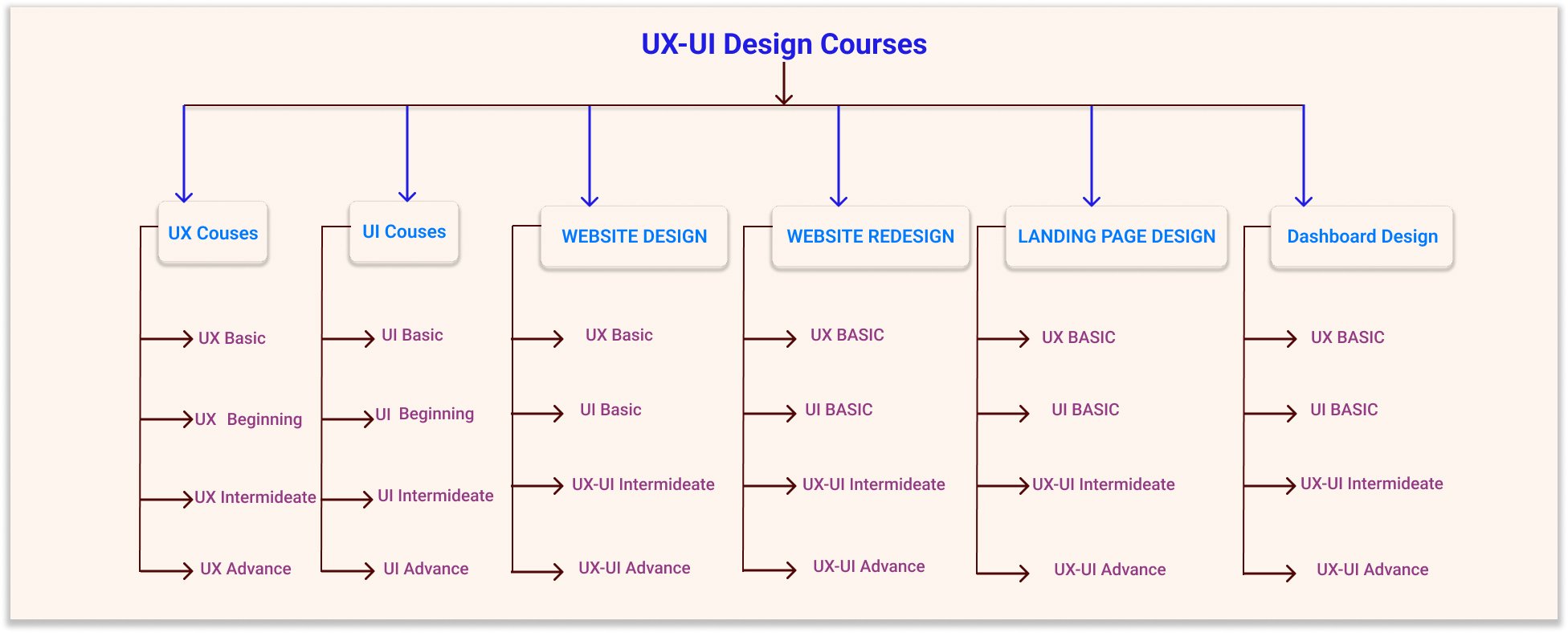
UX-UI Courses

There are various UX (User Experience)– -and UI Courses(User interface) courses available, catering to different levels of expertise and preferences. Here are some reputable online platforms and institutions that offer UX courses – UI Courses: UX-UI Courses

1. Coursera:

2. Udacity:

3. LinkedIn Learning:

4. Interaction Design Foundation:

5. edX:

6. General Assembly:

7 Udemy:

8. FutureLearn:

9. Google UX Design Certificate (Coursera):

10. CareerFoundry:

11. Springboard:

12. IDF:

13. Adobe XD UI/UX Design with Parth Anand (Udemy):

Course: Adobe XD UI/UX Design with Parth Anand

Provider: Udemy

14. UX & UI Design with Adobe XD (Coursera):

Course: UX & UI Design with Adobe XD

Provider: Adobe (Coursera)

15. Figma: UI/UX Design Essential Training (LinkedIn Learning):

Course: Figma: UI/UX Design Essential Training

Provider: LinkedIn Learning

16. The Complete App Design Course for Beginners (Udemy):

Course: The Complete App Design Course for Beginners

Provider: Udemy

17. Responsive Web Design – HTML5, CSS3, and Bootstrap (Udemy):

Course: Responsive Web Design – HTML5, CSS3, and Bootstrap

Provider: Udemy

18. Design Thinking: The Beginner’s Guide (Interaction Design Foundation):

Course: Design Thinking: The Beginner’s Guide

Provider: Interaction Design Foundation

19. UI/UX & Web Design Using Adobe XD (Skillshare):

Course: UI/UX & Web Design Using Adobe XD

Provider: Skillshare

20. UX & Web Design Master Course: Strategy, Design, Development (Udemy):

Course: UX & Web Design Master Course: Strategy, Design, Development

Provider: Udemy

21. Course: User Experience (UX) – The Ultimate Guide to Usability and UX.

22. The course name is “Responsive Design HTML CSS Web Design”, and it is taught using Dreamweaver CC.

23. UI/UX Design Specialization (Coursera):

Course: UI / UX Design Specialization

Provider: California Institute of the Arts

24. Sketch: Design a Mobile App (Udemy):

Course: Sketch: Design a Mobile App

Provider: Udemy

Remember to explore the course content, reviews, and ratings to find the one that aligns with your learning objectives and preferences. Many platforms offer a mix of beginner and advanced courses, so choose accordingly based on your skill level.

Before enrolling in a course, consider your current skill level, the specific areas of UX-UI Courses you want to focus on, and the format that suits your learning style (self-paced, instructor-led, etc.).Additionally, examine critiques and testimonials to make sure the route meets your expectations. UX-UI Courses Many platforms also offer free trials or previews of their courses, allowing you to assess the content and teaching style before committing.

UX Design Process and Responsibilities

UI Animation 2025: In 5 Stage, digitalanivipracticeb

Design Thinking as UX Design Process and Responsibilities

UX Design Process and Responsibilities. Conducting stakeholder interviews and competitor analysis are essential components of the UX (User Experience) design process. Here’s a breakdown of both processes:

Stakeholder Interviews:
  1. Objective:
  • Understand business goals, user needs, and expectations from the project.
Steps:
  1. Identify Key Stakeholders:
    • List individuals or groups who have a vested interest in the project, including executives, product managers, marketing teams, and customer support.
  2. Define Interview Objectives:
    • Clearly outline the goals of the stakeholder interviews. What information are you seeking? What are the key project objectives?
  3. Prepare Questions:
    • Develop a set of open-ended questions that touch on various aspects, including business goals, target audience, challenges, and expectations.
  4. Conduct Interviews:
    • Schedule and conduct one-on-one or group interviews with stakeholders.
    • Ensure a balance between listening to their insights and probing for specific information.
  5. Document Findings:
    • Record key insights and patterns emerging from the interviews.
    • Note common themes, pain points, and priorities expressed by stakeholders.
  6. Analyze and Summarize:
    • Synthesize the information gathered from interviews into a comprehensive summary.
    • Identify key priorities and challenges expressed by stakeholders.
  7. Share Findings:
    • Present the findings to stakeholders for validation and additional insights.
    • Use the information to align UX goals with broader business objectives.
2. Competitor Analysis in UX Design:

Objective:

  • Understand the competitive landscape, identify strengths and weaknesses, and gather insights for informed design decisions.
Steps:
  1. Identify Competitors:
    • List direct and oblique competition inside the industry.
    • Consider both traditional and emerging players.
  2. Define Analysis Parameters:
    • Decide on the criteria for evaluation, such as user experience, features, pricing, branding, and market share.
  3. Gather Information:
    • Research competitors’ websites, apps, and other digital platforms.
    • Evaluate their user interfaces, navigation, content presentation, and overall user experience.
  4. SWOT Analysis:
    • Conduct a SWOT analysis (Strengths, Weaknesses, Opportunities, Threats) for every competitor.
    • Identify areas where competitors excel and where they may be lacking.
  5. User Feedback:
    • Analyze user reviews and feedback for competitor products.
    • Understand what users appreciate and what frustrates them about the competition.
  6. Differentiation Strategies:
    • Identify how competitors differentiate themselves from each other.
    • Understand their unique value propositions and messaging.
  7. Benchmarking:
    • Benchmark your product or design against competitors.
    • Identify areas where you can improve or innovate based on competitor strengths.
  8. Industry Trends:
    • Stay informed about current trends in UX design within the industry.
    • Understand how competitors are adapting or leading in these trends.
  9. Document Findings:
    • Compile detailed documentation of the competitor analysis, including visual examples, data, and key insights.
  10. Present Recommendations:
    • Share the findings with the project team and stakeholders.
    • Use the information to inform design decisions, innovation strategies, and areas for improvement.
3. User Research:
  • Conducting user interviews, surveys, and usability studies to understand user needs, behaviors, and pain points.
  • Creating and maintaining user personas to represent different user types.
Information Architecture:
  • Designing the shape and company of records inside a virtual product.
  • Creating sitemaps and user flows to visualize the user’s journey through the product.
Wireframing and Prototyping:
  • Developing low-fidelity wireframes to outline the basic structure and layout of the interface.
  • Creating interactive prototypes to check and iterate on layout concepts.
Visual Design:
  • Designing the visual elements of the interface, including colors, typography, and imagery.
  • Ensuring visible consistency and adherence to logo guidelines.
Interaction Design:
  • Defining how users will interact with the product, including the design of buttons, forms, and other interactive elements.
  • Creating micro-interactions and animations to enhance the user experience.
Usability Testing:
  • Planning and conducting usability testing sessions to gather feedback on the product from real users.
  • Analyzing usability test results and making design recommendations based on findings.
Accessibility:
  • Ensuring that the digital product is accessible to users with disabilities by following accessibility guidelines and best practices.
  • Conducting accessibility audits and implementing improvements.
Collaboration:
  • Working closely with cross-functional teams, including developers, product managers, and marketers, to ensure a unified approach to product development.
  • Collaborating with stakeholders to align design decisions with business goals.
User Education:
  • Educating team members and stakeholders about UX principles and the importance of user-centered design.
  • Advocating for the consumer at some point in the product improvement process.
Analytics and Iteration:
  • Using analytics tools to gather data on user behavior and interactions with the product.
  • Iterating designs based on user feedback and performance metrics.
Documentation:
  • Creating design documentation, including style guides, design specifications, and design rationale.
Communicating design decisions effectively to team members and stakeholders.
Project Management:
  • Managing and prioritizing tasks to meet project deadlines.
  • Adapting to adjustments in mission scope and requirements.
Continuous Learning:
  • Staying informed about industry trends, emerging technologies, and best practices in UX design.
Participating in professional development and networking activities.
  • These tasks and responsibilities may be distributed across different UX roles, such as UX designers, UX researchers, interaction designers, and usability analysts, depending on the size and structure of the UX team.
  • Additionally, the specific demands of each project may influence the emphasis on certain tasks at different stages of the product development lifecycle.

Frequently Ask Questions

As part of UX design, what are the critical stages involved in it?

The UX design process usually incorporates a series of steps which include user research, user personas, wireframes, prototyping, user testing, and iterations. Through these steps, it is guaranteed that the design is oriented towards the user and addresses them accordingly.

What are the primary duties of a UX designer?

UX designers focus on the target audience and their behavior; devise the wireframes and prototypes; perform usability testing; and coordinate within the team. The purpose is to create comfortable and interesting solutions for users

In what way does a UX designer relate with other team members?

UX designers are usually associated with UI designers, developers, product managers, and other stakeholders. They make sure that the design is informed by the user’s perspective and work with the developers to ensure the delivery of designs that are functional and user-friendly at the same time.

Key UX Principles in Everyday Situations?

What is Competitor Research & Analysis in UX design. digitalanivipracticeb

User Experience (UX) principles play a vital role in shaping how people interact with products, services, and systems in everyday situations. Key UX Principles in Everyday Situations. Here are some key UX principles and how they apply to various scenarios:

  1. Clarity and Simplicity: Make interfaces and interactions simple and clear. Whether it’s a website, app, or physical product, avoid unnecessary complexity. For example, a microwave should have intuitive buttons with clear labels for different functions.
  2. Consistency: Maintain a consistent design and behavior throughout the experience. Users should be able to predict how things work based on previous interactions. In a messaging app, consistent placement of send buttons and similar icons creates a smoother experience.
  3. Visibility: Ensure important elements are easily visible. In a grocery store, placing essential items at eye level makes it convenient for shoppers to find what they need quickly.
  4. Feedback: Provide feedback to users for their actions. A progress bar when uploading files or a confirmation message after submitting a form reassures users that their actions were successful.
  5. Efficiency and Speed: Minimize the time it takes for users to achieve their goals. Search engines prioritize showing relevant results quickly, so users can find information efficiently.
  6. Flexibility and Control: Allow users to customize their experience. Video streaming platforms let users control playback speed, subtitles, and video quality, catering to individual preferences.
  7. Error Prevention and Recovery: Design interfaces to prevent errors and offer clear paths for recovery. Autocomplete in search bars helps users find what they’re looking for, reducing the chance of mistyped queries.
  8. Accessibility: Ensure your design is usable by people with disabilities. Websites should have text alternatives for images, and apps should be navigable using screen readers.
  9. Aesthetics and Consistency: Design should be aesthetically pleasing, but also consistent with the brand’s identity. A well-designed cafe not only offers great coffee but also provides a visually pleasing ambiance.
  10. User-Centered Design: Prioritize user needs and behaviors in your design decisions. A fitness app should align with users’ health goals and make it easy to track progress.
  11. Minimize Cognitive Load: Avoid overwhelming customers with an excessive amount of data at once. A public transportation app should present the most relevant options first, simplifying the decision-making process.
  12. Storytelling: Create a narrative or flow that guides users through their journey. A museum exhibit should lead visitors through a logical sequence, making it easy to understand the context and significance of each display.
  13. Contextual Awareness: Design experiences that adapt to the user’s context. A smart thermostat learns users’ schedules and adjusts the temperature accordingly.
  14. Emotional Design: Evoke positive emotions through design. A meditation app might use calming colors and soothing sounds to create a relaxing atmosphere.
  15. User Testing and Iteration: Continuously gather user feedback and make improvements. This applies to everything from website navigation to the layout of a physical store.
  16. Cross-Platform Consistency: Maintain consistency throughout exceptional structures and devices. A banking app should offer a similar experience on both its website and mobile app.
Key UX Principles in Everyday Situations. These principles are adaptable to a wide range of contexts, from digital interfaces to physical spaces. They serve as guidelines to create experiences that are user-friendly, effective, and memorable.

Good Design vs Bad Design: With 6 Key Differences

Good Design vs Bad Design: With 6 Key Differences

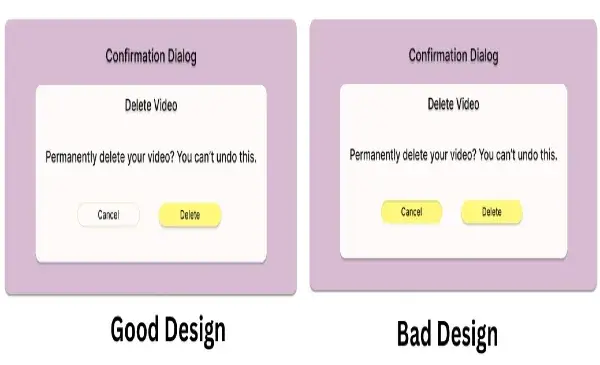
Before Start Good Design vs Bad Design: With 6 Examples. Let us understand Why Bad design is important and good.

Why Bad design is important and good?

Bad design can be good in certain contexts because it is usually a learning process. It brings attention to the user’s frustrations, allowing designers to see what does not work and where there needs to be changes. Equally poor designs can ignite a creative fire within people and catalyze ideas leading to better designs.

Good Design

  • The essence of good UX design is in responding to users – creating experiences that are simple, effective, and even fun to engage with. It entails transparency and the serving of purpose, such that a user can easily operate without difficulty performing any action. By its nature focusing on simplicity and understanding the user’s state of mind, good UX design aims to reduce negative experiences and increase positive ones while also making sure the developed products are not just usable but also quite desirable.

Bad Design

  • In contrast, the absence of good UX design puts more emphasis on the process than on the user making the process more in the end ineffective. It does not communicate, gives no comfort, and often fails to assist the user in completing the required task. Such designs make the experience better while making the product or service less effective than it should be.

6 Key Differences of Good Design vs Bad Design

Simplicity in Operation.
  • Good Design: Leaning towards making the product user-friendly, where the user can understand it and operate it without reading a user manual or any other usage instructions. For instance, clear labeling of the products, rational ordering of elements, and placement of relevant controls.
  • Bad Design: More often than not has an ambiguous set of instructions, concealed features, or a complex design. The user may have to fiddle with it or look for what is not readily available, and this can be quite annoying
Usability
  • Good Design: Takes into consideration the wide range of users including those who have some form of disability. These consist of things like large font sizes, high contrasting colors, images with content written in a different text and other languages, and so on. For instance, when it comes to physical products, it could be shapes that are more inventive and easier to use.
  • Bad Design: Unable to design or accommodate such features which the other users will also be able to utilize hence becoming difficult or impossible for some individuals to use. This could be a very low-contrast website for a person or a door without an easy-turn handle for a person with mobility issues.
Feedback Mechanism and Level of Responsiveness
  • Good Design: Communicates promptly and effectively to the user and acknowledges that something has been done. An example can be sounds, vibrations, or blinking lights indicating that an entry has been made. For instance, an ATM that displays a countdown timer while processing the transaction.
  • Bad Design: Does not give out any confirmation or gives out some contradictory confirmation making the user not sure if what he/she did was successful. A case in point is a microwave that has no bell at the end of the timer, leaving the user in doubt as to whether the cooked food is ready or the cooking is still on.
Effectiveness and Efficiency
  • Good Design: Simplifies work processes, thereby lessening the amount of effort and time taken to accomplish a specific task. It allows users to perform tasks in the shortest time possible and use the least energy. One such device is a remote control unit that has all the keys associated with commonly done tasks, such as changing the volume and the channel.
  • Bad Design: Is cumbersome and involves a lot of unnecessary steps or making the user do an action over again. For instance, an icky coffee maker that is easy to operate the user is presented with a lot of settings that take time to understand before one can make coffee.
coffee maker

Coffee Maker

Aesthetic Considerations and Attractiveness
  • Good Design: Good design should be pleasing to the eye, balanced, and appropriately focused.
  • Bad Design: Disorganized, inconsistent, and unprofessional-looking.
Stability and Uniformity
  • Good Design: Model colors, layouts or any other components assist users in navigating the design.
  • Bad Design: Non-uniform design creates confusion and hinders the navigation process.

Conclusion

In the end, a well-designed object improves the user experience whereas a poorly designed object hinders the user experience. The most effective designs foresee what the user would need and what problems they may come across. In contrast, unfitting designs ignore such factors causing irritation and dissatisfaction more often than not.

Frequently Ask Questions

What qualifies as “good” and “bad” design?

A good design seeks to promote ease of use, aesthetics, and clarity to enhance the overall user experience. In contrast, a bad design is one that looks ugly and is very difficult to understand and use hence it being in most instances frustrating and ineffective.

What role does consistency play in the quality of a design?

It assists the users in that, they know what to expect from a product and this guides them in the interaction process. When the design is not consistent, it creates an ineffective user interface as the user will spend a lot of time looking for things.

In what connections user comments are important to discriminate between good design and bad design?

User feedback assists designers in understanding what is effective and what is not. In most cases, good design incorporates user feedback in a bid to make the design more usable while in the case where feedback is ignored, the design tends to be bad since it does not consider how actual users operate or their pain points.

UX in EveryDay Life? 7 UX in Real Life Example.

UX in EveryDay Life. digitalanivipracticeb

UX in Everyday Life? 7 UX in Real Life Examples.

Have you ever gotten frustrated with an app that you find confusing, or have you ever been pleasantly surprised by how effortlessly you navigate through an online checkout portal? That’s User Experience (UX) at work in one of two ways—either enhancing or inhibiting your journey.

But UX isn’t necessarily about a web page or a mobile app. It’s everywhere— in physical objects, in public systems, and in gadgets found in your house. A few of the most impactful UX designs are often overlooked because they just work.

In this article, I will explore 7 examples of UX designs we use almost every day. Which makes our daily routine more convenient, safer, and more intuitive, often unbeknownst to us.

What Is UX in Real Life?

User Experience (UX) is how people experience products, services, or systems, and how those experiences make them feel. Good UX is intuitive, taming, and satisfying. Poor UX is difficult, slow, or irritating.

In real life, UX design appears in tools and environments where ease of use, safety, or speed is important. The best real-life UX resolves a challenge without instructions, training, or a second thought.

7 UX Design Examples That You Can Find in Daily Life

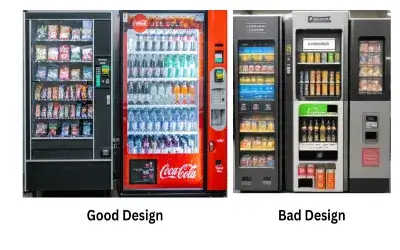
Vending Machines:
  • Vending machines have made it very simple for the customer to use the machine.
  • Because the vending machine provides a self-service site, with all the instructions in visual aid, plus clearly labeled buttons.
  • It is almost effortless for a customer to make an order with the machine.
  • The instructions to follow are a product slot image, a visual image of inserting coins or cash or using their calling card, and Approximate push buttons.

Additionally, the vending machine almost always provides a visual or auditory response, indicating. Whether a selection has been made and, in the case of a successful purchase, confirming the transaction.

🚦 Traffic Lights and Crosswalks

When an Extravagant User Experience can show holes in services:

  • UX principles are inseparable from how we navigate our world. Traffic lights are used.
  • Universally interpreted color-coding (Red = stop; Green = go) symbols,
  • like a walk sign or a hand symbol, document sounds for people with sight impairments.
  • Crosswalks often include timers and flashing or vibrating alerts, making them accessible.

✅ UX focus: Safety nearly always involves design that includes the greatest variety of user groups by making it accessible for those with disabilities.

🚪 Door Handles and Push Plates

Objects we see and use every day, door handles and push plates, illustrate how form can communicate a function.

  • A pull handle almost suggests pulling.
  • The flat push plate invites you to push.

When doors are designed to coincide with our actual (not ideal) instincts, the user can’t be confused. A door that requires pushing but that has a pull handle is an example of a UX failure- otherwise known as a “Norman Door.”

✅ UX Focus: Physical cues align concepts based on the user’s expectations, which lessen the chances of error.

🎟️ Ticketing Kiosks in Public Transport (MTR, Metro)

Ticketing kiosks in metro systems (such as MTR) are streamlined for speed to make it easy to get a ticket and quickly get on the train. Some features of ticketing kiosks:

  • Big buttons,
  • Multiple languages,
  • Visual instructions along with step-by-step instructions,
  • Clear flow for payment and ticket collection, Auditory and visual confirmation.

Therefore, the process feels seamless and guided, even for first-time users and travelers from other countries.

✅ UX Highlight: Decreased friction from entering transit to decreased friction for self-service in busy situations or environments.

🚰 Automatic Taps and Dryers

Automatic taps and hand dryers in public bathrooms assure minimal touch and maximized hygiene. The experience is:

  • Contactless and intuitive
  • Usually activated by a natural hand motion.
  • Sometimes has LED indicators for personal use.

The basic tap and dryer have evolved a lot because early designs had lag issues with the tap and hand dryer; now, common designs such as the tap allow for a true instant on, which is perceived are more reliable.

UX Highlight: Hygienic, efficient, and user-friendly interaction will only be elevated for high volume situations, ie, women’s washroom.

☕ Coffee Makers

Popular drip or pod coffee machines emphasize:

  • Simple buttons (e.g., Brew, Strength, Size),
  • Water identification and monitoring level.
  • Started or one-touch operation.
  • Usually comes with a pre-programmed timer or auto-start.

It only takes a few seconds to brew a cup of coffee, and the user does not need to read a user manual.

UX Highlight: Streamlined functionality for an everyday experience with a low learning curve.

🍿 Interacting with Microwave Ovens

Microwave ovens are yet another common household appliance that provides an undeniably good UX:

  • Pre-set buttons for recurring common actions (Popcorn, Reheat, Defrost),
  • Intuitive icons for food groupings,
  • Scroll wheel dials and touchpads to set the time,
  • Visual progress indicator bars or beeps provide an individual with feedback on what is happening.

These elements lessen guesswork and increase consistency, even for a first-time user.

UX takeaway: Smart preset functionality and streamlined controls for a variety of common tasks.

💡 Why These Examples Are Important

Each of these real-world examples incorporates the core UX principles:

  • Clarity: Users understand what to do.
  • Efficiency: Minimal steps to complete tasks.
  • Feedback: Something visual or auditory confirms their actions.
  • Accessibility: All users are considered, including those with impairments.
  • Error prevention: Attempts to make it hard for users to do the wrong thing
🎯 Final Thoughts: UX is Everywhere.

Great UX is often unnoticed— because it works!

From a ticket machine to just about any device in the kitchen, these items are thoughtfully designed to assist you every step of the way—no manual needed, no frustration, and no hesitation or lack of confidence. That is the sheer power of real-world UX design.

As communicators, bloggers, or conscientious designers, we can learn from these examples for our own digital experiences. The best design makes people feel smart, not confused.

Frequently Ask Questions

How is UX present in the physical environment?

In addition to the common experiences mentioned above, which are limited to static designs, various examples can be encountered in real life, such as a vending machine, a traffic light, parking signage, and even the positioning of items in a grocery shop. These are illustrative examples showing the what and how of UX design in everyday life to facilitate uncomplicated and time-effective processes such as buying a quick snack, waiting to cross the road, searching for a car, or even going around a supermarket.


Why is it important to have good UX design outside of websites and apps?

UX is familiar and essential to people outside the scope of technology. It dictates how people engage with the items that they face in the surrounding environment. In this regard, better experiences can be brought about where safety, productivity, and contentment levels are enhanced in performing daily chores. For instance, designed properly, the buttons of an elevator with clear signs will ease the challenge of shifting from one floor to another, while a user-friendly shopping cart will give relief to a shopper in the course of doing their shopping.


What are Examples of UX in non-digital objects?

Audio-visual communication. Banks, restaurants, libraries, hospitals, and airport terminals are just a few examples of public spaces with varying degrees of design and architecture. It is easy to see that every ATM and even the public toilet sign bears the stamp of some kind of UX Evolution. Good design in use goes beyond just appliances and gadgets; any object in any given environment should be designed in such a way that it will function naturally with use.

What is UX Design and Is UI UX a good career 2025

What is UX Design and Is UI UX a good career 2025

What is UX Design, and Is UI UX a good career in 2025

Let’s understand what UX Design is, whether UI UX is a good career in 2025

Introduction (Revised)

“Wondering whether UI/UX design is worth it in 2025? With the expansion of AI tools, remote jobs, and all things digital, you’ll likely have a ton of demand for this tech creative job more than ever. Let’s unpack what UX design is, what skills you will need, and if this is the right career for you.”

UX stands for User Experience, or UX is an abbreviation for User Experience. It is a broad field encompassing all aspects of an end user’s interaction with a product, system, or service. UX design aims to develop a product that is useful and easy to use while successfully engaging the user in a pleasurable and sustaining experience.

Here are a few key aspects of UX:

User-Centered Design:
  • Right from the beginning, UX design focuses on the intended audience and their needs. User research, user personas, and finding ways to communicate with the users are required
Usability:
  • Till the design development process, great emphasis is put on the usability of. The design ensures the product is not only easy to use but also easy to navigate. This includes things like how simple the interface is. How straight the paths are. And how much stress the users are subjected to.
Information Architecture:
  • This deals with the way information is presented and the way it is structured to assist the users in getting what they are looking for. This includes building spider diagrams and developing a usable hierarchy of pages.
Interaction Design:
  • The designers that will be involved in the project will deal with the different elements that will be interacting with the user for instance buttons, forms, and menus.
  • They make sure that these elements are easy to use and help enhance the overall experience of the user in a seamless and timely manner.
Visual Design:
  • Although mostly regarded as part and parcel of UI (User Interface) design, visual design also finds its place here.
  • This includes but is not limited to color palettes, fonts, and pictures that help in creating the aesthetic appeal of the product.
Accessibility:
  • Making sure that the created product is usable by physically challenged users becomes a major focus in UX.
  • In this case, you have to follow a set of guidelines and make changes concerning the user in question.
User Testing:
  • User Testing: Similar to the case with usability testing,
  • UX designers also have to gather (or estimate) empirical data by conducting user tests on the given site. This helps in pinpointing the areas of usability issues and improvement in the design.
Iterative Design:
  • Designing for UX is not a one-off effort. Designers are always in constant feedback mode, improving and re-testing the product to perfect the user experience.

User Satisfaction: The end product of any UX design process is products that users interact with and enjoy using, and users’ contentment is said to be fulfilled. Contented users tend to be the most loyal customers and will also market the product to other potential users.

Is UX a good career in 2024

UX (User Experience) is considered a promising and rapidly growing field, and this trend will likely continue into 2024. Here are some reasons why it can be considered a good career:

Increasing Demand:
  • The demand for UX professionals has been consistently growing as businesses recognize the importance of delivering positive user experiences.
  • As companies strive to stay competitive, they invest in creating products and services that users find easy to use and enjoyable.
Diverse Opportunities:
  • UX spans various industries, including technology, healthcare, finance, and e-commerce. This diversity allows professionals to explore different sectors and apply their skills to a wide range of projects.
  • Remote Work Opportunities: The COVID-19 pandemic has improved the recognition of far-flung work.
  • UX professionals often have the flexibility to work remotely, providing them with more job opportunities and a better work-life balance.

Continuous Innovation:

  • The tech industry is dynamic, with constant advancements and new technologies.
  • UX professionals are at the forefront of innovation, working on emerging technologies such as augmented reality, virtual reality, and voice interfaces.
Competitive Salaries:
  • Skilled UX professionals are often well-compensated for their expertise.
  • Salaries can range primarily based on elements that include experience, location, and the particular industry.
Collaborative Environment:
  • Its design involves collaboration with cross-functional teams, including developers, product managers, and marketers.
  • This collaborative approach allows professionals to work in diverse and dynamic teams.
Growing Influence:
  • The role of UX in decision-making processes has been increasing. UX professionals often contribute to strategic decisions, and some even hold leadership positions within organizations.

Job Satisfaction: Creating positive user experiences and seeing the impact of your work on the end-users can be highly rewarding. UX professionals often find satisfaction in knowing that they contribute to making products more user-friendly and enjoyable.

Continuous Learning: IT is a field that encourages continuous learning. As technology evolves, It is professionals have the opportunity to stay updated on the latest trends, tools, and methodologies.

Global Demand: The skills of UX professionals are in demand globally. This provides the opportunity for professionals to work for international companies or as freelancers serving clients from different parts of the world.

It is, however, worth noting that the job market and the dynamics of the industry are subject to transformations. It is prudent to keep the pulse on the prevailing trends and skill set enhancement from time to time. And be flexible to the trends of that industry. Also, try to look for other materials that are more current regarding the current position of the UX job market in 2024 and beyond.

Frequently Ask Questions

What is user experience design?

UX design, or user experience design. It is an aspect of design that involves developing meaningful interactions with products, websites, or applications in a seamless way for end users. It encompasses all aspects of research, prototyping, usability testing, and user-friendly interface design.


Is UI UX a good career in 2025?

Yes, UI/UX design is a very rewarding profession in 2025, and it is likely to be even more so shortly. All industries, such as e-commerce, healthcare, and entertainment. Have realized that they need more user-centric digital experiences than just selling products to customers. With the advancement of technology, it has been found that UI/UX professionals. Hold the key to improving usability and customer satisfaction.


Which skills are required for a UI/UX career?

Some of the core skills consist of conducting user research, wireframing, prototyping, visual designing, usability testing, an empathetic approach, and the use of tools such as Figma, Adobe XD, and Sketch


Which industries will hire UI/UX designers in 2025?

Some of the other industries that would employ in-house UI/UX designers in 2025 would include technology, healthcare, gaming, e-commerce, and AI.


How do I start a career as a UI designer and UX designer?

Getting started with UI/Ux design involves studying. The fundamentals of the study through online courses, sharpening one’s portfolio, mastering design tools, and looking for either an internship or entry-level positions in the industry

UX-UI Design
Optimized with PageSpeed Ninja