How To Learn UI Design?

How To Learn UI Design? digitalpracticeb

Mastering UI design involves grasping design principles, and tools and attaining hands-on experience. Here is a stepwise guide for you to get started. How To Learn UI Design?

Grasp Basic Design Principles:

  • Typography: Be able to apply fonts in UI design efficiently.
  • Color Theory: Find out how to develop color schemes, use contrast, and know color psychology.
  • Visual Hierarchy: Learn how to arrange the webpage’s elements to make it easy for the users to navigate.
  • Spacing and Layout: Master grid systems and spacing for clean and organized designs.
Resources:
  • “The Design of Everyday Things” via way of means of Don Norman
  • “Don’t Make Me Think” by Steve Krug

Understand UI/UX Principles

  • Usability: Find out how to create interfaces that are user-friendly and easy to navigate.
  • Accessibility: Learn how you can make your designs inclusive for people with disabilities (e.g., proper use of colors, readable fonts, alt text).
  • Consistency: Use similar patterns throughout your design.
  • User-Centered Design: Concentrate on the needs of users, their behavior patterns as well as goals during designing any product.
Resources:
  • Nielsen Norman Group (NNG) articles and videos on UI/UX design
  • “Universal Principles of Design” by William Lidwell

Learn UI Designing Instruments

  • Figma: This is a web-based interface designing tool, prototyping, and collaboration.
  • Adobe XD: Like Figma, it provides powerful features for UI/UX design and prototyping.
  • Sketch: It’s widely used by macOS users focusing mainly on UI and icon development.
  • InVision: it’s a prototyping tool that works well with other design software.
Resources:
  • Figma official tutorials, Sketch tutorials, Adobe XD tutorials
  • YouTube channels such as DesignCourse and Flux Academy.

 Follow Design Trends

  • Stay informed about current design trends in this field. Innovating UI designs are available on websites.
  • Like Dribbble, Behance, or Awwwards which can serve your creative purpose
Resources:
  • Dribbble (for design inspiration)
  • Behance (for creative portfolios)
  • Awwwards (for web design examples)

Platforms

  • Coursera: UI/UX Design Specialization (by Google or California Institute of the Arts)
  • Udemy: UI Design Bootcamps
  • (IDF): A company that offers courses specifically on UI design and usability.
  • Treehouse: UI/UX tracks for starting point.

Practice, Practice, Practice

  • Recreate the existing interfaces: choose any app or website which are appealing to you and redesign it. Concentrate on usability improvement or aesthetics enhancement.
  • Work on personal projects: develop your portfolio by designing websites, mobile applications, or other interfaces.
  • Collaborate: join design communities to get feedback, collaborate on projects, and learn from others.

Get Feedback and Iterate

  • Share your designs with anyone in the design community or platforms that use social media like LinkedIn or Dribbble.
  • Accept critiques freely hence advancing the quality of your work consistently.
Resources:
  • Join design communities like UX Design on Reddit, Designer Hangout on Slack, and Dribbble.

Build a Portfolio

  • Find a place to put together a professional portfolio containing some best UI designs that you have done. Concentrate on practical applications used in these projects while elaborating on how they were designed for each single task done.

Learn How to Code (Optional)

  • Although coding isn’t a requirement, if you comprehend fundamental front-end technologies like HTML, CSS, and JavaScript you will have an improved dialogue with developers and you can also understand design limitations.

Resources:

  • FreeCodeCamp
  • Codecademy’s Front-End Developer track.

The gradual enhancement of your skills in UI design can be achieved through an amalgamation of the theory, practice, and comments on it.

Free Resources

  • YouTube Tutorials: These are free high-quality resources concerning UI design.
  • Example: DesignCourse or Flux Academy (YouTube channels)
  • Blogs & Articles: Websites like Nielsen Norman Group and Smashing Magazine provide free articles on UI/UX design principles.
  • Design Communities: Platforms such as Reddit (e.g., r/UI_Design, r/UserExperience) include discussions, feedback, and advice at no charge.
  • Free Courses:
  • Coursera (Audit Mode): It gives students access to course materials at no cost (though without certification) on subjects like Google UX Design.
  • Interaction Design Foundation (IDF): Some contents are available for free, but complete access requires payment
  • Free Tools: Figma, Sketch (trial), and InVision provide free versions to use in practice UI designs
  • Cost: $0

Paid Online Courses

  • Coursera: UI/UX Specializations (offered by Google, CalArts, etc.). They can be audited without a fee; however, certificates have an associated fee
  • Price: $39–$79 per month (subscription-based)
  • Udemy: Offers UI/UX courses with eternal access.
  • Price: ten bucks up to two hundred dollars per course depending on the promotion
  • LinkedIn Learning: Provides UI/UX design courses certified as well.
  • Price: $29.99 each month or $19.99 every year
  • Skillshare: This offers several choices to choose from concerning UI design.
  • Price- $19 per month or if you decide year you pay only $99 per year
  • Interaction Design Foundation (IDF): There are targeted UI and UX programs here.
  • Price: $16–$19 per month (billed annually)

Boot camps

Boot camps offer in-depth, practical training sessions that normally come with career support such as portfolio reviews, mentorship, and job placement assistance.

  • Springboard: UI/UX boot camp with a job guarantee.
  • Prices: $6,900-$8,500
  • CareerFoundry: UI Design Program (mentorship included).
  • Price: $6,555 (could differ based on the payment plans you choose).
  • Designlab: UI/UX bootcamp with mentoring.
  • Cost: $6,749
  • Pricing: $4,000 – $9,000 (One-time payments or monthly subscriptions)

The books

Books on best practices for user interface (UI) design analytical thoughts into practice.

  • One instance is ‘Don’t Make Me Think’ by Steve Krug and ‘The Design of Everyday Things’ by Don Norman.
  • An example cost would be $15-50 per book.
  • A small collection may cost $50 – $150

Costs Summary

  • Free: using YouTube videos, blogs, and no-cost coursework hence henceforth costing nothing.
  • Cheap: online portals such as Udemy or Coursera charge around $10 up to about $100 depending on each course.
  • Moderate: subscription-based platforms (cost: $20–$100 per month).
  • Expensive: boot camps that are less than or equal to four thousand dollars up to fifteen thousand dollars (4000-15000).

Frequently Ask Questions

What amount of time is used to learn UI design?

This depends on the daily practiced time you dedicate to learning and previous experience; hence for starters, it may take 2–4 months to understand the simple things if they give it their all every week but become skilled and create a good portfolio within 6–12 months especially when doing real projects and having continuous practice


Is coding a must for someone who wants to become a UI designer?

Not actually, coding is not a requirement for UI designers but it can be beneficial. For instance, knowledge of HTML, CSS, and Javascript languages will make communication better with developers as well as help you grasp some of the technical problems laid down in your designs. Nevertheless, most of the professional users interface designers do not touch on coding


How about essential tools that I need for UI design?

Some of the most famous tools used in earlier user interface designing are:
Figma: A website-based tool for the creation and prototype development of UI that is also beginner-friendly and used widely in this industry.
Sketch: A desktop application running under macOS committed to UI design and is renowned for its clear interface and integration into other systems related to design.
Adobe XD: Initiative created one of the leading graphics editing programs often as a good companion with other Adobe products.

UI Fonts

UI Fonts, digitalanivipracticeb. digitalanivipractice

Fonts created specifically for user interfaces including websites, mobile applications, and software programs among other digital platforms are known as UIs (User Interfaces). In small sizes and across various screen resolutions, they care about legibility, readability, and clarity. Users can easily interact with digital products by reading texts like instructions, menus, or buttons without getting tired thanks to the good work done by UI fonts.

The following are some of the major characteristics that make up UI fonts:

  • Legibility: Fonts that are easy to read irrespective of size. Most have very clear letterforms that increase their recognizability.
  • Simplicity: Most of them tend to have simple clean letterforms so as not to distract. With different screens and resolutions, these UI fonts must maintain their clarity and appearance.
  • Consistency: Their appearance on multiple devices and different screen resolutions is appealing. They help maintain visual consistency across different parts of an interface, creating a cohesive look and feel.
  • Spacing: To improve reading they mostly possess even tracking within texts.
  • Scalability: At any point during their growth they will never lose quality or transparency.
  • Web-safe: Many UI fonts are optimized for digital environments and often regarded as being web-safe which means they work perfectly well in different browsers or devices.
  • Versatility: They can also work well in different types of content, ranging from headings to buttons, body text, and labels.
Some Common UI Font Types Are
  • Helvetica Neue – This is known for its modern and clean look.
  • Roboto – Google designed this to ensure good readability on screen.
  • Open Sans – it’s a humanist sans-serif font that is legible when it’s small
  • Segeo UI – Used in Microsoft applications where one needs a neat and professional appearance.
  • Montserrat – This is an innovative geometric sans-serif that gives a classy feel.
  • Poppins – Since it possess geometric forms with a neat look, it can suit headings and body texts appropriately.
  • Source Sans Pro – the open-source sans-serif created by Adobe, especially for user interfaces.
  • Nunito – A rounded sans serif that has friendliness as well as readability.
  • Work Sans – A sans-serif font optimized for reading on screens.
  • Proxima Nova – this one is favored for being neat and modern, intertwining geometric with humanist styles.
  • Fira Sans – it functions well in different UI environments because its legibility was its primary aim.
  • PT Sans – offers a direct and impartial line of appearance fit for various uses.
  • Glock – A flexible serif typeface that can bring refinement to UI parts

It is very important to choose the appropriate UI Font as this makes an interface easy to use and attractive.

How can I download fonts for UI design?

To make a long story short, here is a simplified procedure for downloading fonts:

Identify the Font Decide on the font you would want to use. Several repositories such as Google Fonts, Adobe Fonts, or other types of foundries provide this service.

Download From Repositories:
  • Google Fonts- Go to Google Fonts then search for your desired font and click on the “Download family” button to obtain a ZIP file that contains font files.
  • Adobe Fonts- In case you possess Adobe Creative Cloud membership, you have a chance to synchronize your fonts directly into your system through the Adobe Fonts website.
Download From Foundries:
  • Inquire at their website (for example: Font Squirrel, MyFonts), identify a specific font you like, and follow instructions towards downloading which may include either purchase or free version download.

Install The Font:

  • Windows Users: Double-click on the downloaded ZIP file, choose .ttf or .otf files, then right-click on the font file and select the “Install” option.
  • Mac Users: Similarly open the downloaded ZIP file extract font files and double-click on a specific type in those files viewed by a preview window that follows installing other applications among other steps.
Utilization in Design Programs:
  • After installation, the typeface will be accessible in your graphic design tools such as Adobe XD, Figma, Sketch, and more. In your app, just select the font from the list of available fonts.
Verify License:
  • Make sure that you possess an appropriate license for the typeface, especially if it’s going to be utilized for business ventures.

That’s all! You can now include the new font in your UI design initiatives.

Frequently Ask Questions
What features should a good UI font have?

An ideal font for UI purposes should be readable, understandable, and adaptable. It must have good scaling qualities throughout diverse screen sizes or devices, remain legible despite weight differences (in terms of thickness such as bold or light), and if required support various languages. Generally, sans-serif typefaces are preferred due to their simplicity and clarity

How do display fonts differ from UI ones?

Display fonts have been specially made to meet the needs of big-sized letters, often found in headings or titles where they are mainly done for style and impact. UI fonts are tailored for better readability when they are small-sized and for body text, buttons, menus, and other interactive components. In general, art cannot be prioritized over usability in UI fonts

Choose the Right Font Size UI Design?

The font size must be large enough so that it can be readable on every screen while not extensive enough to waste various spaces. A body text size of 14 – 16 px is a regular base for web interfaces; 16 – 18 px is highly recommended for mobile apps to agree with the readability while zooming

Are free fonts reliable for UI design?

However, some free fonts are very reliable and are often used by professionals in making UI designs such as those from Google Fonts or Font Squirrel. But it’s important to check if they optimize well on different screen sizes and resolutions, besides checking whether there’s a commercial usage license available

What’s the difference between TTF and . OTF font formats?

File Formats True Type Font (.TTF): They are older and more compatible with various operating systems and gadgets. Their glyph shape is simpler than Open Type Fonts (.OTF). Open Type Fonts (.OTF): These are TTF extensions with additional features such as improved support for special characters, ligatures, typographical controls, etc. Therefore, the OTF format remains the preferable choice for high-quality UI designs because of its flexibility

Best UI Fonts

Best UI Fonts, digitalanivipracticeb

Based on the readability, personality of the brand, and type of devices on which the interface would be viewed among other factors, selecting the best UI fonts can be quite challenging. Nevertheless, certain fonts have gained international prominence in UI font design because they are legible and adaptable and also look nice. The following list contains some of the most suitable UI typefaces.

Helvetica / Helvetica Neue
  • Description: One of the classic and widely-used sans-serif fonts best known for its clean and neutral appearance.
  • Why It’s Great: This font name is timeless because it remains legible in various sizes making it the most preferred option among many UI designers.
Roboto
  • Description: A modern sans-serif typeface developed by Google is being used mostly in Android apps and Material Design.
  • Why It’s Great: Roboto is a highly legible, versatile typeface with a huge font family that encompasses different styles and weights; thus making it suitable for various purposes.
SF Pro:
  • Outlines: Apple’s system font for iOS, macOS, and watchOS.
  • The Best of Its Kind: SF Pro is designed primarily for the digital screen with high legibility levels while maintaining design continuity throughout all Apple products.

Open Sans

  • Description: web and mobile interface-friendly humanist sans-serif typeface crafted by Steve Matteson—a font used to write on the internet’s biggest platforms.
  • Why It Stands Out: Its strong readability plus flexibility across many weights that make it notable in various UI parts enable Open Sans to fit in anything from buttons to menus.
Lato

Description: It’s a sans-serif typeface designed by Łukasz Dziedzic with semi-rounded details giving it a modern look.
Why it’s great: Lato seems friendly but at the same time professional therefore ideal in many UI designs.

Montserrat
  • Description: A geometric sans serif inspired by urban typography seen in Buenos Aires.
  • Why it’s great: This font stands out visually and works well with headings or display text adding a touch of modernity to any UI design Montserrat thus strikes visitors’ eyes at once either heading section or in cases where we should enforce the user’s attention too.

Poppins

  • Description: A geometric sans-serif font composed of clean lines.
  • Why it’s great: Poppins provides modern minimalist aesthetics making it great for current-day user interface designs.
Nunito
  • Description: A well-balanced sans-serif typeface with rounded terminals designed by Vernon Adams.
  • Why It’s Great: It is easy to read and has a gentle, amicable feel making it just right for applications that need to be friendlier.
Segoe UI
  • Description: Microsoft’s system font for Windows and its products.
  • Why It’s Great: its high legibility guarantees an identical experience for users across Microsoft platforms.

Inter

  • Description: A modern sans-serif font designed especially for web or screen usage.
  • Why It’s Great: As an interface, Inter is optimized with small sizes, thereby ensuring good readability at different screen resolutions which makes this typeface ideal for use in spaces where you have to be clear with letters even if they have been shrunk down significantly.
Source Sans Pro
  • Description: Paul D. Hunt designed Adobe’s first open-source font family.
  • Why It’s Great: Source Sans Pro is a very readable and adaptable font that comes in many weights and styles, which are well suited for both body text and headings in UI design.
Raleway
  • Description: Initially designed as just one bold style, this clean and elegant sans-serif typeface has since expanded into a full family of fonts.
  • Why It’s Great: Raleway fits perfectly into modernist minimalist designs and is ideal for headings, banners and other display texts
 PT Sans
  • Description: A typeface created by ParaType specifically for print and digital format requirements.
  • Why It’s Great: PT Sans projects professionalism and neutrality; hence enhancing legibility when viewed on screens with its clean-cut appearance.
Avenir
  • Description: A balanced geometric sans-serif typeface invented by Adrian Frutiger who is known for its harmonious proportions.
  • Why It’s Great: Avenir offers a contemporary but still classic appearance making it appropriate across diverse applications including body text or headings.
Merriweather
  • Description: A serif font made particularly for legibility on screens, with somewhat compacted letters.
  • Why It’s Good: For conventional projects requiring a more traditional design, Merriweather font can be used to maintain high readability when viewed on the computer monitor.

Some other considerable options:

  • Arial: A very commonly used sans-serif font, very easy to see and more adaptable, especially for web design.
  • Ubuntu: A sans serif typeface designed by Dalton Maag specifically for the Ubuntu operating system which offers good clarity and a modern appearance.
  • Muli (rostered as Mulish now): A minimalistic sans-serif typography working best within pure and simple designs.

Most Recommended Steps:

  • Match Judiciously: Use two fonts that can complement each other well. A sans serif is typically used for body text and a contrasting font for heads.
  • Make Certain About Legibility: Different sizes as well as devices should be able to read the fonts chosen with ease.
  • Consider Consistency in Branding: Select typefaces that help contribute to an overall brand identity and design rules.

The appearance of these letters is fascinating. They offer users an optimal experience across varied devices and platforms.

Frequently Ask Questions

Why is a font chosen for UI design?

A decent UI font must be very easy to read at different sizes, provide a variety of weights and styles, and appear good in light and dark modes. Additionally, it should have a contemporary sleek look that improves user experience without interfering with the content.

What are some common UI fonts?

Commonly used UI fonts are Roboto, Open Sans, Montserrat, Lato, and Poppins. These typefaces tend to be widely employed since they combine great readability with versatility whilst giving them a modern look.

How do I choose the right font for my UI design?

Think about the overall aesthetic of the design, your audience, and the goal of your interface. Go for a font that integrates well into your brand’s persona and is readable on various devices and screen sizes.

Is it possible to use multiple fonts in my UI design?

Yes, using many fonts is permitted, but it is advisable to confine it to two or three for visual uniformity. Generally, one typeface is used for headings whereas another one serves as body text. The importance of consistency cannot be overemphasized if an uncluttered style is desired.

Are Google Fonts appropriate for UI designing?

Certainly; many freely available high-quality typefaces offered by Google Fonts are popular among developers because they are often utilized in user interface designs across all platforms today Some specifically embraced by digital interfaces include Roboto, Open Sans, or Lato among others.

Visual Hierarchy In UI Design

Visual Hierarchy In UI Design, digitalanivipracticeb

Visual Hierarchy In UI Design

In UI design, visual hierarchy places and presents elements to indicate their importance. Allowing effective user navigation through the interface. Designers can control the sequence in which users notice and understand the information displayed on the screen by manipulating the size, color, contrast, alignment, spacing, and other visual elements.

Importance of Visual Hierarchy in UI Design:
  • It Gives a Direction: The first thing visual hierarchy does is hold the user’s attention at the most crucial parts of the interface. Helping them pay attention to important information or move in a desired direction.
  • User Friendly: Good visual hierarchy allows an interface to be easily navigated. And thus it improves the overall user experience. This makes it possible for users to get what they want without wasting much time.
  • Fosters Comprehension: By creating a good hierarchy, text and other items become readable. Hence do not overload the user’s mind.
  • Creates Better Interaction: Visual hierarchy increases interactivity by making certain elements. Like buttons for actions easier for users hence ending up increasing their engagement with the program.
Key Principles of Visual Hierarchy in UI Design:
Size and Scale:
  • Bigger components inherently attract more notice. Crucial things like headings, main buttons, or significant pictures are typically made larger to differentiate them. Usage of varying element sizes to signify significance and direct user focus is what visual hierarchy is all about. Bigger elements like headers or primary buttons will get more attention under their size thus making them appear as the major ones on any screen. Lesser valued components tend to be seen as unimportant. Hence, they are mostly used in presenting secondary information. With this approach, it is easier for users to detect important actions or content on a web page and so overall user experience improves.
Color and contrast:
  • The use of color and contrast within a visual hierarchy distinguishes the various components and directs user attention. The visibility is brought to the text and background. As well as the buttons having high contrast with other surrounding objects. This division highlights their significance. Bright or radiant colors can be employed to capture focus on significant actions or facts, whereas muted or neutral colors tend to be reserved for functions that aren’t as vital. It helps users to immediately know where they should concentrate thus enhancing the interface’s clarity and usability.
Typography
  • It is one of the most vital aspects of visual hierarchy in UI designs. Adjusting the sizes, thicknesses, or styles of texts helps designers organize information so that headings pop out, sub-headings maintain flow, and body texts are legible. Therefore, this means that important bits of information have to be put in bold or big letters while those that are less important may use small light fonts. This makes it easy for users to read through and comprehend content effectively hence enhancing user experience and also making it readable
Closeness:
  • Relatedness is perceived from the groupings. Therefore, spacing and grouping contribute towards making users understand relationships among elements displayed on the screen. Visual hierarchy’s proximity means grouping common elements so that individuals comprehending them can easily ascertain their significance and correlation
Negative space:

In other words, whitespace refers to surrounding empty spaces for different components. The purpose of this is to avoid clutteredness which makes the interface easy to digest while directing user attention to significant areas.

Alignment:
  • Consistently aligning them either to the left, center or right side creates orderliness that allows for easy navigation through the interface by users. Cleanliness and organization of the layout through the arrangement of components as visual hierarchy alignment enhances the user’s focus as well as ease of reading
Repetition:
  • This is done by repeating some design aspects within an interface. Such as colors or shapes help reinforce visual hierarchy making it more cohesive
Weightiness:
  • Balancing out everything hence preventing one area from getting too much loaded thus making it feel more balanced as well as harmonious as possible among interfaces
Examples of Visual Hierarchy in UI Design:
  • Landing Pages: Usually use big, big headlines to catch eyes first, then smaller sub-headings and full written text. In most cases, call-to-action buttons are very noticeable for their size and hue.
  • Forms: Crucial fields such as name field or email field might just receive bigger sizes or size-wise dominate while the small ones are just not very important.
  • Navigation Menus: Mostly, primary navigation options are larger or bolder than the secondary ones and frequently located at the top side or left-hand side of the interface.

Conclusion:

One of the cornerstones of UI design is visual hierarchy. Which allows users to use an interface without much thought. Sensibly arranging all elements according to their significance makes it possible for designers. To create both nice-looking and friendly user interfaces that result in more engagement and satisfaction.

Frequently Ask Questions
What is Visual Hierarchy in UI Design?

In UI design, visual hierarchy refers to the arrangement and presentation of interface elements in a way that directs the reader’s eye through the content thus prioritizing what they see first.

Why is Visual Hierarchy important in UI Design?

It enhances user experience by making the interface intuitive and helping users find key information quickly and efficiently.

How does size influence visual hierarchy?

Visiting larger elements draws more gaze and they give more importance to what they hold.

How do color and contrast affect visual hierarchy?

The use of bright colors and high contrasts would help different pieces stand apart while soft shades may give indications of secondary items

What role does typography play in visual hierarchy?

It is easy to find one’s way around typography because it separates the various levels of content like headers, sub-heads, and body texts

How does alignment contribute to visual hierarchy?

Most importantly, proper alignment results in a structured layout, thus a clean organized interface that enhances readability

What is the significance of proximity in the visual hierarchy?

Elements that are close to each other are seen as related, which assists users in understanding how different content pieces connect.

 How can whitespace be used in the visual hierarchy?

Whitespace allows for content demarcation hence reducing clutter while allowing vital elements to stand out

How can visual hierarchy improve user experience?

Essentially, through reduces confusion as well as guides people through various materials, and makes their interactions easier on them all together thus improving a person’s entire cycle through all these things called interactions between themselves and computers or software used to create them.

How To Learn UX Design

UI Animation 2025: In 5 Stage, digitalanivipracticeb

Taking Into Account Pillars Of Learning UX Design

Training in UX design, as in any other profession, involves theoretical knowledge, practice, and continuous improvement. The following are some of the steps some people use:

Realization of UX Design Fundamentals
  • Comprehension of What is meant by UX Design: Comprehending the variability in people’s tastes about different products and services. How they think when using them; their likes and dislikes; and their behavior patterns. This is an important principle that differentiates UIs and UAs in this regard.
  • Familiarize Yourself with Core Concepts: Study user-centered design, usability, information architecture, and interaction design. How To Learn UX Design
Educational Resources Enrollment
  • Free Online Courses: Some of the leading online platforms for UX design are Coursera, Udemy, Interaction Design Foundation, and LinkedIn Learning which comes with an array of comprehensive courses. It is advisable to check for those that cover the various aspects of UX design including human-centered design, wireframing, prototyping, and usability testing.
  • Books on UX Design: Recommended books are “Don’t Make Me Think” by Steve Krug and “The Design of Everyday Things” by Don Norman.
Learn UX Research Methods
  • Involvement in Learning User Research Methods: Know how to make inquiries, questionnaires, and usability testing. Knowing your users has great value in UX design.
  • Practice Crafting Personas and User Journeys: With the use of your research develop personas and map out customer journeys that will direct your design choices.

Expertise in Design Instruments

  • Gain Knowledge of UX Design Programs: Acquire skills in using applications such as Figma, Adobe, Sketch, and InVision. These are vital for wireframing, prototyping, and cooperating.
  • Initiate with Low-Fidelity Prototypes: Begin by producing simple wireframes that depict the layout of your designs before working on more advanced fidelity prototypes.
In hands-on projects practice
  • Transform existing products: Choose any of the products that you use regularly and attempt redesigning them. The focus should be on addressing usability issues or improving user experience.
  • Partner with Open source projects: Participate in open-source projects or work on actual clients’ projects for practical experience.
Develop your Portfolio
  • Record your design procedure: Show ways through which you approach overcoming obstacles, researching, or changing designs. Case studies are good examples of demonstrating one’s abilities.
  • Show different types of projects: Incorporate different types of assignments in your portfolio to show your flexibility in UX design.
Seek Feedback and Make Changes
  • Join Online UX Communities: Participate in platforms such as Reddit’s UXDesign or Designer Hangout. Display your work to obtain feedback and learn from others’ perspectives.
  • Conduct User Testing: Test your designs using real users to validate them. Use the comments to further enhance and better them.
Staying Aware of Trends Within the Industry
  • Read UX Blogs and Listen to Podcasts: To stay informed about recent trends, tools, and methodologies simply subscribe to their blogs, podcasts, or newsletters.
  • Go to UX Conferences and Meet With Someone: Meeting other designers can give you useful insights while job offers may also arise as well.
Submit Applications for Internships or Entry-Level Positions
  • Get Actual Experience: Use this as a guide for internships or graduation projects to test your knowledge and recommend recent jobs undertaken by students or beginners in UX
  • Gain Mentorship from Experts: This way, you will learn quickly on the job from people who have been there before you.
Iterate and Enhance Continuously
  • Engage in Critical Thinking and Problem Solving: Always put your assumptions in question. This means that it should be the basis upon which any corrections to the designs are made. Rather than focusing on appearance alone, design fixing means looking for solutions to the problems involved.
  • Keep Learning: This is because UX has many changes over time. Thus, be sure to release some recent trends every once in a while. How To Learn UX Design

What is UX design?

It’s important because it focuses on what the user experiences when using them, making sure that products and services are intuitive, accessible as well as satisfying to use. Companies will be able to develop solutions that meet the needs of users, solve problems effectively, and ensure smooth interactions with UX design. This leads to greater user satisfaction, more involvement from users, and better general success of the product. Good UX design also reduces frustration, improves usability, and can differentiate a product in a competitive market. Fundamentally, UX design is instrumental in making things people love to work with. How To Learn UX Design

When questioning why UX design is so much more important than anything else, here are some extra thoughts:
  • Enhances User Satisfaction: A well-designed user experience makes products and services more enjoyable and easier to use, leading to higher user satisfaction.
  • Boosts Conversion Rates: By optimizing the user journey, UX design can significantly improve conversion rates, turning more visitors into customers.
  • Reduces Development Costs: Addressing usability issues early in the design process can prevent costly changes later in development.
  • You made an application: But users continually run into obstacles. If they are indicating ease of use problems, it means you can enhance.
  • Graphic and UI Designers: UX is a smooth progression from the skills that you currently have. It is much sought after, and getting good at it can make your pay rise in an instant.
  • Entrepreneurs, you work so hard on creating your application that no one ever sees it if they get frustrated with it.
  • Increases Customer Loyalty: A positive user experience can lead to repeat business, as satisfied customers are more likely to return and recommend the product to others.
  • Conveniently Accommodates Users’ Needs While Serving Business Goals: UX style coupled with business goals gives the product a competitive edge over others within a particular market by meeting the customers’ expectations as well as those of the entrepreneurs themselves.

As you proceed with the stated steps, you will establish a solid ground in UX design and become adequately prepared for growth in this area. How To Learn UX Design

Frequently Ask Questions

What is the most excellent way to start learning UX design?

To begin with, understand the basics of UX Design by taking online courses, and reading books and articles. You can enroll in some fundamental courses from places like Coursera, Udemy, or LinkedIn Learning. Books like “Don’t Make Me Think” by Steve Krug, or Don Norman’s “The Design of Everyday Things” can also be advantageous.

Do I require formal education to become a UX designer?

Formal education may help but not always needed. Most UX designers have different origins and they learn through self-study methods, boot camps, or online programs. However, practical experience and a strong portfolio are frequently more significant.

When learning UX design, which skills should I focus on?

Main skills involve user research, wireframing, prototyping, interaction design, and usability testing. Get acquainted with tools such as Figma, Sketch, or Adobe XD while practicing wireframes and prototypes.

Is it important to build a portfolio when it comes to UX design?

A good portfolio is essential. It illustrates your expertise, procedure, and knowledge. Add case studies of projects that you have worked on showing your design process, problems encountered as well as solutions offered.

How can I get real-life experience in UX design?

Take up some hands-on projects participate in design contests or help out at non-profit organizations. There are also internships or freelance jobs available that provide practical experience. You may want to connect with individuals working within the industry for opportunities and mentorships too.

Color Theory In UI Design

What is Color Grading 2025? A Complete Guide

1st understand What is Color Theory.

The color theory has been established as a guide for artists, designers, and creators to comprehend how colors interplay, intermingle, and influence people’s feelings and thoughts. It assists in achieving an attractive arrangement of colors with legitimate purposes. Color Theory In UI Design

Color Theory In UI Design

  • UI (User Interface) design relies heavily on color theory, which controls not just the visual appeal, but also the utility and usability of digital items as well. Here’s an overview of how to incorporate color theory into UI design:
Key Components of Color Theory:

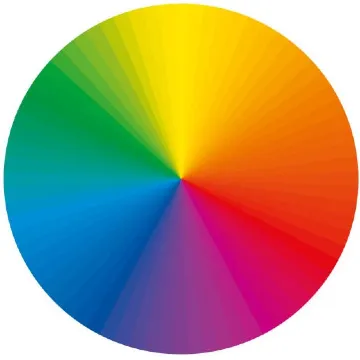
Color Wheel: A circular representation of colors based on their chromatic interaction is known as a color wheel. Sir Isaac Newton initially devised it in 1666.

  • Primary Colors: Red, blue, and yellow. They are the elementary colors that cannot result from mixing any other color.
  • Secondary Colors: Green, orange, and purple. This occurs when two primary colors are combined.
  • Tertiary Colors: Colors that result from the combination of one primary and one secondary color (for instance, red-orange or blue-green).
Harmonization of Colors:
  • Opposing Colors: On the contrast wheel of color, these two are located opposite each other (red and green for instance). They produce vividness as well as large diversity when put together.
  • Adjacent Colors: Those colors that are side by side with one another on the color wheel (for example, the hue blue-green). Correspondingly these hues often combine effectively resulting in unstressed and easily approachable designs.
  • Triadic Colors: A trio of hues that are spaced evenly in a circular manner around the color chart (for example, red, yellow, and blue). Such combinations enable frequent bright yet stable arrangements frequently.
  • Monochromatic Colors: Using various shades, tints, and hues generated from one particular color. The result is an outfit that has a simple but beautiful character.
Color Properties:
  • Hue: The basic color like red, blue, or yellow.
  • Saturation: It method how extreme or natural a shadeation is. When saturation is high, colors appear more vivid while low saturation makes them appear muted.
  • Value: It means the lightness or darkness of a color. Adding white leads to tints (lighter), whereas adding black leads to shades (darker).
Color psychology:
  • Red: Often related to energy, passion, and urgency.
  • Blue: Represents calmness, trust, and stability.
  • Green: Symbolizes growth, nature, and tranquility.
  • Yellow: Evokes happiness, optimism, and caution.
  • Purple: Associated with luxury, creativity, and mystery.
Application in Design
  • Creating Mood: In the designs, colors are used to bring forth different feelings or moods.
  • Visual Hierarchy: Colors serve as signals for directing users’ attention to significant aspects.
  • Branding: Applying the same color scheme throughout enhances brand identity and communication.
Importance of Color Theory:
  • It is critical for all who participate in making visuals to know color theory since this is a basis for deciding on colors that not only improve an aesthetic value but also serve other purposes such as functionality or inducing certain moods.

Contrast and Accessibility

  • Contrast Ratios: It is crucial for readability that there is enough contrast between the text and the background colors especially for visually impaired people.
  • Accessibility: When choosing colors, keep in mind the accessibility making sure that everyone can read them including colorblind people. For instance, using tools such as contrast checkers can ensure your design is accessible to everyone.
Colors in Branding
  • Consistency: Uniform use of brand color throughout UI helps fortify brand identity whilst creating a unified user experience.
  • Emotion and Perception: A company’s values should align its palette to evoke the appropriate feelings in its customer base.
 Practical Application in UI Design
  • Hierarchy: Visual hierarchy can be established by way of color thus directing users’ focus toward important things on any given screen.
  • Feedback: The use of clicking to change color on success or errors like green or red hence making everything clearer and more comprehensible.

Combining eye-pleasing colors with usability is what UI design’s color theory is all about; It ensures harmony in UI design by choosing colors that seem nice but are also helpful to the totality of the user experience.

Frequently Ask Questions

What is color theory in UI design?

Color theory in UI layout involves using the principles of colors to come up with visually appealing, functional, and easy-to-navigate interfaces. It entails knowing how colors relate with one another, how they mix, as well as their effects on users’ moods and actions.

Why is color theory important in UI design?

Color theory is significant for UI design because it aids designers in producing visually attractive interfaces that offer a good experience to the users, communicate appropriate feelings, and effectively direct the attention of the users.

How does color psychology influence UI design?

This part of psychology studies how colors affect a human’s feelings and behavior. By understanding color psychology it helps designers in selecting hues that can influence users’ minds with trust, excitement, or even calmness in UI design

What are the principles of complementary colors in UI design?

Colors that can be contrary every different at the ideation wheel are referred to as complementary colors. They create very high contrast when used together. In UI design, these are often used to draw attention to important features and to make the interface more interesting: for example, bright complementary colors may be applied to buttons that call for action.

How can color theory be used to improve user accessibility in UI design?

Adequate contrast between text and background colors can be achieved by applying color theory which enhances readability for persons with affected vision through this arrangement. It also means using tones that will not mix up with one another, making it easier for those who see colors differently.

What is ADA Compliance

What is ADA Compliance

The Americans with Disabilities Act(ADA), is a U.S. law passed in 1990. Banning discrimination against individuals with disabilities is what ADA Compliance entails. This means that it ensures all users have equal access to website content and digital material. Physical locations irrespective of their physical limitations.

The key aspects of ADA compliance

  • Web Accessibility: Making sure that web content is accessible for people with different disabilities. Such as visual impairment, hearing impairment, or motor disability. Use appropriate text as alternatives for images, ensure keyboard navigation, and provide transcripts for the audio materials.
  • Physical Accessibility: Ensuring that buildings, places of public use, and other structures are accessible by providing ramps, lifts, accessible toilets, and signages that are easy to read.
  • Legal Requirements: Non-compliance with ADA laws can lead to legal action including lawsuits and penalties. Businesses and organizations must provide reasonable accommodation for the needs of individuals with a disability.
  • Guidelines and Standards: The Web Content Accessibility Guidelines (WCAG) are commonly used standards for digital accessibility. Criteria are outlined in these guidelines that can help improve access to web-based information by persons living with disabilities.
ADA Compliance Relevance:
  • Inclusiveness: It guarantees that services, information, and opportunities can be accessed and enjoyed by all people without considering their abilities.
  • Legal Safety: It aids in avoiding legal suits associated with accessibility by companies and institutions.
  • Enhanced Experience For Users: It improves the usability of sites as well as spaces for everyone not only persons who are disabled.
  • Social obligation: The commitment to diversity, equity, and inclusion manifested through the provision of services to disabled individuals.
Accessibility tools on the web include:
  • Web Speakers: Software that allows one to hear the text you find on websites such as JAWS or NVDA which aids individuals without sight to move around in an online environment.
  • Keyboard accessibility: The vital feature ensuring every single part of any site is open to those who experience physical challenges even if they cannot operate computers’ mice.
  • Accessible Forms: Web forms should not only be keyboard-friendly. But also have recognizable labels, lucid directions, and error messages readable using screen readers.
Common Challenges in Achieving ADA Compliance:
  • Complex Media: Videos and audio require captions, transcripts, and descriptions for complete access, which may require significant effort to actualize.
  • Dynamic Content: Websites that are regularly updated such as social media feeds or interactive tools can make it difficult to maintain accessibility.
  • Third-Party Content: It is often hard to manage and keep track of third-party plugins, embedded items, and external references that are in according with the Act of ADA compliance.
Legal Implications:
  • Recent Legal Cases: There is a visible concern on the issue of digital accessibility due to the increase in the number of lawsuits being filed against businesses that do not comply with the ADA. As a result, many corporations are now focusing on ensuring their products are ADA-compliant after being sued by large corporations.
  • Settlement Agreements: Those companies who are non-compliant often sign settlement agreements requiring them to make changes on their online platforms. Educate their personnel about ways to enhance accessibility, and conduct regular audits. Aimed at establishing whether or not they comply with laws and regulations related to website maintenance.

Procedures for Attaining ADA Compliance:

  • Perform an Accessibility Audit: Evaluate your website, applications, and online content to determine. The places that require enhancement are as per the ADA and WCAG guidelines.
  • Execute Improvements: Tackle the concerns uncovered during the scrutiny by adjusting your code, design, and content to satisfy accessibility criteria.
  • Constant Monitoring: Always keep an eye on your digital possessions for accessible issues since fresh content updates may create new barriers.
  • Training: Teach your employees about the best practices in accessibility so that any new content or updates will comply with standards.
  • User Testing: Engage people living with disabilities in user testing of your designs to obtain their opinions on how accessible they are in real life.
Advantages of ADA Compliance:
  • Expanded Audience: Making your website accessible opens it to a wider audience including thousands of individuals with disabilities
  • Search Engine Optimization Benefits: Improving accessibility usually means good. SEO since search engines prefer sites that are easy to use and organized well.
  • Enhanced Branding Image: A commitment to making things accessible can build up a positive perception about the brand indicating its consideration for inclusion and diversity.

Conclusion

ADA Compliance is not merely a law requirement. It is a critical element of modern digital design and user experiences. By making sure that your website, applications, and real estate are available for all. You will not only meet legal needs. But also help in creating a more encompassing and fair society. The fundamental aspects of ADA Compliance include regular audits, continuous improvements as well as being up to date on the latest guidelines that influence the practice.
ADA Compliance is essential for establishing an inclusive atmosphere both online and offline. That allows each person equal access to resources and prospects.

https://digitalanivipracticeb.com/how-do-drones-work/

Frequently Ask Questions

What is ADA Compliance?

ADA compliance refers to following the standard set by the Americans with Disabilities Act (ADA), which means companies and organizations must ensure that their physical and digital environments are accessible to people who have disabilities.

Why is ADA Compliance important for websites and digital content?

ADA compliance guarantees that all users, including those who are moving around on these pages using a wheelchair or having trouble seeing, can get everywhere without any problems. Moreover, it helps businesses avoid legal troubles and improves their public image through the support of diversity.

What are some fundamental aspects of ADA Compliance for online materials?

Essential constituents involve accessible web layout (by incorporating alt text to images, allowing keyboard navigation, and adding videos’ captions), end-user-friendly forms, and easy-to-read fonts. It also entails arranging content in such a structure that screen reads can effectively interpret it. Furthermore, there needs to be respect for standard typography rules as well as every document style’s format.


How do I recognize if my internet site is ADA Compliant?

You can perform an accessibility audit using tools like WAVE or Lighthouse to identify compliance issues. Additionally, flexibility and freedom about divesting one’s disability-exclusive learning styles is what enhances better understanding through proper hands-on experience with those likely having physical limitations.


What are the legal consequences of failure to comply with the ADA?

When businesses do not comply with ADA regulations, they are probably sued, fined, or even ordered by a court ruling that they must change their internet materials. This has happened before; companies such as Target and Amazon have been involved in legal battles over their failure to provide websites and other accessible services. Consequently, this can attract quite many challenges like hefty legal bills and social relations.

Material UI Fonts

Material UI Fonts

Material UI, which is probably the most widely used React component library, complies with the principles of Material Design by Google and employs. Its special styling to keep all applications uniform and neat in appearance. It is crafted to grow in diverse environments with an adaptable typography scheme that can suit different screen dimensions and gadgets.

Important characteristics of Material UI fonts

Primary font: Roboto

  • Now what Material UI does is to use Roboto as its default font. The beauty of this typeface lies in its spacious and clean design, which makes it possible for people to read it from any background or screen size they prefer. Roboto has a friendly and open appearance having a mechanical skeleton capable of performing well across different contexts ranging from headings to body text.
Font Weights
  • It UI provides various font weights for making text hierarchy and contrast. The font weights available therefore include:
    • 300-light
    • 400-regular
    • Medium (500),
    • 700 bold

As such, it can be employed in emphasizing some pieces of writing like titles as well as crucial data.

Customer Fonts
  • Although Roboto holds the title as the default one, Material UI avails an easy integration for customized fonts into your project. For example, you need not worry about how to make time for Google fonts or even go through other sources but use your favorable typography settings instead of going through the pain of downloading them.
Flexible Typography
  • By nature, typography in Material UI is responsive – which means that depending on the size of your screen, the size and weight of text will automatically adjust themselves accordingly. This guarantees that it remains legible across all types of devices from smartphones to huge desktop displays.
Modification and Replacements
  • Typography can be extensively customized using Material UI. The default font settings for the entire site or various components can be changed. This includes settings like the size, height of lines, and spacing between letters among others.
  • For instance, you would create a custom theme that defines different fonts for headings (h1, h2, etc.), paragraphs, buttons, and any other text labels.
Combining Fonts
  • The typography system of Material UI has been designed to go together with different pairs of fonts. By default, Roboto goes well with other sans-serif typefaces or may be used together with a serif typeface giving it more of an ancient appearance.

How to Use Fonts in Material UI:

Installing Roboto:

  • Robots are therefore by default included in Material UI after its installation.
  • Moreover, to avoid inconsistencies in font rendering across different browsers, you should add the Roboto font directly into your project by putting this line to your HTML code

<link rel=”stylesheet” href=”https://fonts.googleapis.com/cssfamily=Roboto:300,400,500,700&display=swap” />

Custom Fonts:
  • Your project can go with another font to override the default typography settings of Material UI.
  • If you want to apply Open Sans font, you can put this line in your HTML document:

<link rel=”stylesheet” href=”https://fonts.googleapis.com/cssfamily=Open+Sans:300,400,600,700&display=swap” />

Then, override the theme typography in your Material UI project
  • import { createTheme } from ‘@mui/material/styles’;
  • const theme = createTheme({
  • typography: {
  • fontFamily: ‘Open Sans, Roboto, Arial, sans-serif’, },
  • },
  • });

Weights of Fonts:

  • By using properties such as fontWeightLight、fontWeightRegular、fontWeightMedium and fontWeightBold. Material UI enables you to indicate different font weights.

Customizing typography:

  • You may also change the styles of typography for different text pieces like titles, body content, etc.:
Using Google Fonts along with Material UI
  • It has an easy way of integrating Google fonts; simply import Google fonts into your project then customize your theme to utilize those fonts.

Summary

The font system at Material UI is primarily based on Roboto font type that is crafted for clarity alongside readability. The system tends to have numerous weights of fonts and is adaptable enough to allow one to incorporate as well as modify several other types of typeface depending on the project’s requirements. This guarantees that text contained within any given application looks aesthetically attractive while still being usable across all devices and operating systems.

Frequently Ask Questions

What is the default font type of Material UI?

It employs a default typeface known as Roboto. The typeface is modern, sans-serif, and enjoys a great reputation for its readability on various screen devices as well as size specifications.

Is it possible to employ custom fonts instead of those provided in Material UI?

Certainly, one can utilize personal fonts incorporated with Material UI. Such fonts may be imported directly from outside sources such as Google Fonts with ease while modifying typography configurations of one’s Material Style sheet to incorporate them in the design.

Is Material UI typography responsive?

Font sizes, line heights, and spacing automatically adjust to ensure optimal readability and visual consistency across different screen sizes.

Can I override the typography settings for individual components?

Specifically, you can specify text properties like typeface, size, or weight for your titles, buttons, or even body texts within the theme or directly in the component styles.

What are the steps to combine fonts in Material UI?

There is a flexible typography system that allows pairing the standard Roboto typeface with other fonts. You can create an appealing and consistent design by defining different fonts for various text types (like headings, and body texts) within the theme.

 Is it feasible to utilize multiple font styles in one Material UI project?

Using several different fonts within a single Material UI project is feasible. You can customize your theme in such a way that allows you to assign diverse types of fonts to diverse elements; like having two separate fonts where one is only used on headings while body texts adopt another font.

What is Co-Branding

What is Co-Branding, digitalanivipracticeb

Two or more brands collaborate to create a product, service, or marketing campaign. That uses the strengths and reputation of each participating brand in co-branding. Which is one of the marketing strategies. It aims at enhancing the perceived value of products, reaching larger audiences, and creating synergy among all parties concerned.

Key Points of Co-Branding:

  • Reciprocally benefitting: The partners in the co-branding have much to gain from each other by way of brand equity, customer base, and market reach.
  • Common Identity: Product or service carries out both brands’ symbols, designs, or messages.
  • Opening Up New Areas: It enables brands to dabble in new markets or demographic segments that may be hard to reach alone.
  • Higher Value Assumptions: The product may be given a higher perception among consumers due to the conglomeration of both brands’ image and quality attributes.
Co-Branding varieties

This may be classified into different categories depending on the kind of relationship involved and the goals of the partnership. The main kinds are:

Ingredient Co-branding

  • Definition: This specific type consists of one brand whose product contains another brand’s product as an important element or ingredient within theirs.
  • Example: Intel processors advertised under “Intel Inside” in several PC manufacturers such as Dell or HP.
Same-Company Co-Branding:
  • Definition: This is when two or more brands owned by the same company team up to provide a product or service.
  • Example: Coca-Cola running an ad campaign promoting Coca-Cola beverages along with food items of its subsidiary brand such as Frito-Lay snacks.

National to Local Co-Branding:

  • Definition: National brands align with regional brands for personalized services within that territory.
  • Example: A national hotel chain working alongside a local restaurant to offer diners unique meals inside the compound of the hotel.

Co-Branding In Joint Ventures:

  • Definition: This involves the amalgamation of two or more brands from distinct entities to formulate a novel commodity or service that symbolizes the characteristics of each of them.
  • Example: A partnership between Sony and Ericsson resulted in Sony Ericsson mobile phones.

Complementary:

  • Definition: When brands making products or services that go hand in hand join forces to create wider alternatives available for potential consumers.
  • Example: A credit card firm joining forces with an airline company to introduce an air mile accumulating co-branded credit card.

Retail Co-Branding:

  • Definition: A type of co-branding happens when a retailer works with a brand to sell exclusive products or create a shopping experience that has a trade name.
  • Example: Target getting into bed with design houses to have restricted edition product lines that are found in only Target stores.

Despite their differences in strategic goals, It is aimed at product allure, market range enlargement, or brand reputation fortification.

Co-branding can take three forms:

Product-based

  • Definition: Collaboration between two or more brands to manufacture a new product that incorporates aspects from each.
  • Example: The collaboration of Nike and Apple in the creation of Nike + running shoes which are built with Apple’s fitness tracking technology.

Communications-Based Co-Branding:

  • Definition: This involves brands working together on joint promotional activities, marketing campaigns, or advertising initiatives to leverage each other’s brand equity and market reach.
  • Example: A promotional campaign where Starbucks partners with a music streaming service to offer store-exclusive playlists.

Distribution-Based :

  • Definition: In this form, brands collaborate to share distribution channels or platforms, making products or services available through each other’s networks.
  • Example: A luxury fashion brand partnering with a high-end retailer to create an exclusive line of products sold only in the retailer’s stores.

The strengths of brands taking part. And used at every level to offer customers a better experience, allow for wider market penetration, and improve brand value.

Concludes

It is one of the most effective strategies for businesses looking to improve their brand visibility. Enter new markets, and build distinct products or services. By combining them with another brand that has already established itself as strong. This means that through co-branding, companies can achieve more in terms of marketing performance and competitive edge than they ever could individually.

Nevertheless, successful co-branding demands meticulous planning. Synergy of brand philosophies as well as unambiguous communication channels amongst partners. A well-coordinated venture involving co-branding could increase the equity of a particular brand. Promote customer fidelity, and pave the way for revenue expansion. Conversely, it could lead to diluting a given brand’s identity or misleading consumers if it lacks appropriate matching or good management.

Therefore, It is a powerful instrument that yields significant benefits to every participant when used wisely.

Frequently Ask Questions

Co-branding explained?

Co-branding is a marketing technique that involves. The association of two or more brands together in a product, service, or advertising. It is an initiative that seeks to take advantage of the strengths and customers. Bases of each brand to widen their market presence and raise their brand value.


What are the different co-branding types?

Ingredient Co-Branding: This is where a product from one brand contains an ingredient or component of a popular brand. For instance, Dell computers have Intel processors.

Same-Company Co-Branding: It is done by two brands in the same parent company, like Microsoft and Xbox.

Joint Venture Co-Branding: It happens when two separate companies join forces to come up with a novel product such as in the case of Apple and Nike for their Nike+ range.


It’s about the same thing after a while.

Strategic Alliance: Extended ties between brands that contribute considerably.
Brand Partnership: Defined as short-term or restricted associations often seen in engagements. Ingredient Branding: One brand’s good is included in another brand as an element.


Advantages of co-branding:

More Brand Recognition: More customers will come into contact with the brand. More consumers come across it.
Common Resources: Save on expenses by combining promotional activities and research with development.
Improved Image of the Brand: Blending two brands makes one superior product.


What chance to share co-branding?

Brand Dilution: If the brands do not match, sometimes it leads to confusion or people may get alienated.
Reputation Risk: When a product fails or there is negative publicity, then all brands involved would be affected in one way or another.
Complex Partnerships: It compels careful coordination and clear communication to synchronize the interests of both brands.

Visual Design vs Graphic Design

Visual Design vs Graphic Design

What Is Visual Design

The visual design discipline concerns itself with the creation and improvement of the aesthetic qualities attached to digital products, interfaces, and experiences. It employs various design elements such as color, typography, imagery, space, and layout in crafting an engaging, intuitive as well as a cohesive user interface (UI). Its primary focus is on how best to improve user experience (UX) by making the interfaces not just beautiful but also functional and easy to use.

What exactly does graphic design mean?

Graphic design happens to be a discipline grounded in creativity that incorporates making use of color, typography, imagery as well as layouts to communicate visually and solve problems. Graphic designers utilize visual content to pass out messages, advertise concepts, or even motivate/inform people in their target market. The tasks encompassed under graphic design are very diverse such; as making logos and branding material, creating websites, brochures, and advertisements among other more comprehensive things like product packaging.

Visual Design vs. Graphic Design:

Definition:
  • Visual design refers to a wider domain that includes all the visual aspects and layouts of digital and physical interfaces. It aims at the appearance and impression of products. Ensuring that all the images come up together in an understandable way that captivates users from all age groups.
  • Graphic Design: This term explains how one can use graphic-related elements like typefaces, visual images, and color themes. Among others to pass information in print materials such as books or newspapers as well as advertising messages or promotions online.
Scope:
  • Visual assets such as logos, brochures, posters, and social media. Graphics are some of the products people use when they want to promote their ideas. Such type of work is more about making independent work instead of developing a whole product.
  • Graphic Design: It includes graphic design as well as other global user interfaces or user interactions. Such as websites and applications that are designed to be communicated through various means. It incorporates both graphic design and interface design for websites.
Aim:
  • Visual Design: The main objective of visual design is to enhance user satisfaction through attractive and functional designs. It seeks to make sure that the interfaces are not only stunning but also very easy to use and move around.
  • Graphic Design: Graphic design aims to communicate a specific message or idea using visual materials. It concentrates on aesthetics, composition, and typography to achieve designs that strongly attract attention and normally convey the right idea.
Strategy and Methodologies:
  • When designing visuals, combine the tools and techniques such as wireframing, and prototyping. To develop visual designs such as Sketch, Adobe XD, and Figma. Commonly focus on all visual hierarchies including user’s flow.
  • Graphic Designing: Graphic designers often utilize applications such as Adobe Photoshop, Illustrator, and InDesign for their work. Their main purpose is to create individual graphics and typography along with layouts while putting into consideration the color theory. Thus they should always mind about branding as well as composition.
Application:
  • Visual design is applied in digital product design. Consider it a factor in websites, mobile apps, and software interfaces. In other words, it refers to how products are designed in terms of color schemes as well as other visual aspects.
  • Graphic design on the other hand encompasses branding services, marketing campaigns, printed materials, and any other type of digital content that requires graphical representation. It involves creating pictures and illustrations or any other kind of imagery that can be used on various platforms. For instance; social media pages, billboards as well as different articles in newspapers or magazines.
Collaboration:
  • Visual Design: Visual designers usually cooperate closely with UX designers, developers, and products. Managers to ensure that the visual aspects correspond with all user experience and functionality.
  • Graphic Design: For instance, graphic designers can work hand-in-hand with marketers, copywriters, or other brand managers to come up with visually appealing materials that fit into the brand‟ ‘s strategy messages and its promotional objectives.
To conclude

Even though graphic design is an important aspect of visual design, the latter does more, including its general look and feel and how users navigate through it. As such, graphic design deals with a specific set of visual things whereas visually oriented products deal with how the various visuals are put together for them to form one whole product or even interface. Visual Design vs Graphic Design

Frequently Ask Questions

Visual design is not just confined to digital products.

Digital products like websites, apps, and user interfaces are closely associated with visual design. It helps in ensuring that the digital interfaces are visually attractive and user-friendly.

Should visual designers know user experience (UX)?

Definitely. Visual designers, because of their work enhancing user experience through visuals, must understand the various principles behind UX. They interact closely with UX designers so that the design is not only usable but also visually engaging.

Do graphic designers create digital projects like websites and apps?

Yes indeed. Graphic designers can engage in digital projects but they mainly concentrate on making components such as icons, banners, or even designs. Nevertheless, in most cases, their emphasis does not entail an examination of the user-centered design process similar to what visual designers have trained for—the emphasis being on the end-user’s experience while interacting with a product.

What skills are common in visual design and graphic design?

Typos, color principles, arrangement plans, and software kits such as Adobe Creative Suite form the solid ground of both. Both duties require inventiveness as well as sharp sight to realize artwork that is attractive to the eye

Should I pursue visual design or graphic design as a career option?

If you have an interest in designing for a variety of media including print and would like to work with branding, advertising, and marketing then graphic design could be what you need. However, if you are the type who loves working on digital products while focusing on improving user experience via designs then visual design is probably where you belong.

Optimized with PageSpeed Ninja