What is a 360-degree Camera Stand?

What is a 360-degree Camera Stand, digitalanivipracticeb

Camera 360 degrees,

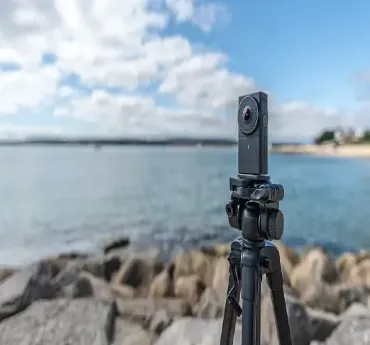
A special mount or tripod titled 360-degree camera stand is an object that is utilized to hold a 360-degree camera firmly so that it can take immersive spherical photos, and videos from a fixed position. On the other hand, tripods meant for standard cameras are different from 360-degree camera stands. They offer a stable bottom for the camera by allowing height adjustment and flexibility in terms of positioning. As such, they give the camera the ability to see everything without any obstruction around it.

Key Features:

Stability:

  • Keeps the camera still so no shaky or unclear photos are taken.
  • A primary purpose for a 360-degree camera stand is to offer a stable base for the camera, reducing any vibrations or movements that may result in blurriness or distortion of images taken.
  • With wide legs, rubber feet, and weighted bases comes enhanced stability.

Adjustable Height:

  • Extendable legs or center columns help to adjust the camera’s height for a better field of view.
  • A lot of the camera stands for 360 degrees have legs that can be adjusted or central columns that can be extended, thus giving users a chance to either raise or lower the height of their cameras.
  • This adjustable feature plays a very important role in helping one take shots from different angles and positioning the camera correctly before taking a photograph.

Compatibility:

  • Made with standard tripod screws, quick-release plates, or specific adapters that work with different 360-degree cameras.
  • They accommodate various kinds of 360-degree cameras and have standard tripod screws (normally 1/4-20) plus quick-release plates that are easy to attach or detach.
  • Additionally, some stands include specific adapters or mounts for certain camera models.

Portability:

  • These designs are lightweight and can be folded which makes them easy to carry from place to place and set up.
  • Portability is very important especially when shooting outdoors or while moving around.
  • Most of the 360-degree camera stands are lightweight and foldable for easy transport and set-up in different places. This ensures that it is compact as well as suitable for traveling.

Flexibility:

  • Typically, ball heads or tilting mechanisms are found in the stands, permitting users to shift the camera angle freely.
  • Hence enabling them to take shots from various angles as well as capture fast-moving subjects.
  • By positioning it appropriately, one can obtain an ideal picture composition for time-lapse videos static, or even live streaming.

Benefits of Using a 360 Degree Camera Stand:

Improved image quality:

  • A well-constructed stand provides stability for the camera enabling it to stay still all the time and consequently, results in images that are sharp and clear.
  • This is very crucial in taking high-definition 360-degree photographs and videos.

Flexible Shooting:

  • The adjustable height and variable positioning enable photographers as well as videographers to explore creative angles and perspectives that enrich visual storytelling.

Convenience and How Easy It Is To Use:

  • By providing a hands-free setup then this stand allows the users to pay attention to other aspects of their shoot like the lighting or directing, thus making the entire process simpler.

Popular 360 Degree Camera Stands:

Insta360 Selfie Stick:

  • One can say that the Insta360 simply has an invisible stick, as per their signature style.
  • Therefore, the stick doesn’t show up in the video and therefore it gives a full 360-degree view without interruption.
  • This is lightweight, can be extended, and is suitable for vlogging as well as action shots.

A unique design of Joby GorillaPod 360 :

  • Stand allows it to have flexible legs that can wrap around objects hence providing versatility in positioning.
  • Portable and compact making it appropriate for many places.

Manfrotto Compact Action Tripod:

  • Buyers will find it attractive for many reasons including its stability, adjustability, and portability making it a favorite among photographers both amateurs and professionals.
  • The camera can be effectively controlled with an easy-to-hold handle and a panning-tilt head that functions smoothly.

GoPro MAX Grip + Tripod:

  • This is purposely made to fit the GoPro MAX but it can still work on other cameras that rotate in all directions.
  • It serves two purposes in one: part handle and part tripod thus allowing endless possibilities in still or moving photographs.
Conclusion:

To be able to capture immersive and high-quality 360-degree content, one needs a 360-degree camera stand which is essential. These camera stands make sure that photographers have stable bases, flexible adjustments, and can be moved in different directions to provide more creative options through photographs or videos Frsterm’s of great significance include taking panoramic pictures, etc. In addition, in various institutions, and structures; a good 360-degree camera stand is necessary as well as for people who do photography either at land or sea resorts.

https://digitalanivipracticeb.com/how-does-help-share-videos-on-social-media-platforms/

Frequently Ask Questions


What is a 360-degree camera?

360-degree cameras are cameras that take pictures or videos in all directions at once. It builds a spherical scene by using multiple lenses, enabling one to view from different angles


How does a 360-degree camera work?

In general, these cameras come with two or more broad-angle lenses that embrace adjoining areas of sight. The pictures or videos made by every lens are then put together by software to compose an unbroken 360-degree panorama.


Main utilizations for 360-degree cameras include

Virtual reality (VR) driven material, immersive film productions, digital walkthroughs of places, presentation of real estate properties at its best, archiving different events among other purposes. Their ability to produce engaging and interactive content is what makes them an attraction.


What benefits come with the utilization of this kind of device?

Some key advantages comprise producing more engaging content; being able to photograph complete surroundings without leaving anything out and better audience interaction. They can also be used in virtual reality applications as well as in interactive experiences.


What drawbacks are there to using a wide-angle lens?

High costs, big files, difficulty in editing them, low definition, and too many radio frequency requirements for instance all fall under the category of disadvantages listed. More so they drain power quickly; there are often problems due to stitching images together and it takes time before one gets used to them properly.


Which social media platform is best for B2B marketing?

social media, digitalanivipracticeb

For social media interactions in B2B, LinkedIn, Facebook, and Instagram are the best platforms but LinkedIn is superior for web traffic and leads generation. For getting to younger viewers and improving brand engagement via visual content and videos – Instagram, YouTube, and TikTok would be useful.

It all comes down to your particular work sector, intended clientele, and advertising objectives. To find the best social media site for B2B marketing purposes. But LinkedIn is often considered the best option. Here are some reasons:

Social Media Sites

LinkedIn
  • Professional Networking: LinkedIn focuses on professional networking, which makes it suitable for B2B marketing.
  • Targeted Advertising: The advertising platform of LinkedIn gives room for tight targeting such as job title, industry, company size, and other professionalism.
  • Content Sharing: It’s a great place for sharing industry insights, whitepapers, case studies, and other content that show your expertise.
  • Lead generation: This means that LinkedIn gives you tools such as LinkedIn Lead Gen Forms and InMail which can help you to get quality leads.
  • Community engagement: This means that via LinkedIn groups you can be able to give your input on the discussions happening within your specific area of work and also show expertise in your profession
Facebook
  • User BasePretty Big: Worldwide Access: Facebook has more than 2.8 billion monthly users which means that the platform can get to people of all walks such as experts, analysts, and those who make the decisions.
  • Targeting Options: Custom Audiences: Utilize data such as email lists to build custom audiences to reach existing customers or leads.
  • Content Sharing: The blogs, reports, whitepapers, webinars, and other information needed for creating an image of authority should be shared through various means of social media.
  • Ads that generate leads: Using lead generation forms enables you to obtain contact info directly through an advertisement thereby making the entire process more efficient.
  • Connection Making: To get involved in conversations, exchange knowledge, and link up with possible leads, join or form groups that are connected to your field.
Instagram
  • Content Sharing: Educative Articles: Disseminate essential industry information, strategies, and how-to manuals to earn respect and credibility.
  • Visual Content: The most effective way to display products, give a look into what happens behind the scenes, and reflect the company’s culture.
  • Instagram Stories: Short videos and stories that let you interact with the audience enticingly.

Other Platforms

Although LinkedIn happens to be the commonly used platform for B2B marketing, other social media platforms can also be effective depending on the strategy:

Twitter:

  • Real-Time Engagement: It is the perfect platform for sharing industry news, and updates and engaging in real-time conversations.
  • Engagement: Connect with experts and firms instantaneously.
  • Brand Awareness: This will help to build brand presence while connecting with influencers and decision-makers. Disseminate content and meet trade leaders.

YouTube:

  • Video Content: Perfect for distributing exhaustive product demonstrations, tutorials, webinars, and case studies.
  • SEO Benefits: YouTube videos can contribute to the enhancement of search engine ranking.

Slideshare:

  • Sharing Content: Presentations, infographics, and PDFs are shared with a professional audience. –
  • SEO Advantages: Slideshare content may rank highly on search engines.

Choosing the Right Platform

  • Know Where You’ll Find Them: Determine which platform is most popular with your target audience.
  • Content-Type: Choose platforms that support the type of content you make (e.g., articles, videos, infographics).
  • Goals: Select a platform that meets your marketing goals, be it lead generation, brand awareness, or customer engagement.
  • Industry Trends: Keep up with the latest industry trends to see which platforms are getting popular in your field.

Achieving successful engagement with your B2B audience through effective reach can be accomplished by understanding various platforms’ strengths and aligning them to a marketing strategy; this would mean paying attention to their qualities closely.

https://digitalanivipracticeb.com/?s=visual+design+vs+graphic+design

Frequently Ask Questions

What is B2B marketing?

B2B marketing is the sales of one company’s product or service to another company. It often takes into account logic, features, and ROI instead of the consumer’s drivers.


Importance of social media to B2B marketing

Social media is critical for B2B marketing as it enables businesses to connect with prospective customers, build brand authority, interact with the audience, and generate leads. The platform provides networking opportunities, content sharing, and instant communication.


Is it possible for me to engage in B2B marketing across numerous social media sites?

Of course, employing many platforms will serve you better. This will enable you to broaden your audience base as well as allow you to customize your content for various user categories. Nevertheless, make sure that you have enough resources to efficiently manage and generate content on each platform


How do I select the most suitable platform for my B2B marketing strategy?

Here are some key factors to consider when selecting a platform for B2B marketing: Audience: Find out where most of your target audience spends time online. Goals: Specify your marketing goals, such as lead generation or enhancing brand visibility. Content Type: Do you want to share articles, videos, or infographics? Industry Norms: Examine which platforms are predominantly used in your industry. Engagement: Opt for platforms that have better chances of engaging with your audience.

Camera Stand For Video Shooting

How to Learn Videography in 2025, digitalanivipracticeb

A tripod, or camera stand, is an indispensable device in video recording that gives stability and support to a camera. It enables videographers to take smooth and professional videos, which are paramount in producing high-quality films.

Different Types of Camera Stands:

  • Standard Tripods: The most popular types of camera stands feature three adjustable legs and a central column. They vary in size, weight, and build quality.
  • Fluid Head Tripods: Specifically designed for video shooting, these tripods have a fluid head that helps in smooth panning and tilting.
  • GorillaPods: GorillaPods are characterized by their flexible legs which can wrap around objects thereby making them perfect for unconventional shooting angles and tight spaces.
  • Monopods: While not as stable as tripods, monopods support the camera and are easier to move about, making them ideal for situations where quick repositioning is necessary.
  • Travel Tripods: They are lightweight and small enough so that they can easily be transported from one place to another without much hassle. They are meant for videographers who travel frequently.
  • Studio tripods: bigger and stronger, these tripods serve in studio environments that require utmost stability and height adjustment.

Recommended Camera Stands:

Camera Tripods:

Manfrotto 502 fluid head and 055 aluminum tripod:
  • Features: Smooth movements because of fluid head; long-lasting aluminum construction; fast power lock system.
  • Best for: Professional video recording, maximum steadiness and strength.

Benro Aero 2 Travel Angel Video Tripod:

  • Features: portable and light, fluid head, converts into a monopod.
  • Best For: shooting on location or while traveling.

Joby GorillaPod 5K Kit:

  • Specifications: Flexible legs meant for wrapping around objects; lightweight; ball head.
  • Most Suitable For: Versatile shooting angles, vlogging, and compact setups.
Neewer 2-in-1 Aluminum Alloy Camera Tripod:
  • Specifications: detachable monopod, adjustable legs, fluid drag head.
  • Appropriate For: Cheap alternative, flexibility.

Sachtler Ace XL Tripod System:

  • Specifications: professional class, fluid head, ultralight design of carbon fiber.
  • Suitable For: professional video makers, premium category.

Key Features and Benefits:

  • Stability: The main purpose of a tripod is to make sure the camera remains still, preventing unwanted shakes and movements that can happen during filming handheld. For long takes, time lapses, and telephoto lenses, stability is very essential.
  • Height Adjustment: Tripods commonly possess adjustable legs and a center column, allowing you to position your camera at different heights. Such flexibility promotes diverse shooting angles as well as perspectives.
  • Weight Capacity: Check if the tripod can hold your camera’s weight together with any other equipment which includes microphones and/or lights.
  • Smooth Panning and Tilting: A fluid head is included in many tripods which permits smooth panning and tilting. This is important when taking dynamic shots like following a moving subject or creating panoramic views of landscapes.
  • Versatility: Tripods can be placed on many types of surfaces ranging from rough ground to even studio floors. Some versions have bendable legs or can also be changed into a monopod for more flexibility.
  • Ease of Use: A tripod generally is very easy to set up because it has an uncomplicated workflow. Many contemporary devices today come equipped with quick-release plates that allow attaching as well as detaching cameras easily.
  • Portability: Most tripods are created lightweight and small allowing them to be moved around more quickly as well as set up in various places easily.
  • Head Type: The camera can be positioned using a tripod head. A video-shooting fluid head is preferable for smooth tilt and pan motion.
  • Adjustability: For versatile shooting angles, finding a tripod with adjustable legs and a center column should be your goal.
  • Durability: You must take into account its construction quality and endurance, particularly. If you plan to frequently use it or in harsh environments.

Tips for Using a Camera Stand:

  • Balance Your Camera: Make sure that your camera is well-balanced on the stand so that it does not fall over.
  • Levels Help Out Quite A Lot: Most tripods have such things as bubble levels which help to make sure that photographs taken appear straight.
  • Lock It Down: So as not to spoil what we are shooting because of shaking be certain to lock everything well.
  • Make You Test Before Proceeding: Never begin your photograph session without first making sure that it can maintain the necessary steadiness and adjustability.
  • Maintain The Tripod: To increase its reliability and durability regular cleaning is required along with checking whether there are any signs of wear or tear on it from time to time.

Choosing a Good Tripod:

When it comes to choosing a tripod for video shooting, here are some factors you may need to consider:

  • Load Capacity: Make sure the tripod can carry your camera and any additional equipment you want to use such as microphones or lights.
  • Build Quality: Go for heavy-duty tripods made from aluminum or carbon fiber.
  • Height Range: Select an appropriate height range tripod that suits your shooting needs.
  • Portability: If you move around a lot, then go for something…
  • Head Type: Smooth camera movements during video shooting require the presence of a fluid head tripod.

Conclusion:

For video shooting, a tripod or camera stand is an indispensable tool that provides both the stability and flexibility required for capturing quality footage. No matter whether you’re an amateur or an expert in videography investing in a good tripod will improve your quality of shooting videos substantially. Camera Stand For Video Shooting

https://digitalanivipracticeb.com/what-does-a-ux-designer-do/

Frequently Ask Questions

What is a camera stand used for in video shooting?

A camera stand, also known as a tripod, is required for steadiness as well as providing support to the camera while filming videos. This prevents unsteady motion in films and offers smooth movements when rotating or tilting the camera


What advantages arise from video shooting with a tripod?

The advantages predominantly involve enhanced steadiness, height and angle variations, smoothness in camera motion, adaptability on a variety of surfaces, user-friendly nature, and ease of movement.


What will be the appropriate tripod for my video camera?

Consider factors like the weight of the camera and accessories. It is supposed to hold (load capacity), how strong it is built (build quality), how tall up (height range, maximum and minimum heights), how portable it is (weight and compactness), and which type of head is better suited (smooth movements require a fluid head


May I employ an ordinary photography tripod for filming purposes?

Yes, however, to attain superior outcomes, in particular when it comes to seamless panning and tilting, it is advisable to utilize a camera stand that has a fluid head made purely for cinematography.


What is a fluid head, and why is it important for video shooting?

A fluid head is a type of tripod head that provides smooth resistance when panning and tilting, essential for capturing professional-looking video without jerky movements


What’s the best way to ensure that my tripod lasts long?

Keeping nuts and bolts tight, washing them post usage (mainly in rough terrain), and storing them properly are among the ways you can maintain the good working condition of your equipment. Also, acquire a carry bag that will help protect while moving.

How does help share videos on social media platforms?

Short Videos in 2025, digitalanivipraciceb

For various reasons, video is essential in social media:

  • Engagement: Text or images would never engage viewers as effectively as videos do. This is because they combine both visual and auditory components. Thereby becoming more appealing and simpler to consume.
  • Algorithms: Video materials tend to command a higher placement within the algorithms of social media platforms than any other kind of input. Therefore, videos are presented in people’s profiles more often than additional messages. Increasing their visibility as well as reach.
  • Storytelling: Videos tell stories in a powerful way that no other medium can match. With them, brands and individuals can transfer their concepts. While revealing inner feelings as well as communicating on an extra-close emotional basis to the public.
  • Information Retention: A person is more likely to retain video information than a text-based one. As such, it makes them good for communicating serious messages and information.
  • Adaptability: Video can serve multiple purposes like tutorial sessions, merchandise demonstrations, client success stories, real-time transmission, etc. This adaptability ensures that various viewers’ tastes and preferences are catered for.
  • Increased Conversion Rates: By demonstrating product usage or service delivery through live videos. Individuals tend to develop trust hence increased sales.
  • Social Sharing: Thus, it becomes probable to have a person share your video. Than any other kind of digital content resulting in extra visibility. With no cost attached to it for costume makers and organizations respectively.
  • SEO Implications: Videos help search engines love websites more. Hence, they can boost their SEO ranking. As a result, there will be an increase in internet users who visit commercial websites. How does help share videos on social media platforms?
As a whole, the use of video in social media strategies is vital. Because it serves as an engaging way that inform and link audiences dynamically and memorably.
Why do people use Instagram to post videos?

Individuals utilize Instagram to share videos for different reasons that allow them to connect, engage, and share with a mass audience. The major ones include:

Expression and Creativity: Users of this platform use it as a means of expressing themselves creatively. As well as showing their personality in the form of short clips, stories, or IGTV video content.

In the act of Marketing and Promotion: Instagram Videos are used by businesses and influencers to promote products, services, and personal brands. In addition to demonstrating features of the product, the videos also provide tutorials as well as testimonials from customers.

Education and Information: Tutoring, how-to guides, as well as other informative snippets, are quite a rage in Instagram circles. From cooking to fitness to technology, people share videos with their followers on various subjects.

Composing Communities: By creating videos we create and enhance communities. This has been possible through sharing materials based on people’s preferences and convictions which consequently brings togetherness among those who share it.

Amusement: Humorous, entertaining, and viral videos are shared by people. On various platforms to make their followers laugh. This is the reason why videos like memes, dance challenges, and pranks are immensely popular on this platform.

Awareness Creation and Support for Movements: Videos are utilized to create a platform that raises all sorts of awareness about social, environmental, and political issues. This is why activists or organization staff put up videos to spread messages. During important movements that require public alertness toward dire problems.

Personal connection: Videos give users the chance to feel personal relations as they can use them. To reach out to their followers on another level. Sharing your very private and real moments in a video type has proven that it makes one more truthful and reliable.

Trends and Challenges: The main reason for posting videos is to follow the trend or take on the challenge that has gone viral. People who have been alive for just a short while want to stay with the times by following what is currently trending.

Using Instagram to post videos is a great way to communicate, engage, and connect with your audience, leveraging. The unique features of the platform and reaching out to many people at once. How does help share videos on social media platforms?

https://digitalanivipracticeb.com/how-to-remove-a-component-in-figma/. How does help share videos on social media platforms?

Frequently Ask Questions
How does video content influence social media engagement?

Videos have a great ability to engage people and tend to get more likes, comments, and shares than text or image posts. They capture viewers’ attention vaguely and tend to get watched and interacted with more often, which increases the general interaction in all social media sites.


Why are videos more persuasive for storytelling on social media?

Videos are an effective storytelling medium owing to the combination of visuals, sounds, and movement. Compared to static images or text only, they are capable of conveying emotions, demonstrating products as well as clarifying concepts much better thus providing viewers with a richer experience altogether.


What functions do video clips have in the marketing sector of social networks?

Social media marketing is incomplete without videos that can show off goods, give how-to’s, share client feedback, or illustrate company principles. They help in creating product identity, generating website traffic as well as increasing purchase rates because they engage online visitors and urge them to act.


How do videos play a role in forming social media communities?

Videos help to construct and consolidate virtual communities through interaction and discussion. They have relevant material that touches on the viewers’ preferences and beliefs; Hence followers will respond, disseminate the contents, and deliberate on forums this creates a feeling of togetherness.


What are the advantages of using videos to disseminate information on social media?

One way video is a great tool in social media communication is its ability to reduce intricate subjects into simpler concepts, give physical examples as well as make content easily accessible. There has been a rising trend of educational videos, tutorials, and how-to guides being shared through various social networks making them places where people acquire new skills and knowledge.


What makes videos an entertainment choice on social media sites?

The reason behind this is that videos are so entertaining and tend to hold people’s attention much faster. This has made it a suitable platform for sharing comedies, challenges often seen on viral trend charts, or any other creative act that transforms them into widely exchanged items for fun or other reasons.


In what ways can the use of video make social media content more credible?

With the help of videos, people can depict themselves more genuinely. This makes live videos, behind-the-scenes clips, and genuine moments contribute to trust and authentic aura hence enabling followers to relate with the content creator or brand at an inner level.

What Social Media Video?

What Social Media Video, digitalanivipracticeb.com

A social media video is short and precisely designed to be shared on social networking platforms such as Instagram, Facebook, Twitter, TikTok, LinkedIn and YouTube. These videos are made to engage, entertain, inform, or market a brand, product, or service to a target audience. Social media videos affordably include some special traits for each platform like:

Social Media Video

Duration: Generally brief, ranging from a few seconds to a couple of minutes, to keep viewers engaged.

Mode or Format: Different formats such as square (1:1), vertical (9:16), or horizontal (16:9), based on specific platforms.

What’s Inside: It may consist of tutorials, product shows, behind-the-scenes scene shots, user-generated content, and testimonials among others.

Visual Appeal: High-resolution pictures with lively motions that attract attention immediately.

Titles-For Most Parts: More often than not they will have titles or subtitles because many people watch videos silently.

Branding: To improve brand identification, include attributes of the brand such as logos, colors, and uniform typefaces.

Call-to-Action: Often concludes with an unambiguous call-to-action (CTA) aimed at stimulating individuals to engage in a particular behavior, for instance, going through a site, buying a product, or subscribing to an account.

Social media videos are a powerful tool for increasing engagement, building brand awareness, and driving conversions in a visually driven and easily consumable format.

A Quick Guide

The Making of Social Media Videos In case you were not aware, making social media videos is one of the most effective methods by which you can connect with your audiences, boost the visibility of your brand, and enhance your presence online. This article aims to help you make good social media videos.

Define Your Goals:
  • Identify the purpose of your video: brand awareness, engagement, conversions, etc.
  • Know your target audience and create content according to their interests.

Content Planning:

  • Decide upon the crucial message of your video.
  • Make a storyboard or script to gather your thoughts.
  • Your material should be brief and interesting, taking 15 seconds to 1 minute at most.
Select an Appropriate Style:
  • Equally square (1:1) or rectangular portrait (9:16) shapes are commonly used on Twitter but on Instagram and TikTok too.
  • Wide rectangles (16:9) would be okay on the other hand for YouTube and Facebook.
Mobile Optimization
  • Your video needs to be accessible on your mobile devices.
  • Large fonts and strong but simple visuals should be utilized so that they can easily be viewed on small screens.

Attract your viewers:

  • Within a few seconds of the beginning, hook them using an intriguing question or any other hook.
  • By employing eye-catching visuals and lively movement, you will not lose the viewer’s attention.

Employ Captions And Subtitles:

  • Most of the visitors see videos on mute; therefore, you need to include captions or subtitles.
  • Besides, it is important that your text is simple to understand and well-matched with the sound.
Combine Brand Identity:
  • Put in your emblem, brand shades, and steady typefaces.
  • Finish with a recognizable call-to-action (CTA) such as going to your website or checking out your social network pages.

Edit Professionally:

  • Utilize video editing software such as Adobe Premiere Pro, Final Cut Pro, or mobile applications like InShot.
  • Make use of color correction, transitions, and effects to elevate the quality of the video.
Include Music and Sound Effects:
  • Select a history track that fits the tone of your video.
  • Incorporate sound effects for emphasis on important moments or transitions.
Share and Advertise:
  • You should optimize your video’s specifications for each platform.
  • Make compelling captions and use proper hashtags.
  • Post at peak times when your followers are online the most. 11.
Evaluate Performance:
  • Monitor engagement, views, and shares using analytics tools.
  • Seek feedback and modify your strategy following performance measurements

Taking these steps will allow for the production of purposeful social media videos that capture your audience’s attention and direct your marketing objectives.

https://digitalanivipracticeb.com/troll-face-green-screen/

Frequently Ask Questions

What is a social media video?

social media video is a video of short length designed for sharing on social media channels such as Instagram, Facebook, Twitter, TikTok, LinkedIn and YouTube. These videos are intended to be used to engage people, have fun with them, inform them, or sell something to them belonging to some particular brand or organization.


What’s the length of social media videos?

Social media videos are often short from a few seconds to some minutes to retain the attention of viewers and conform to the required content length of the various platforms.


What formats do social media videos come in?

They differ based on the platform and may include square (1:1), vertical (9:16), or horizontal (16:9) videos. These formats are tailor-made for optimal use in certain platforms.


What are the usual kinds of materials seen in social media videos?

Videos that appear on social media can involve instructional videos, product displays, behind-the-scenes shots, user-created content, endorsements, announcements, and the rest. The content is customized to capture the attention of the target audience of every platform.


Why is it essential to include captions or subtitles in social media videos?

Since most social media video views happen on mute, captions or subtitles help convey messages even when the volume is turned down.

 
In what way can branding be included in social media videos?

For building higher levels of brand identification and ensuring all the filth is delivered consistently across unique films, branding ought to also comprise valuable costumes (including logos), colors, and similar fonts for other purposes.


The CTA (call-to-action) on social media videos is?

It is usually included at the end of the video to encourage viewer engagement. In other words, it’s an instruction that aims for a certain action from viewers and can include suggestions like going to a particular website, buying something, or subscribing to that account.

How can you improve a video ad in Post-Production?

YouTube Script Writing (2025) , digitalaivipracticeb

Here are several strategic and creative ways to enhance an ad’s performance on video post-production to make the final ad clear and engaging. Some key techniques for improving a video ad include:

Edit for Clarity and Brevity.

  • Remove Unnecessary Footage: Exclude any parts of the video that do not directly contribute to what you are talking about.
  • Make It Brief: Aim for the video to last less than 60 seconds; preferably about 30 seconds to retain your viewers’ attention.
  • Revise to be easier to understand and interesting: Cut out scenes that are not needed.
  • Use jump cuts to keep things moving quickly in your story or ad.
  • Create an arresting beginning so that people are interested right away.”
Enhance Visual Appeal
  • Improve Aesthetics Color Correcting and Grading: This will adjust the colors to look good throughout the video clip.
  • Stabilizing Footage: Just get rid of those nasty camera shakes!
  • Top-Notch Transitions: Whatever you do, don’t interrupt the tempo or interest of your video with cumbersome transitions that don’t fit in well.
  • Make it look better: Consistency in colors enhances the color appeal of the video.
  • A mood and tone are fostered through a consistent color grading.
  • Put in some slight visual effects that can tell a better story without covering the main message line.
  • The purpose of using graphics, animations, or texts in content is to stress important points and make them easy to understand. How can you improve a video ad in Post-Production?
Improve Audio Quality:
  • Clean Up Audio: Enhule the clarity of dialogues through the use of noise-reduction tools to get rid of background noise.
  • Sound Effects: In addition, some sound effects may be included for increased reality and influence in particular sequences.
  • Background Music: As for the appropriate tone of the advert and message in general, select the background music that goes with it. Let the music levels be even with dialogue.
Optimize for Different Platforms:
  • Aspect Ratio and Resolution: Change the aspect ratio and resolution depending on the device (e.g., 1:1 for Instagram, and 16:9 for YouTube).
  • Captions and Subtitles: To ensure that the video can still be understood without sound, include captions and subtitles to accommodate users watching on mute.
You can add calls-to-action (CTAs) in the following ways:
  • In Videos: Add clear and concise CTAs all over the video, with more towards the conclusion.
  • Interactive Components: In case the platform allows it, consider putting interactive components such as links that can be clicked on or end screens.
Review and Feedback:
  • Several reviews: It should be done on the video to catch errors or areas of improvement.
  • A/B Testing: Where applicable, make different ads for A/B testing to notice the one that works best.
Avoid conflicting:
  • Brand Identity: Another way to put it is that the visuals and tonal quality of your brand have to be complemented by the content in the video.
  • A video having brand colors, logos, and fonts maintains consistency in brand awareness.
  • Consistent Storyline: The plot should be coherent/should not contradict itself hence having a logical ending.
Editing Software:
  • You are advised to use professional software such as Adobe Premiere Pro, Final Cut Pro, or DaVinci Resolve for more advanced editing features.
  • Plugins and Presets: Utilize plugins and presets to achieve professional finishes fast and easily.”

To make your video advertisement more captivating, visually appealing, and more likely to attain. The marketing objectives that are set, enhance its effectiveness by using these post-production techniques. How can you improve a video ad in Post-Production?

https://digitalanivipracticeb.com/how-to-convert-figma-design-to-html/

Frequently Ask Questions

What are some basic editing tips to improve a video ad?

Begin with removing irrelevant clips to maintain a brief advertisement. Employ jump cuts for continuity’s sake and make sure the introduction captures the viewer’s attention


How should I make my video ad visually appealing?

Edit your video to ensure that images are consistent and appealing. Make small visual enhancements (color correct, grade), and introduce relevant text overlays or graphics that draw attention to specific spots.


How can I make the audio quality better for my video?

Clean it with noise reduction software, use the correct sound effects then compliment your tone with good music.


Can you help me prep my video ad for distribution on different platforms?

Purpose different sizes and resolutions based on the platform Video ad. Add some captions and subtitles to reach a wide audience more easily.


Why should I have call-to-action elements in video adverts?

CTAs may appear as graphics or phrases that guide viewers through the next required steps, hence enhancing engagement and increasing conversion rates. Just fit them into the video silently.


In what manner do reviews assist in perfecting my video ad after filming?

Organize the reviews and seek feedback from the workmates or even from audiences that you conduct the test with. All the necessary changes have to be made based on this feedback.


What is A/B testing about video advertising, and how can it benefit me?

You create different variations of your advertisement and test these variations to determine the best one. This method enables video marketers to identify the most impactful characteristics.


Are there any post-production enhancement tools available?

Yes, tools like Adobe Premiere Pro, Final Cut Pro, and DaVinci Resolve offer editing capabilities as well as color grading and audio editing functions.

Ai Tools For YouTube Video Creation

Short Videos in 2025, digitalanivipraciceb

Artificial intelligence tools used in creating YouTube videos are software applications and platforms that enable content creators to receive help from artificial intelligence systems during different stages of video production, editing, optimization, and promotion on YouTube.

Such tools aim at simplifying the video creation process making it more time-saving, personalizing the content quality, and widening the audience base. Here are some examples of AI tools for YouTube video-making: AI Tools For YouTube Video Creation

Video Editing and Enhancement

Adobe Premiere Pro (with Adobe Sensei) Characteristics:

  • Characteristics: Video editing software powered by AI automatically resizes videos (Auto Reframe), matches their colors (Color Match), and transcribes speech into texts (Speech-to-Text).
  • Suitability: Professional video editing utilizing AI.

Magisto

  • Characteristics: is an AI-powered video editing software that enables automatic editing and intelligent storytelling.
  • Usage: It works by automatically featuring editing styles, images, and songs depending on the content.

Pictory

  • Characteristics: Videos are produced automatically from scripts and blogs.
  • Usage: Use it to convert text into interesting videos with AI technology.

Video editing in an advanced way.

Filmora

  • AI-controlled impacts, shifts, and audio increases are some of the uses of this product.
  • This product offers an easy-to-use interface that has all sorts of tools designed to enhance video quality using advanced Artificial Intelligence techniques such as adding classy effects.

Kapwing

  • It is a platform that enables users to do three things: Combine their skills when editing videos together on the internet, make use of captions for video clips as well as develop memes.
  • JanyFanny is a platform that allows developers to carry out the following tasks: edit video, add subtitles, and create compelling content. Using artificial intelligence (AI) techniques, precision and speed can be enhanced while performing these operations

Scriptwriting and Content Creation:

ChatGPT

  • Characteristics: It has characteristics like coming up with new ideas through brainstorming and writing scripts for making videos among others.
  • Usage: This will then be used to make video outlines as well as come up with new content ideas.

Jarvis (now Jasper)

  • Characteristics: Scriptwriting and SEO optimization.
  • Application: Creates captivating video scripts and enhances content for wider audience interaction and reach.

Voiceover and Audio Description

  • Characteristics: Overdub (AI voice cloning), transcription, and audio editing.
  • Criterion: The tool is applied to make voiceovers utilizing AI-driven voices and processes sound files through text-based utilities.

Speechelo

  • Summary: Text-to-speech and speech personalization.
  • Criterion: Creating voiceovers in various languages using the same voice as a human, helps.

Voice Synthesis and Dubbing

Replica Studios

  • Attributes: AI voice talents, imaginative simulation as well as multi-language assistance.
  • Application: In different video types, AI has the capability of creating audio casts that mimic the tones of real life.

Synthesia Attributes:

  • AI-produced video cartoons and various language over-voice services.
  • Application: It is employed to create video files with pretenders which enables the simple generation of captivating video disks in several tongues.

Video creation and Animation

Animoto Features:

  • A video maker that allows you to drop and drag, with templates that can be customized in seconds.
  • Usage: With this tool, all you need is to simply upload your media clips or pictures and press play; you will have a professional video created for you using AI-driven editing alongside customizable templates.

Veed.io

  • Features: Automatic captions for videos (subtitling), editing as well as transcription capability are available in this app.
  • Usage: This software supports video edition, automatic captioning, and audio transcription services.

Lumen5 Features:

Thumbnail and Visual Design

Canva

Characteristics: Thumbnail creator, design models, and suggestions from AI-powered design.

Application: YouTube thumbnails that are interesting and which are customizable can be created by Canva using its templates along with design tools.

Snappa

  • Features: Image design and thumbnail creation.
  • Usage: Developing professional YouTube thumbnails and Graphics for social media sites.

Analysis and Optimization Instrument.

TubeBuddy:

  • It enables us to perform keyword research and A/B testing and optimize SEO.
  • Instructions: This AI optimizes the visibility and attractiveness of video titles, descriptions, and tags.

VidIQ Characteristics:

  • Video analytics, SEO tools, and competitor analysis.
  • Instructions: This AI optimizes content by examining how videos perform over time, finding relevant video topics that are trending, and suggesting improvements for all of them.

Workflow Automation

Zapier Feature:

  • Workflow Automation and App Integration
  • Use: It enables you to do things like post and update your spreadsheet for videos regularly.

Social Media and Promotion

  • Buffer Feature: Social Media Scheduling and Analytics
  • Use: It schedules and manages the promotion of YouTube videos on different social media platforms.

Key Benefits of Using AI Tools for YouTube Video Creation:

Here are some of the key reasons why you should consider using artificial intelligence (AI) when making your videos on YouTube.

  • Efficiency: The tools are very efficient as they can save a lot of time that could have been used during the editing process.
  • Quality: They produce very high-quality work by enhancing videos with color grading, audio correction, and automated editing which makes them look much better than others.
  • Optimization: Also, these tools help us increase the chances that people will watch our stuff because there are things like SEO software among many others that we want everyone to know about to produce top-notch material.
  • Creativity: Artificial intelligence can help in developing creative ideas, writing scripts, and designing visuals.
  • Automation: Performing repetitive tasks as automation gives creators time to concentrate on creating content.
YouTube video makers can make their work easier, improve video quality, and get better outcomes by integrating such AI tools.

With the use of AI tools, YouTube video creators can make their videos more interesting and of a better standard. At the same time, such individuals can also make their production process simpler through them. This way, what remains to them is the focus they pay to audiences and their engagement levels in addition to being creative.

Troll Face Green Screen

Troll Face Green Screen, digitalanivipracticeb

For those who want to create the troll face green screen effect, they should use video editing applications such as Adobe Premiere Pro.

To bring in your footage:

  • Firstly, open Adobe Premiere Pro and create a new project.
  • Then bring in your main footage as well as the troll face green screen video.

Dragging a video straight into a timeline:

  • Put your main video in the timeline of a program.
  • Bring the troll face green screen clip to a level above your main footage.
How To Apply Chroma Key:
  • Choose the troll face green screen clip from the timeline.
  • Navigate to the “Effects” panel and choose “Ultra Key” instead.
  • Put the Ultra Key effect upon your selection.

Take away the Green Screen:

  • Locate the Ultra Key settings in the “Effect Controls” panel.
  • Select the green color in the troll face clip using the eyedropper tool, doing this will only leave the troll face and get rid of the green background.

Position, and scale:

  • The troll faces accordingly after loading it into the primary footage.
  • To resize or move the troll face as required, you need to manipulate it using the sound effect control>Motion setting.

Adjust the Ultra Key effect settings

  • If necessary smooth out the edges and blend the troll face nicely with the main footage.
  • You can also use other effects such as drop shadow or hue/saturation. For instance, to make the troll face light match the lighting and color on the main footage.

Preview and Export:

  • For you to approve of the final video, please review the troll face green-screen effect in it.
  • If you are okay with it, you can now proceed and export your video.”
This method would help you combine the troll face into your footage by applying a green screen technique.

What Is A Green Screen Troll Face?

Green Screen Troll Face is a meme of a famous troll face with a green background found in a video or picture. This green can be substituted with any desired background while editing videos with the chroma key technique. Editing systems enable video editors to put it in front ground of other videos or images hence bringing humor or memy nature into the picture.

Below is a layout of what the meme represents:

Troll Face: One of the most common internet memes for trolling or being naughty in cyberspace is Troll Face. It shows us a simple face drawing with a wide naughty smile in black and white colours.

Green Screen: A chroma key, also known as a green screen, refers to a solid-colored backdrop that is evenly lit (typically with green) which is employed during the shooting of the video. In video editing, it is easy to separate the subject from the green background so they can appear on another stage.

Using video editing software to edit videos.
  • You can remove the green screen by inserting a video of a troll face. This is usually done for comedy or meme purposes to attach the troll face on various memes, video clips, and imagery.
The step involves:
  • Take the troll face green screen video or image and import it to the video editing software that you have.
  • Using the chroma key effect to remove the green background color of the troll’s face.
  • Incorporating your preferred footage with troll faces integrated into them.

This method is used frequently in meme culture and online videos for comedic purposes.

When did Trollface get famous?

The word about the Trollface meme started spreading around in 2008. Carlos Ramirez was the first person to create it. He posted it on the DeviantArt site on 19th September 2008. It quickly circulated through various forums and social networking sites where it became known as a symbol for Internet trolling or pranks’. Due to its simplicity and versatility which made it easy for users to manipulate depending on their interests; thus accelerating its”.

What does a Trollface mean?

The primary use of a Trollface is as a meme representing a character that is deliberately being a troll or provoking another person over the internet. It depicts a mischievous smile that most of the time is indicative of the fact that whoever posts it, wants others mad or fooled to have some fun with himself. The Troll face has been adopted in various internet settings like social media platforms and forum discussions among many others to imply playful taunting or mild trouble-making.

How much money did the Trollface creator make?

According to reports, Carlos Ramirez, the artist behind the creation, has made a lot of money licensing the image. By 2015, it was said that he made more than $100,000 from license deals and lawsuits against unauthorized uses. The precise sum at present could differ but this just goes to show how much you can make on internet memes if they are properly copyrighted and protected with legal laws.

Chroma Key in Adobe Premiere Pro

Chroma Key in Adobe Premiere Pro, digitalanivipracticeb

Chroma Key in Adobe Premiere Pro

We will be discussing how to use the chroma key in Adobe Premiere Pro. Specifically, we will look at how color hues can be utilized in compositing digital images and movies using chroma keying—more popularly known as the green screen technology- hence, there are several Adobe Premiere Pro features that facilitate chroma keying, including replacing backgrounds and adding effects.

“What is another name for premiering chroma keying?”

The Ultra Key effect is the way the chroma key is referred to in Adobe Premiere Pro. More so, one can use this effect to remove specific colors from video clips, including but not limited to green and blue screen backgrounds that can be replaced with other images as well as videos. Here, the user is provided with several controls that can be used to tweak the key, hence guaranteeing a neat final product.

There are different types of Chroma.

Removing a particular color from a video is known as chroma keying. They are often used when dealing with backgrounds such as green or blue screens. Here are the varied kinds of chroma keying and associated techniques:

  1. Green Chroma Key Section (Green Screen):
  • The reason why green is the most common color for chroma keying is that it is easily distinguishable from human skin tones and clothing.
  • To prevent shadows and to guarantee an even color, there must be proper lighting.

2. Blue Chroma Key Section (Blue Screen):

  • It is a frequent choice among filmmakers. In scenes where green props or costumes are involved.
  • This method is better since they cannot blend in appearance.”

3. Luma Key:

  • Luma keying is a technique that uses the intensity (brightness) of pixels in an image as a transparent mask to create composites with other images.
  • It works great when used against solid colors like black and white, which lack any tones or shades of gray whatsoever.

4. Difference Key:

  • It compares the present frame with a reference frame, which in many cases is a clean plate of the background, and selects the differences.
  • This is handy in circumstances where the background remains constant.

5. Color Keying:

  • This denotes a broad method whereby any color can be ‘keyed out’.
  • While its versatility enables novel effects, specialized adjustments might be needed for close color exclusion.”.

6. Spill Suppression:

  • This article talks about the issue of spillage of color from the background onto the subject.
  • It is very crucial when working with colored backgrounds, such as blue or green, if you want your footage to look clean.

“Using Chroma Key in Premiere Pro:

A Detailed Guide to Getting the Footage into Your Project

  • Go to the import video clips with green or any other color of the chroma key background, including the background footage, which can be different.
  • On the timeline, drag both clips where the green screen is supposed to be above the one with the actual background.”

Choose the green screen clip:

  • Click on the green screen clip on the timeline to select it.
Activate the Ultra Key Effect:
  • If not visible, one can activate it via the Window tab from the Effects panel.
  • In the Effects panel, look for Ultra Key.
  • Apply the Ultra Key effect in the timeline to your green screen clip and drop it there.

To fine-tune the Ultra Key Settings:

  • While your green screen clip is selected, visit the Effect Controls display window. If you can’t see it, turn it on using the Window menu.
  • Ultra Key Effect settings are shown in the Effect Controls panel.
Select Key Color:
  • Hover the eyedropper tool located near the Key Color feature in the settings of the Ultra Key effect.
  • Please, select the green background from your footage using the same eyedropper tool.
  • When done, remove the green screen and expose the backdrop.
Fine-Tune the key:

Fine-tune Matte Generation settings in the Ultra Key effect to make slight adjustments.

The settings in question here are:

Transparency: A setting that, when adjusted will determines how much transparent color is carried out from the keyed-out region.

Highlight: This one can be set to higher or lower levels depending on the intensity level desired by the user in terms of brightness within the particular area being dealt with –

Shadow: These settings should be regulated if aiming at darker semi-transparent regions only during processing through this algorithm. –

Tolerance: By adjusting this value, we can narrow down different hues used to alter any particular image or video frame colour –

Pedestal: choose a range for which you need any brightness levels represented in your media production using the Ultra Key effect.

Modify the Matte Cleanup settings to perfect the key more:
  • Choke: Tighten the edges of the matte by tuning it down.
  • Soften: Apply so that you may smooth the edges of the key.

To remove any green spill around your subject, use the Spill Suppression settings.

Last touch-ups:

  • View your video to check how the chroma key effect appears.
  • Perform any other adjustments to the Ultra Key settings for a nice key.”
For Better Chroma Keying:
  • High-quality lighting is essential as it helps eliminate shadows and hot spots from appearing on your green backdrop.
  • Wrinkles should be shunned: It would be better if there were no creases on this plane at all.
  • Distance: To minimize color spillovers you should stand away a little from the person whose image you want to key out on the green fabric behind him/her.
  • Use Bright or Dark Green/Blue Screens Only;
  • Do Not Choose Any Other Color That Resembles The One Worn By The Actor.

How To Mask In Premiere Pro

How To Mask In Premiere Pro, digitalanivipracticeb

Here is a simple step-by-step guide on how to hide or reveal some parts of the clips in your footage using Adobe Premiere Pro

1. Import and Select your Clip

Import your Footage: Drop your video clip into Premiere Pro and drag it onto the timeline.

Select the Clip: On the timeline, click the clip.

2. Access the Effects Controls Panel

Open Effects Controls: When you select your clip, navigate to the Effect Controls tab. If you can’t see it, press Shift + 5 to do so.”

3. Create a Mask that Supports Masking

Choose an Effect: Apply a masking-compatible effect. For masking, the most common effects used are Opacity, Lumetri Color, and some of the Blur & Sharpen effects such as Gaussian Blur.

4. Generate a Mask Creating a Mask:

  • Below your chosen effect from the Effects Control Panel, options for making different kinds of masks like – Ellipse Mask: press the Ellipse Mask Button to make the circular or oval-like mask.
  • Rectangle Mask: To create a rectangular or square-shaped mask, tap on the “Rectangle Mask” button.
  • Free Draw Bezier: For a customizable mask, click the “Free Draw Bezier” button.

5. Fit Mask

  • To change the shape, size, and position of the mask, click on it in the Program Monitor. As required, drag its corners or edges to adjust its position/size ratio.
  • Thicken the Mask Border: The Effect Controls Panel allows you to soften the mask’s edges by feathering it.
  • Increase Opacity and Spread: The mask can be finely adjusted by fine-tuning the Mask Opacity and Expansion.

6. Add animation to the mask when needed

  • Adding keyframes: You can animate a mask if you need it to change over time. To add keyframes at various points along the timeline, click the stopwatch icon beside Mask Path.
  • Alter the position and shape of the mask at each keyframe so that it moves across the screen.

7. Put on a mask Final Touches

  • Make any other adjustments necessary on both mask and effect parameters for you to achieve your desired appearance.

Example: How to Blur an Image

1. To apply the Gaussian Blur effect on your clip, just drag and drop Gaussian Blur onto it.

2. On the Effect Controls panel, somewhere below Gaussian Blur is the Free Draw Bezier button; click it to create a mask.

3. Draw a mask around the area you want to blur

4. Alter the Blurriness values to increase the amount of blur within the selected region

5. For softer edges use Mask Feather settings

Follow this list of steps and effectively use masking in Adobe Premiere Pro to enhance your video editing projects with a good amount of control over your footage that is precise and creative as well.

Advanced Masking Techniques in Premiere Pro

Incorporating Many Masks

  • Usage of Many Masks: A single clip or effect can have more than one mask. To incorporate another mask, select the effect you are interested in from the Effect Controls tab, and then click the type of mask you wish to add (Ellipse, Rectangle, or Free Draw Bezier). Consequently, every mask will be listed independently of any other under the same effect.
  • Here is a human language version of the text: “You can adjust each mask independently. Each mask has specific features that are used to control it. You can change the opacity of the mask, adjust its feathering, or even its expansion”.
Mask Tracking
  • Mask Tracking of Moving Objects: In Premiere Pro there are such tracking tools as to track moving objects and adjust automatically the mask’s position, size, and rotation. Once the mask is created, click on Play in Mask Path to start tracking – in this case, Premiere Pro will analyze frames and move the mask depending on them.”
  • The mask’s track can also be adjusted manually in the Effect Controls panel by moving Mask Path keyframes if automatic tracking is not ideal.

Combining Masks with Effects

  • Merging Masks with Effects Merged with Color Grading: Make use of masks to single out sections for color grading. As an illustration, you can give a person’s face a Lumetri Color effect, lighten up, and put a mask around the face. In that way, the rest of the scene will remain undisturbed as such an action isolates the effect under consideration.
  • To blur or sharpen particular areas of your video by combining some masks with Gaussian Blur or Sharpen effects. Deciding to use this means you can blur sensitive data during video editing or emphasize some specific region.

Nesting Sequences:

  • Occasionally, it’s useful to embody one sequence of clips into another, and then use masks on the nested sequence. Highlight clips in your timeline, click on the right button and select Nest. This serves to simplify things in your tough projects as well as making them easy to edit mask-wise.”
  • Before crafting animations in After Effects, think about applying this application for masking purposes. By connecting your work in Premiere Pro with After Effects, you can create complicated masks and effects in Premiere Pro that will automatically get updated.
Example Practical: Wearing a Mask to Replace a Face Importing
  • Footage: Import your original clip and the clip with the face you want to replace.
  • Align footage: Place the face replacement clip above the original clip in the timeline.
  • Make a mask: Apply the Opacity effect on the replacement face clip. Use the Free Draw Bezier tool to make a mask around the face.
  • Feather: Adjust Mask feathering so that it can blend the edges of the face with the original clip.
Effective Masking Pointers
  • High-Resolution Footage: Mask better by choosing higher-resolution footage.
  • Zoom In: Refine the edges of a mask by zooming into the Program Monitor.
  • Use Contrast: Detect better edges with masks around areas with high contrast.
  • Feathering: Don’t create harsh edges; always feather your masks slightly. Refine Keyframes: Always review and refine keyframes accordingly when animating masks.
Optimized with PageSpeed Ninja