Creating a Responsive Grid: A 2025 Guide for Designers and Developers


YouTube is more than just a video-sharing platform. It has evolved into the second-largest search engine in the world and a heavy-hitter for creators, brands, and educators. In 2025, with AI-driven recommendations, Shorts, and comprehensive SEO, finding your audience requires more than just hitting “record.”
A good script informs the video’s organization and also gives it purpose. First, in grabbing viewers’ attention within the first 5 seconds. Second, in providing valuable information. And third, in encouraging viewers to engage, subscribe, and share your content. Whether you’re creating an educational tutorial, vlogs, product reviews, or even Shorts, writing the right script is the groundwork for your success.
In this blog, you’ll discover how to write an engaging YouTube script in 2025, complete with examples, tips, and strategies for clicks, SEO, and audience retention.
Before you write anything, ask yourself questions such as:
👉 Example: If your channel is on travel, then your audience may want the “5-Minute City guide,” as opposed to a 30-minute documentary.
💡 Pro Tip: Look up YouTube Analytics, Google Trends, and community polls to see what your audience will be searching for in 2025.
Viewers in 2025 will have even shorter attention spans, and if you don’t hook them immediately, they are likely to scroll to the next video.
Your hook should:
👉 Sample Hooks: “Are you struggling to grow your YouTube channel in 2025? Then stay tuned, because I am going to share three hacks that actually work.
Do you want to learn how to edit videos like a pro without expensive software? You are in the right place.”
💡 Pro Tip: Try to keep your hook to under 10 seconds and deliver it with energy + confidence.
All YouTube video scripts should follow a certain structure to keep the audience engaged. Here’s a basic structure that all scripts should have:
👉 Here’s an example structure of a tech tutorial script:
YouTube scripts are spoken. They’re not read. That means:
👉 So instead of saying,
“Video editing software always has many features to help enhance your workflows significantly.” Just say, “Editing software available today can make your work a lot faster, and I’m going to show you how.”
YouTube SEO must be AI-driven in 2025, meaning it emphasizes engagement + keywords in natural language.
While you are writing your script:
💡 Pro Tip: YouTube subtitles your video automatically, so the words you speak become part of the SEO!
Even if you are teaching someone something, stories stick in people’s minds.
👉 For instance: “Back when I did my first video, I forgot my script – it took me 15 takes to finish it. Don’t make the same mistake as I did – here’s how to write a great scripted video.”
YouTube’s algorithm in 2025 looks for engagement signals like comments, likes, and average watch time.
👉 You can always add points in your script like:
“Pause the video and let us know your biggest YouTube struggle in the comments.
“If you’re really enjoying this video, pound the like button – it goes a long way to help the channel grow.”
Not only do you want to write the text, but you also want to write the directional notes.
Including the cues will help with smoother editing, and it will also help your video flow and sound polished.
You never want to end your script without providing the viewer with an action.
💡 Just a simple CTA that suggests an action to the viewer will help with watch time and loyalty.
The more you practice writing scripts, the more authentic and connected your videos will feel and sound.
Writing YouTube Scripts in 2025. With AI recommendations, Shorts, and search in YouTube in 2025, you need a script, not just as an option, but a necessity.
A strong YouTube script will help you:
So, whether you are a beginner or an experienced creator, start creating focused, engaging scripts today and see your channel grow!
Competition is fiercer than ever on YouTube in 2025. A script will help you stay organized and deliver value faster while keeping your audience engaged. In addition, YouTube auto-generates captions, and everywhere with captions becomes a link; therefore, placing keywords in your script increases your SEO ranking.
This will depend on the length of the video. A 5-minute video will usually require 600-750 words. Scripts for Shorts may be as little as 50-100 words; however, longer tutorial scripts may be around 1,500+ words.
Both work; writing a script word-for-word will give a precise delivery, while writing bullet points will create a more natural delivery. In 2025, Many creators are giving their hooks and CTAs word-for-word and writing bullet points for their main content
Start with a great hook. Use storytelling and give examples. Put engagement breaks in the script like, “Comment below” or “smash that like button.” Write like you normally talk, as if you are talking to a friend.
Use your main keyword at the start of the script and naturally throughout the script.
Say related terms, for example, use “YouTube script writing” or “video scripting for creators.
Make it natural because YouTube likes it when the captions espouse genuine speech.

In our fast-paced digital world, users are increasingly expecting the same experience on mobile devices, tablets, desktops, and smart devices. This is where the concept of a responsive layout is significant.. Figma has become the best tool for responsive design in the most simplified visual manner. Regardless of whether you’re a blogger, a UX/UI designer, or a digital creator of any kind, being a master of responsive design with Figma offers you skills that will set you apart in 2025. This guide will provide you with everything you need: what responsive design is, why Figma is the best tool, steps to getting started, best practices, and tips for creating amazing design presentations.
Responsive design is the act of designing layouts that transition effortlessly across various screen sizes and devices. Instead of designing various editions for mobile and desktop, you design one dynamic system that can automatically adjust.
Responsive design in 2025 is not just screen resizing. It’s also about:
Figma is the go-to platform for responsive design because of the following:
Long story short, Figma lets you design once and scale everywhere.
A Step-by-Step Guide: Here’s a straightforward workflow to learn responsive design in 2025:
Use constraints to define how items are positioned and behave when we resize them.
For example,
✔️ Think in Systems, not Screens.
✔️ Utilize Relative Sizes
✔️ Design for Accessibility:
✔️ Always Keep Content Priority.
✔️ Use Variables in Figma’s
✔️ Use AI-Powered Plugins.
Responsive design is no longer just a desktop or mobile interaction design problem. Designers need adaptive systems with wearables, foldables, AR, VR, and ultra-wide screens.
In summary, in 2025, responsive design in Figma will be moving from static adaptability to intelligent fluid systems.
Responsive design is not optional in 2025. Design will be based on responsive systems in every digital product. With the responsive design tools in Figma (auto layouts, constraints, variables, components), it has never been easier to create an experience that feels native across every device and setting.
For all designers, bloggers, and video creators, knowledge of Figma’s responsive design will position you to be ahead in the process. The truth is, you’ll save time, impress clients, and deliver incredible user experiences for everyone
Responsive design in Figma involves creating layouts that automatically respond to different screen sizes (desktop, tablet, mobile). To maintain consistency across all devices, designers make use of features such as Auto Layout, Constraints, and Breakpoints
As the frequency at which end users utilize adaptable devices, smart displays, and a variety of screen ratios increases, responsive design is essential to create a seamless experience for the viewer. Furthermore, search engines and other platforms such as Google or even Amazon, are prioritizing mobile-first responsive designs, if not design systems altogether, where the end user is able to increase the likelihood of better SEO and ranking.
Auto Layout helps to create responsive frames where content naturally resizes or realigns itself and spacing. This supports our use cases for buttons, text, and cards being responsive to multiple screens without designers noticing every time something shifts and adjusting it again.
Constraints control what happens to an object as its parent frame changes size. For example, using constraints of “Left & Right” will keep a button centered, while “Top & Bottom” can be used for sticky navigation bars. Constraints allow prototypes to be scalable across devices.
Yes, with Figma’s Responsive Resize and Breakpoints, you can see how a design will respond on various screens. Some plugins, like Breakpoints, Responsify, or Layout Grid, can improve this

As of 2025, video content is king on the web. Whether it is for YouTube Shorts, Instagram Reels, online courses, or blog video support. The demand for fast, engaging, and polished video content in an ever-faster marketplace has never been greater. Yet, as content creators compete for eyeballs and revenue, manual video editing creates a bottleneck in the content creation workflow.
This is where AI-powered video editing tools revolutionize the process of creating video assets. These tools have grown to become much more than silent, automated editors. AI-powered tools are capable of detecting and recognizing scenes, enhancing audio, handling emotions, and creating sophisticated videos with only text input. In this blog, we will explore how AI is transforming video editing, the best tools to utilize, and how you can create content that drives SEO, clicks, and immersion.
Traditional editing was very labor-intensive. You had to painstakingly cut video clips, synchronize audio, color-correct, and implement transitions. Though traditional editing gave you complete control over your edit, it was time-consuming and ideally, an advanced skillset.
AI editing uses cutting-edge technology to automate many tasks, including machine learning and deep learning algorithms to analyze footage, find the best moments, cut scenes, add music, and create captions—without human beings.
While each AI video editing tool has its own set of features and functionality, here are the top AI tools that are available in this market.
These AI editing tools are not just for grade A coders. Instead, they are designed for bloggers, creators, solopreneurs, and small teams wanting to scale their content.
While AI editing is impressive, it is not perfect.
There are no ways to address these shortcomings of AI video editing, but we feel that the pros outweigh the cons, especially from the perspective of a blogger, solopreneur, or marketer who regularly has limited time to produce video.
The evolution of AI editing tools is just starting. Here is what we expect to see in the coming term:
1. Real-time AI editing – it is predicted that video editing will happen live while you are recording!
2. AI avatars – your created videos will feature AI-hosted, AI-generated fictional characters.
3. Automated style matching – uses blog tone/style to video tone (funny, educational, dramatic).
4. Dynamic audience edits – videos that will auto-edit themselves based on viewer behaviour or preferences.
There are so many tools that choosing the right tool for your project will depend on your: –
AI is our New Creative Partner. AI-powered video editing is not here to replace our creativity. It is here to improve and speed it up.
If you are a content creator in 2025, you can’t afford to spend 9 hours editing a single video. Audiences expect quality and consistency, and AI tools can help you have both at any scale.
Whether you are a blogger trying to increase traffic, a coach marketing your course, or a brand making people aware, AI can shift your process—and your impact.
AI-based video editor tools are software or platforms that apply machine learning and automation to take away some of the most complicated aspects of video editing. All these tools add a layer of enhancement and value. From auto-trimming and smart scene recognition to voice-to-text captions and mood-based transitions, they help creators produce polished content, allowing them to focus on their craft without wasting so much time doing manual labor.
Are AI video editors easy to use for beginners? Yes! Like most AI video tools, they are typically built for “non-techies”. Drag-and-drop interfaces, preset styles, and smart automation all help make sure anyone can make a video that looks like a professional, regardless of prior experience.
Not entirely. While AI can complete repeatable tasks and, as a result, it will make production faster, human creatives will still be a part of storytelling, intent, and emotion. Think of AI for video as a creative assist; it enhances your vision rather than replaces it.

In an ever-changing web design landscape, UI (User Interface) and UX (User Experience) are not just keywords anymore. They’re the basis of every successful website. Regardless of whether you’re a blogger, entrepreneur, or digital product provider.
A UI that is easy to use and seamless user experience can help significantly increase traffic to your website, raise conversion rates, and improve engagement for users.
So what does high-quality UI/UX website design look like in 2025? Let’s take a look.
Before we begin to talk about trends and techniques, let’s clarify what the components are:
UI (User Interface)– It refers to the visual and interactive elements on a site, including buttons, colors, typography, and layout.
UX (User Experience)– It is the overall experience of the user as they experience the website. UX is about ease, flow, satisfaction, and reaching user goals.
In 2025, the shift has gone from just “pretty designs” to “purpose-driven, human-centered design” to keep users engaged, satisfied, and coming back for more.
Here are the reasons why investing in good design is no longer optional:
In a world drowning in content, UI/UX design is what gives your website the advantage to stand out.
If you want a performing web presence, follow these principles of UI/UX design:
1. 🧭 Clear Navigation Sticky header or hamburger menus. Breadcrumbs. 5-7 limits on navigation items.
2. 🎯 Visual Hierarchy Use larger CTAs (Call to Actions), bold headers, and whitespace to direct the user’s eyes.
3. ⚡ Fast Speed Optimize images, code clean, and omit unneeded scripts. Speed = better UX + boost SEO.
4. 🎨 Consistent Design System Follow a UI kit design system to maintain consistent colors, fonts, and elements.
5. 📱 Mobile Optimization Touch-friendly buttons, no horizontal scrolling, and test in and across screen sizes (Google Chrome DevTools is your friend)
Good UX is more than just visuals—it’s readability and messaging:
UI/UX design and SEO work hand in hand:
1. Figma – Collaborative wireframing/prototyping and designing systems.
2. Canva – Quick visuals, banners, and mobile mockups.
3. Adobe XD – Design advanced, interactive prototypes.
4. Hotjar / Microsoft Clarity – Monitor how users are participating in the UI.
👉 Bonus: Google Forms or Slides to assist with UX research.
🌏 View it in your browser to read more about this content.
Say you run a blog that covers digital tools. Here is how UI/UX can impact your homepage:
What kind of engagement might you expect? Maybe 2x the giggles and 40% less bounce rate?
✅ An honest and refined layout of your work or site,
✅ Sufficient page speed,
✅ Clear CTA buttons,
✅ Sufficient FONTS and contrast of colours,
✅ Straight-forward navigation and accessibility,
✅ Engaging visuals, icons, and micro-interactions,
✅ Stronger SEO structure and internal linking.
In 2025, we won’t have the luxury of ignoring great UI/UX design. As the builders of personal blogs, ecommerce sites, and portfolios, UI/UX design will differentiate average sites from impressive sites that lead to engagement, convert traffic. Take the time to research, wireframe, prototype, and polish every single page of your site. Keep your users in mind at all times.
UI (user interface) design is focused on aesthetic elements and layout/interactive elements of a website, while UX (user experience) design is focused on usability, functionality, and user satisfaction. In 2025, fresh UI/UX incorporates emotional design, responsive design, and data-driven design that provides seamless digital experiences across devices.
An intuitive and appealing website results in longer session duration and therefore less “bounce” rate and better overall engagement. A good UX is also likely to contribute to the growth of repeat visits and direct word-of-mouth advocacy, as well as conversion. Simply put: better UX = better SEO and traffic.
Use responsive grids, touch-friendly buttons, collapsible menus, and fast-loading images. Mobile users want speed, clarity, and convenience – so remove everything irrelevant, and deliver a core call to action.
Absolutely. Google now measures Core Web Vitals (page speed, interactivity, and visual stability), which is related to UX. More seamless experiences = better rankings and traffic.
If you’re a novice, DIY may be possible with something like Figma + templates + UX checklists. Otherwise, if you’re running a high-traffic website, e-commerce, or app, it is better to have a UI/UX designer to ensure you fully leverage performance and engagement potential.

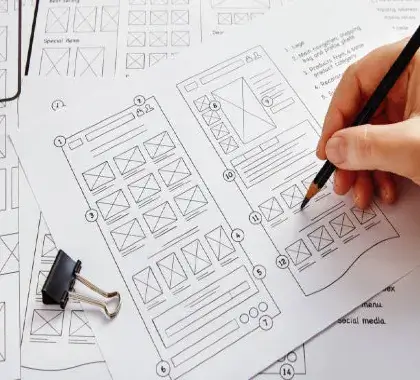
Do you want to turn your ideas into coherent, clickable layouts? Wireframes will help you to start the user experience process.
In the rapidly evolving digital landscape of 2025, the idea of creating user-centered websites and apps should begin with wireframes. Before the flashy colors, animations, or typography, UX designers are sketching out a skeleton, which is wireframing. It does not matter if you are designing a blog, e-commerce shop, or mobile application. Wireframing can help you test ideas, work out issues early, and avoid wasting time and money on development.
A wireframe is best described as a low-fidelity layout that visually represents the arrangement of parts for a web or app screen. Within the confines of a wireframe, you’re usually working on:
You can think of it as the basic sketch of your design. Wireframes are not meant to be pretty—they exist to solve problems.
| Type | Details | Tools Used |
| Low Fidelity | Basic grayscale layout, no images or color | Paper, Balsamiq |
| Mid Fidelity | Requires more structure and contains text and icon | Figma, Adobe XD |
| High Fidelity | Design looks very close to the final output. | Figma, Sketch |
As seen in 2025, many teams begin with low-fidelity and scale within tools like Figma to create interactive prototypes.
| Term | Focal | Area Level of Detail | Purpose |
| Wireframe | Layout & structure | Low | Planning UX |
| Mockup | Visual design & aesthetics | High | Showing look/feel |
| Prototype | Interactions & behavior | Interactive | Test flows |
Say you have a blog about UX (like Digital Anivi Practice) and want to redesign the homepage.
Your Wireframe Might Include:
👉 You can sketch this out on paper, or use something like Figma to drag & drop layout blocks.
| Tool | Best for | Free Plan |
| Figma | Collaborative design | ✅ |
| Balsamiq | Fast low-fidelity UX | ✅ |
| Whimsical | Flowcharts & wireframes | ✅ |
| Adobe XD | Prototyping & wireframes | ✅ |
| Pen & Paper | Fast sketching Always | 😄 |
Blog Post Wireframes can help bloggers, here’s how:
Don’t just use “Lorem ipsum” – make it keynote with real headlines, real navigation items, real call to action text. It makes the wireframes usable and more realistic.
Do you want a done-for-you blog homepage wireframe in Figma?
✅ It includes:
Comment (or DM me) to get your FREE UX wireframe kit (no sign up).
Wireframe is the unsung hero of good UX in 2025. Whether you are a solo blogger or product designer, wireframing before designing saves time, helps focus, and makes the user journey better.
Don’t just skip the skeleton – build intelligent first before building organized.
Wireframes are low-fidelity representations that show the basic structure of the content on a webpage or app screen. Wireframes deal with content placement, user flow, and functionality without addressing more nuanced design elements like color and typography
Wireframes are necessary in 2025 because they help teams save time, encourage collaboration, and create a better digital product for the users. Wireframes allow teams to validate ideas sooner and make sure they don’t invest time creating designs and pages that are costly mistakes.
While wireframes demonstrate a layout and structure (low-fidelity), mockups look at a design (high-fidelity), and prototypes showcase interactivity and user flow (typically clickable)!
Popular wireframing tools in 2025 include Figma, Balsamiq, Adobe XD, Whimsical, and pen & paper for quick sketches. Figma is still the best collaborative wireframing and prototyping option.
Absolutely! Bloggers can utilize wireframes to create homepages, optimize for mobile responsive designs and screen size, and to position CTAs to improve SEO, engagement, and conversion rates.

In 2025, video content is more dominant than ever, and content creators—ranging from vloggers and bloggers, to educators and brands—are utilizing high-quality video editing like never before. Whether you’re putting together a travel log or making a tutorial, the way you edit your footage will be the difference.
Non-linear editing (NLE) is one of the most game-changing introductions to video editing that has taken it by storm. Non-linear editing is not just another buzzword. This is the new standard in video editing.
Now, let’s get into it!
Non-linear editing (NLE) is a style of editing video or audio digitally, where you can order, cut, change, or embellish clips without changing any of the original files.
One way to think about it is, you are using a digital “timeline” to edit, where you can drag-and-drop, delete, add effects, or undo changes, and not destroy your source.
Instead of having to edit in a linear fashion (one unit after another, like old VHS tapes), you can move around as you please. Do you want to take a scene from the end of the film and move it to the beginning – easy. Do you want to change or add a transition or color correction to only minimal parts of the film, done in seconds?
| Feature | Linear Editing | Non-Linear Editing |
| Editing | Order Sequential | Any order (non-destructive) |
| Flexibility | Limited | Extremely flexible |
| Source Material | Can overwrite | Stays intact |
| Tools | Analog hardware | Digital software |
| Common Today? | Rare | Standard |
Analog to linear editing is very different compared to the ease of editing with all the digital NLE suites today. When you were editing with a physical tape in the 70s-90s. There was no chance to change your mind, your cut was final unless you re-recorded it.
Today, you can easily try something new or different because of the digital NLE editing tools, like Adobe Premiere Pro, Final Cut Pro, and DaVinci Resolve.
Here is a typical NLE workflow that creators are using in 2025:
As 2025 NLE is established and solidified, AI integrators will automate aspects of NLE workflow (the inclusion of performance-specific edits from AI, like automatically suggesting moments to cut, auto-detecting bad takes, and separating B-roll from your video)–so it will be different moving forward.
These are some of the best and most popular NLE tools currently available:
Adding video content into blog posts (particularly well-edited, optimized video content) reduces bounce rate and improves time on page—both SEO signals that matter in 2025.
Here are examples of adding video:
Plus, sites like YouTube index captions and keywords, giving you improved organic discovery opportunities.
Adopt NLE for Smarter, Faster, Better Videos. Non-linear editing is more than a technique—it’s the backbone of video making today. Whether you’re trying your hand at making an Instagram Reel, a blog-tutorial, or even a full-length documentary, knowing how to harness NLE can help you build content that is simple and simplistic in today’s vast digital world.
And in 2025—and beyond—when “content” is consumed in milliseconds, quality and speed are everything!
Non-linear editing (NLE) refers to a technique for editing digital video and audio where you can apply changes to any part of the timeline or sequence without affecting the original media. Non-linear editing is by definition non-destructive and allows you to work flexibly; at the time of writing (2025), non-linear editing is the industry standard for YouTube creators, bloggers, and professionals.
With linear editing, footage edited must be in the order desired and must often be done with physical tape, with changes being permanent. With non-linear editing, you are able to edit clips in any order you like, rearranging scenes and even making real-time changes without affecting the original files.
NLE software experiencing popularity at this time (2025) includes Adobe Premiere Pro, Final Cut Pro, DaVinci Resolve, CapCut, and Descript. These content creation software programs offer every feature imaginable, including AI-enabled tools, drag-and-drop timelines, and cloud syncing capabilities that any content creator can take advantage of.
Non-linear editing opens up the opportunity for bloggers to create videos using long-form posts, update old content quickly, and repurpose imagery for Shorts or Reels. In an overcrowded digital environment, non-linear editing is the most effective method to help increase viewer retention, blog retention, and SEO with content.

In 2025, your blog is not only expected to be informational but also visually appealing. Users are looking for visual engagement, and that is where UI tools come into play. It does not matter if you are a lone blogger or a brand content creator using a team of bloggers — with the right UI tools, you can change your blog from “just another website” to a click-tastic, scroll-stopping experience.
In this guide, we are going to show you how to use these top UI tools to build a visually engaging blog that is also going to improve SEO and keep readers coming back.
You have about 3 seconds to capture a visitor’s attention. Good visuals can:
A visually appealing blog merges typography, layout, color, whitespace, images, and interactivity into a single experience.
You should always prototype how you want the look and feel to be before you publish anything.
Figma and XD allow you to:
Pro Tip: Use Figma’s Auto Layout and Grid to position elements straight away and make them responsive.
Every blog post is going to need visual elements — whether that’s:
Canva gives you an easy option, especially if you’re not a designer.
You want the same colors, fonts, and templates to retain your blog identity.
Visual UI is more than images; it’s about color psychology and typography that contribute to readability and user sentiment.
Adding interactive elements keeps readers engaged longer and helps with UX. You may embed:
UI UX Tip: Do not go overboard with animations – they should be subtle, quick, and have a purpose.
Visual storytelling goes beyond just static images. Videos, GIFs, and B-rolls can bring your blog to life.
Embedding Note: Use image compression programs like TinyPNG or Squoosh to help maintain site speed by compressing visuals.
Your blog needs to look good on mobile, where over 70% of your traffic is likely originating. How to be responsive:
Now that you’ve added some engaging UI, track what’s working.
Use this engagement to inform your design, and get users to read more!
💡 Bonus UI (User Interface) Tips for Bloggers
Great UI = More Clicks, More Time Spent, More Traffic.
Your blog isn’t just a collection of articles—it’s an experience.
With the right selection of UI tools, you can:
Whether you’re designing a new homepage in Figma or creating an infographic in Canva, always be mindful of the user’s visual experience.
UI (User Interface) tools are design platforms and design components that help you design enticing blog layouts, graphics, and interactive components. UI tools streamline layout organizing, optimize the user experience, and give your blog a refined and professional look, without advanced coding.
Visuals make readability easier; improve dwell time and engagement, which decrease bounce rates and help to improve SEO signals. A visually optimized blog invites users to spend more time on it, interact with it, and share it.
No! Tools such as Canva, Elementor, and pre-built Figma templates are simple to use for a beginner. Alternatively, you can begin working with drag-and-drop layouts and gradually build up the confidence to customize your blog’s visuals even further.

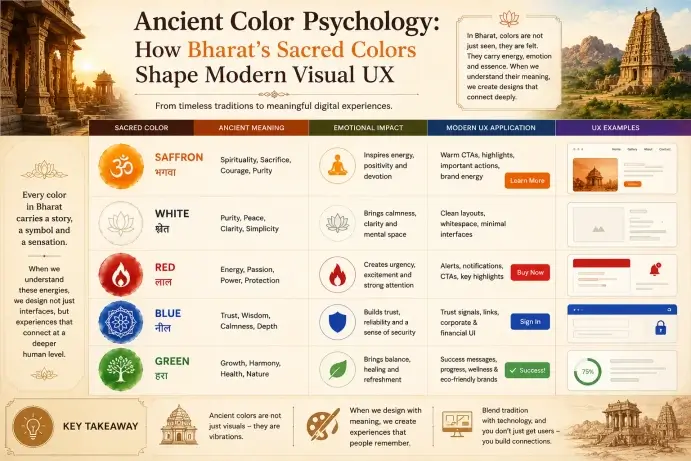
Color is not just decorative — it can be a form of communication. Color is important in UX design because it helps guide users, elicit emotions, and incite action. Whether you are developing a blog, app, or landing page, the right colors can determine whether a visitor bounces or locks in a conversion. In this post, we’ll identify the psychology of color in UX design, how distinct shades of color influence user engagement, and how you can leverage color principles to increase user engagement, trust, and conversion via your blog or website. Design Psychology: The Impact of Color on UX and User Engagement.
Color influences user attitude, interaction, and decision-making. Research shows that people make their impression of a product within 90 seconds – up to 90% of that decision is based only on color.
In UX design, the use of color can help you:
Having a better understanding of the psychology of colors themselves can enable you to make better informed selections based on the context of the website, to improve user experience, and possibly conversion.
Let’s explore the emotional and functional traits of some colors commonly used in UX:
Color is an effective way to visually orient the user to the importance of certain items, for example,
A traditional colour rule, which gives you a good approach to balanced visual design:
This structure ensures that you don’t overload the user.
Check high impact/visibility/contrast between the text and background – this helps to provide accessibility and legibility, which is a key aspect of good UX. For example, black text on a white background.
You can check your contrast against headroom rules like:
Similarly, colors suggest an array of emotions, and in these contexts, both culture, age, and gender play an important role. Things to consider are:
Research Tip: Check out Google Analytics or Hotjar heatmaps to confirm how users react to different colour elements in your site design.
Use an energizing color, like red, green, or orange (whatever fits your colors best) to make your call-to-action buttons stand out! This visually indicates urgency and improves your click-through rate (CTR). Example: A green “Get Started” button on a white background is more effective than a drab gray button.
Real examples from blogs.
Here are real examples of how bloggers and content creators used color to assist with UX:
Blue and white colors dominate credibility and cleanliness, with warm orange buttons for users to sign up or download free resources.
Color is a User Experience Superpower.
In UX, color is more than ornamental! It’s an effective tool for user emotion, confidence, decisions, etc. You can design experiences that are beautiful + effective + engaging by using color psychology.
Whether you want to develop a readable blog or have conversions, the perfect color palettes are your mute friend for UX. Design Psychology: The Impact of Color on UX and User Engagement.
Colors shape how users feel and interact with your interface. They can convey emotion, direct attention, impact readable, motivate to engage with a digital element (e.g., convincing users to click a button, moving to the next page etc ) and influence decisions (e.g., stay on the page), and are one of the most useful tools for designing an effective user experience
Red (or orange) can create urgency and increase clicks on call to actions (CTAs) while blue can impart stability and calm. By learning to apply and be strategic with colors, designers can influence behaviors such as subscriptions, purchases, and improving page views, ultimately increasing conversion rates
2-3 main colors are ideal: a primary brand color, and highlight color (to emphasize), and an accent color (to balance)… This ensures cohesiveness in our designs, not clutter. Also, follow a colour ratio of 60-30-10.
Here are a few: Coolors.co – Colour palette generator, Stark (Figma plugin) – accessibility checking, Adobe Color – colour palette generation & contrast testing, Happy Hues – curated colour combinations with real-world example

Video content isn’t just a bonus for blogs in 2025—it is now a primary path to traffic, SEO, and user engagement. Video-first platforms, such as YouTube Shorts, Instagram Reels, and video-enabled blog engagement, have experienced a surge in popularity. In 2025, bloggers are heavily relying on visual content to tell their stories. Video editing can make or break the performance of your content. In this blog post, I’m going to outline 5 key video editing mistakes to avoid that will reduce engagement on your blog. I will also explain how digital creators can repair these mistakes and maximize engagement and impact to capture their audience’s attention.
By 2025, more than 75% of video watching will be from a mobile device. If that video isn’t optimized for mobile screens (vertical video, readable text, clear visuals), viewers are going to ditch it within seconds. Too often, video creators are editing for desktop layouts and forgetting that the majority of their audience is consuming that video from a smartphone.
Pro Tip: Mobile-first video templates can be found in design applications like Canva, CapCut, or Adobe Express. They are terrific for blog embed and social sync.
Attention spans in 2025 are at an all-time low, and sitting at less than 3 seconds! If your video does not immediately hook your viewer, your engagement potential goes down significantly. Using logos, or slow intros, is leading to getting scrolled away.
Try starting with a question, shocking stat, or teaser of the result. Make sure to utilize text overlays for emphasis (ie, “You won’t believe this edit!” ). Show the “after” – then explain the “before”.
Example Hook: “This 15-second edit increased my blog traffic by 60% – here’s how.”
When you elaborate on the flashy transitions and effects, it takes away from what you’re saying. When a viewer is watching, they are not concerned with how many spin cuts or glitch cuts you have on your video. Whenever you do too much and over-edit, it tends to come off as amateur and can put off professional readers.
Use your standard cuts, fade-ins, and zooms. Let your content and storytelling speak for themselves. Don’t be afraid to use effects, but be purposeful when using effects (ie, you can use effects to highlight important points).
Tip: Instead of excessive editing, put your time into improving the audio, lighting, and script to achieve a more professional quality.
When your visuals are all over the place, you make your content forgettable! If your audience doesn’t connect your video with your blog or brand, you are missing out on recognition and repeat engagement. Many bloggers fail to incorporate logos, intros, or brand colors into their edits.
Example: Add a lower-third text that lists your website link intermittently on the video.
Regardless of how lovely the editing is, if you haven’t conveyed what you want the viewer to do next, the video is irretrievably wasteful. Many bloggers forget to tell users a direction to go in towards blog posts, sign-ups, or product pages. Without a strong, clear CTA, your video doesn’t have a marketing objective.
CTA Example: “Like this video template? Visit the link to the blog in the description!
Why it’s an error:
No matter how beautiful the video is, bad audio will ruin the user’s experience in a split second. Background noises, irregular volume levels, or horrible narration can distract users and lower credibility.
Pro Tip: Platforms like Kapwing or Descript have auto-levelers so that you do not spend hours trying to fix audio.
Why It’s a Mistake: Videos that appear to be a series of random clips will not hold attention. Every video (yes, even a 15-second Short) needs a beginning, middle, and end.
Framework>Problem →Promise→Proof→CTA.
✅ Repurpose Your Video Use a single edit for multiple platforms—YouTube Shorts, Instagram Reels, and as an embedded video in your blog post.
✅ Check Out AI Video Tools Use AI video tools, like Descript, Pictory, and Runway, to automate as much editing, transcription, and scene cuts as possible.
✅ Video SEO When embedding your video into blog posts, use proper video titles, keywords, and video schema. This will help your video rank higher in search engines.
As video becomes an essential part of the blogging landscape in 2025, avoiding the above editing mistakes will help ensure your content is not only appealing but also effective. When you optimize for mobile, create an enticing hook, limit distractions, maintain visual consistency, and ensure strong CTAs, your videos are sure to generate higher engagement, traffic, and conversions.
Ready to level up your video editing skills? Check out our Video Editing for Bloggers and create a video traffic-generating blog.
In 2025, viewers will expect your video content to be visually engaging, fast-paced, and high-quality. Bad video editing—like choppy editing, awkward transitions, or weak introductions—will cause viewers to bounce off quickly and have lower time on page, hurt your SEO, and lower conversion rates.
One of the biggest mistakes bloggers make is not including a strong hook within the first 3 seconds. If your video content does not grab your users’ attention in the first 3 seconds, they will likely scroll away or exit out of the page, especially on sites like YouTube Shorts and Instagram reels.
Bad color grading can make your video appear inconsistent, dull, or unprofessional. Not only does this decrease the visual appeal, but trust is a big factor in viewer retention. Trust is an important factor in whether or not an audience will share your video or take action after viewing.
Not really. Length isn’t the problem—it’s the value and pacing. A well-edited, longer video that delivers the goods will beat a short, boring video! Just keep it tight, it flows smoothly, and the visuals stay engaging.
Start with some simple tried and tried-and-true frameworks. There are loads of beginner tools available, like CapCut, Canva Video, Adobe Express, and more! Use a script! Add captions! Optimize for mobile! Preview your content on all devices.