Archives 2026

Visual Storytelling of Hampi: Framing Heritage through AI & UX

Visual Storytelling of Hampi: Framing Heritage through AI & UX

Visual Storytelling of Hampi: Framing Heritage through AI & UX

Introduction: अतीत और भविष्य का संगम

भारत का इतिहास केवल धूल भरी किताबों में नहीं, बल्कि उन पत्थरों में जीवित है जो सदियों से मौन खड़े हैं। कर्नाटक के तुंगभद्रा नदी के किनारे बसा हम्पी (Hampi), विजयनगर साम्राज्य की वह गौरवशाली राजधानी है। जो आज भी एक ‘Open-Air Museum’ की तरह हमें प्रेरित करती है। लेकिन एक UX/UI Designer और Video Creator के लिए हम्पी केवल खंडहरों का शहर नहीं है। यह ‘Visual Hierarchy‘, ‘Grid Systems‘ और ‘Storytelling’ की एक जीवंत वर्कशॉप है।

मेरे प्रोजेक्ट “Digital Heritage” का उद्देश्य इसी प्राचीन बुद्धिमत्ता को आधुनिक तकनीक के साथ जोड़ना है। इस ब्लॉग में हम जानेंगे कि कैसे हम्पी के मंदिर हमारे AI UX/UI Hub के डिज़ाइन सिद्धांतों और Video Studio की विज़ुअल कहानियों की नींव रखते हैं।

1. The Vedic Architecture:

बुनियाद जो आज भी प्रासंगिक है हम्पी के निर्माण में Vedic Science और वास्तु शास्त्र का गहरा प्रभाव है। यहाँ के हर खंभे, हर मंडप और हर गोपुरम के पीछे एक गणितीय गणना (Mathematical Calculation) छिपी है।

जब हम Vedic Science & Bharat: The Untold Fact की बात करते हैं, तो हम उस सटीकता (Precision) की बात करते हैं। जो हज़ारों साल पहले बिना किसी कंप्यूटर के हासिल की गई थी। हम्पी के विट्ठल मंदिर के ‘संगीतमय खंभे’ (Musical Pillars) इस बात का प्रमाण हैं कि हमारे पूर्वज साउंड इंजीनियरिंग और मटेरियल साइंस में कितने निपुण थे।

2. Framing the Heritage:

एक डिज़ाइनर की नज़र से एक डिज़ाइनर के रूप में, जब मैं हम्पी के प्रवेश द्वारों (Gopurams) को देखती हूँ। तो मुझे वे केवल पत्थर के दरवाज़े नहीं, बल्कि “Frames” नज़र आते हैं।

  • Visual Hierarchy: हम्पी के वास्तुकारों ने मुख्य मंदिर को सबसे ऊँचा और भव्य बनाया ताकि दर्शक का ध्यान (User Attention) सबसे पहले वहीं जाए। आज हम UX डिज़ाइन में इसे ही ‘Primary Action’ या ‘Hero Section’ कहते हैं।
  • User Flow: मंदिर के प्रांगण में प्रवेश करने से लेकर गर्भगृह तक जाने का रास्ता एक ‘User Journey’ की तरह डिज़ाइन किया गया है, जो यूजर को शांत और केंद्रित (Focused) महसूस कराता है।
3. The Figma Connection:

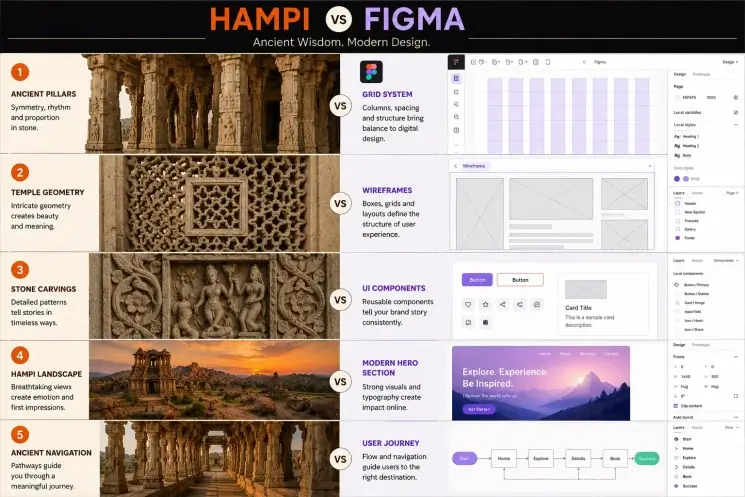
Ancient Grids meets Modern UI यह मेरे काम का सबसे रोमांचक हिस्सा है। लोग अक्सर मुझसे पूछते हैं कि Figma और Hampi का क्या लेना-देना है? इसका जवाब है—The Grid। जब मैं हम्पी के खंभों की एक कतार देखती हूँ, तो मुझे उसमें Figma का 12-Column Layout दिखाई देता है। खंभों के बीच की निश्चित दूरी (Spacing), उनका अनुपात (Proportions), और उनकी एक-दूसरे के साथ अलाइनमेंट (Alignment) वही ‘White Space’ और ‘Consistency’ पैदा करती हैं, जिसे हम आज एक बेहतरीन ‘User Interface’ बनाने के लिए इस्तेमाल करते हैं।

The Comparison: अगर आप हम्पी के एक पिलर के फोटो के ऊपर फिग्मा की ग्रिड लाइन्स रखें, तो आप हैरान रह जाएंगे कि उनका अलाइनमेंट कितना सटीक है। यह साबित करता है कि ‘Design Ethics’ कभी पुराने नहीं होते। वे बस अपना माध्यम (Medium) बदल लेते हैं।

4. AI UX/UI Hub:

भविष्य का कारखाना मेरे AI UX/UI Hub में, हम इसी ‘Vedic Logic’ को आर्टिफिशियल इंटेलिजेंस के साथ मिलाते हैं। हमारा उद्देश्य ऐसे डिजिटल इंटरफेस बनाना है जो न केवल आधुनिक और तेज़ हों, बल्कि जिनमें भारत की सांस्कृतिक आत्मा भी बसी हो।

AI हमें डेटा और स्पीड देता है, लेकिन हम्पी जैसे स्थान हमें ‘Balance’ और ‘Aesthetics’ सिखाते हैं। हम्पी की ज्यामिति (Geometry) को AI एल्गोरिदम के साथ जोड़कर, हम ऐसे डिज़ाइन बना रहे हैं जो मानव मस्तिष्क के लिए प्राकृतिक और सुखद (Natural & Ergonomic) महसूस होते हैं।

5. Video Studio:

पत्थरों को आवाज़ देना वीडियो निर्माण (Video Production) के लिए हम्पी एक स्वर्ग है। यहाँ की हर नक्काशी एक ‘Frame-by-Frame’ एनीमेशन की तरह है। विरुपाक्ष मंदिर की दीवारों पर उकेरी गई कहानियाँ प्राचीन ‘Cinematography’ का सबसे बड़ा उदाहरण हैं।

Video Studio में, हमारा मिशन इन अनकहे तथ्यों (Untold Facts) को डिजिटल कहानियों में बदलना है। हम तकनीक का उपयोग करके इन खंडहरों को फिर से ‘Reconstruct’ करते हैं, ताकि आने वाली पीढ़ियाँ यह देख सकें कि विजयनगर अपनी पूरी भव्यता में कैसा दिखता था। यह सिर्फ वीडियो एडिटिंग नहीं है; यह इतिहास को ‘Frame’ करने का एक तरीका है।

6. Digital Heritage:

क्यों है यह ज़रूरी? आज के ‘Fast-paced’ डिजिटल युग में, हम अपनी जड़ों को भूलते जा रहे हैं। Digital Heritage प्रोजेक्ट का उद्देश्य केवल जानकारी देना नहीं, बल्कि गर्व महसूस कराना है।

जब हम “Bharat: The Untold Fact” के बारे में लिखते हैं, तो हम दुनिया को बताते हैं कि भारत का योगदान केवल अध्यात्म तक सीमित नहीं था। हम इंजीनियरिंग, आर्किटेक्चर,और डिज़ाइन के क्षेत्र में भी विश्व गुरु थे। हम्पी के पत्थर इस सच्चाई के गवाह हैं।

Conclusion:

एक नई शुरुआत हम्पी की मेरी यात्रा ने मुझे सिखाया कि एक अच्छा डिज़ाइनर वही है जो अपने भविष्य को संवारते समय अपने अतीत का सम्मान करे। चाहे वह Figma पर खींची गई एक लाइन हो या Gutenberg पर लिखा गया एक ब्लॉग, हर चीज़ में एक संतुलन होना चाहिए।

“The Visual Storytelling of Hampi” केवल एक टॉपिक नहीं है, यह एक अनुभव है। यह हमें याद दिलाता है कि तकनीक बदल सकती है, टूल्स (Tools) बदल सकते हैं, लेकिन। ‘Beauty’ और ‘Logic’ के नियम हमेशा वही रहेंगे जो हज़ारों साल पहले हम्पी की गलियों में थे।आइए, इस डिजिटल युग में हम अपनी विरासत को न केवल बचाएं, बल्कि उसे एक नया रूप देकर पूरी दुनिया के सामने गर्व से पेश करें।

Frequently Asked Questions

What is the meaning of “Visual Storytelling of Hampi”?

“Visual Storytelling of Hampi” means presenting the beauty, history, and culture of Hampi through images, videos, design, and digital experiences.
हिंदी:
“Visual Storytelling of Hampi” का अर्थ है हम्पी की कला, इतिहास और संस्कृति को images, videos और design के माध्यम से प्रस्तुत करना।

How does AI help in heritage storytelling?

AI tools can enhance old images, generate immersive visuals, create smart recommendations, and personalize digital experiences for users exploring heritage sites.
हिंदी:
AI heritage storytelling में old photos को enhance करने, immersive visuals बनाने और users को personalized experience देने में मदद करता है।

What is the role of UX design in heritage experiences?

UX design improves how people interact with digital heritage content by making websites, apps, and virtual tours easy to use, engaging, and accessible.
हिंदी:
UX design heritage-related websites, apps और virtual tours को आसान और engaging बनाता है ताकि users को बेहतर अनुभव मिले।

Why compare Hampi architecture with Figma design grids?

Both ancient architecture and modern UI design use symmetry, spacing, hierarchy, and structure to guide people visually and emotionally.
हिंदी:
हम्पी की architecture और modern Figma grids दोनों symmetry, spacing और hierarchy का उपयोग करके visual balance बनाते हैं।

How can bloggers use AI & UX for travel storytelling?

Bloggers can use AI tools for image editing, content generation, and UX principles for creating responsive, visually engaging blogs that attract more readers.
हिंदी:
Bloggers AI tools और UX principles का उपयोग करके attractive, responsive और engaging travel blogs बना सकते हैं जो ज्यादा traffic लाते हैं।


Introduction

Bharat: The Untold Fact"

“भारत का प्राचीन ज्ञान केवल अतीत की कहानियों तक सीमित नहीं है; यह वर्तमान की जटिल समस्याओं के समाधान के लिए भी प्रासंगिक है। इस संदर्भ में, ‘Bharat: The Untold Fact’ के माध्यम से हम उन छिपे हुए वैज्ञानिक सिद्धांतों को प्रस्तुत करेंगे, जो हमारी आधुनिक दुनिया को नई राह दिखा सकते हैं। AI UX/UI Hub कनेक्शन: हम प्राचीन भारतीय ज्यामिति और तर्कशास्त्र का सहारा लेकर AI UX/UI Hub में ऐसे इंटरफेस का निर्माण करते हैं, जो न केवल उपयोगकर्ताओं के लिए अनुकूल हैं, बल्कि सांस्कृतिक दृष्टि से भी समृद्ध हैं। वीडियो स्टूडियो कनेक्शन: इन अनकहे सत्य और रहस्यों को हम ‘Video Studio’ के माध्यम से एक प्रभावशाली दृश्य कहानी के रूप में प्रस्तुत करेंगे, ताकि हमारी विचारधारा और जानकारी को उत्तेजक तरीके से साझा किया जा सके।”

Ancient Indian knowledge is not merely historical. It is still applicable today to help solve present-day problems. By drawing on ancient scientific principles from India, we will bring them to the forefront to assist the developed world today through Bharat. The Untold Fact.’ AI-Driven User Experience and User Interface Hub: We can use the ancient geometric and logical principles of India to create user-friendly, culturally relevant, AI-driven interfaces.

How We Create Video-Based Content: We use ‘Video Studio’ and these hidden cultural truths as visual storytelling to make it enjoyable and meaningful.

Introduction

Vedic Science

“भारत का प्राचीन विज्ञान न केवल अतीत का गवाह है, बल्कि यह भविष्य की तकनीकों की नींव भी रखता है। इस श्रेणी में, हम वैदिक विज्ञान के उन रहस्यमय तथ्यों की खोज करेंगे जो आज के AI UX/UI डिज़ाइन के सिद्धांतों से जुड़े हैं। हमारे AI UX/UI हब में, हम इसी वैदिक सटीकता और प्राचीन ‘पैटर्न्स’ का उपयोग करते हुए ऐसे डिजिटल इंटरफेस का निर्माण करते हैं जो आधुनिकता के साथ-साथ हमारे सांस्कृतिक मूल्यों से भी जुड़े रहते हैं।”

“India’s ancient science is not just a witness to the past—it also lays the foundation for future technologies. In this series, we explore Vedic insights that connect with modern AI and UX/UI design principles. At our AI UX/UI hub, we use this Vedic precision and timeless patterns to create digital interfaces that blend innovation with cultural roots.”

Top Free Video Editors in India for Beginners (2027)

Top Free Video Editors in India for Beginners (2027)

Top Free Video Editors in India for Beginners (2027)

Video is king in 2027. It’s king on platforms like YouTube, Instagram Reels, and Shorts. If you’re anywhere from a student to a blogger to an aspiring creator in India, you don’t need expensive video editing software to start creating great videos. These days, you can create professional-level videos on your phone for free using many mobile video editing applications.

In this article, we will review several of the best free video editing applications available in India for newbies (2027), along with information on their features, pros/cons, and which one is best for you.

Why Newbies Should Use the Appropriate Application for Video Editing

It’s important to choose an app that will allow you to:
  • Be productive with basic tools
  • Learn video editing quickly and easily.
  • Enhance the quality of your video and increase viewer engagement.
  • Use a device without high-end technology (typical of phones found in India).
An app designed for the beginner should contain:
  • Easy to use interface,
  • Free functionality (with no expensive up-front costs),
  • No watermark (or the ability to get rid of it),
  • pre-made templates
1. CapCut – Excellent free Video Editor (2027)

CapCut is the preferred application of free video editors by new and fledgling creators in India.

Main Features:
  • AI-powered captions & subtitles,
  • trending templates for Reels & Shorts,
  • background removal,
  • music library & effects, and
  • 4K export support.

CapCut is unique due to its intuitive interface and user-friendly AI-driven tools. You can create viral video content quickly, even if you know nothing about video editing.

Pros:
  • User-friendly for beginners,
  • Most exports have no watermark.
  • Reels and Shorts are creator-friendly.
Cons:
  • Some functions of the application require internet access.
  • It may lag on slower devices.

👉 Best Suited For: Reels, Shorts, and Viral Content Creators.

2. VN Video Editor – The Best No Watermark Video Editor.

VN Video Editor is designed for those looking for a way to produce high-quality video content without watermarks.

Main Features:
  • Multi-layer editing,
  • key frame animated features,
  • editing speed control,
  • transitions, and
  • 4K export features.

VN Video Editor has advanced features but remains very easy to learn and operate for beginning video creators.

Pros:
  • No watermark; no advertisement;
  • operates efficiently without lagging.
Cons:
  • Has a little bit of a learning curve.

👉 Best Suited For: YouTube creator videos and Cine-matic editing.

3. KineMaster- Best Advanced Editing Tool KineMaster is an old and established editing app.

Key Features:
  • Multi-layer editing,
  • Chroma keying (green screen),
  • Audio editing tools,
  • Frame-by-frame editing,

KineMaster provides users with the tools they need to start producing at a professional editing level.

Pros:
  • Powerful Features,
  • Excellent for editing YouTube content
Cons:
  • A watermark will appear in the free version

👉 Best Uses: Educational Videos, Vlogs, Advanced Editing

4. InShot- Best Fast and Easy Editing Tool. If you need to create short clips quickly for social media, InShot is the right editing tool.

Key Features:
  • Trim, Cut,
  • Merge videos,
  • Add Filters,
  • Effects, music, and
  • Control the speed of a video.
  • Use a pre-set aspect ratio.

InShot is a beginner-friendly editing application that makes it easy to do fast and uncomplicated editing.

Pros:
  • Easy to navigate,
  • great for making reels or short videos to run on WhatsApp.
Cons:
  • Very few advanced editing tools.
  • A watermark will appear in the free version.

👉 Best Uses: Instagram Reels and WhatsApp

5. Power Director- Best Free Editing software with Professional capabilities.

Power Director is a powerful editing tool that balances ease of use with advanced characteristics.

Key Features:

The format’s users can apply a range of unique A.I.-generated special effects and transitions to enhance their work.

  • Edit video in 4K,
  • record a voice-over for any video project, and
  • Track any moving subject through a video project.

PowerDirector is recommended for anyone wanting to edit at a semi-professional level.

Pros:
  • Beginners will find that this app is user-friendly.
  • Beginners can edit videos faster than most apps, and
  • they can complete the job quickly.
Cons: Some features will require users to pay for them.

👉 Best Uses: YouTube Creators and Storytelling Videos

6. Adobe Premiere Rush is a superior video editing

App available on multiple platforms, including desktop and mobile devices.

Key Features:
  • Device Synchronisation
  • Drag and drop editing functionality
  • In-App Templates
Advantages:
  • Strong brand reputation,
  • well-designed, and
  • provides users with an easy-to-use interface.
Cons:
  • It does not provide a free tier that offers many features.

What Type of User Benefits Most:

  • People who are students or have access to multiple devices.
  • Community Insight: What Editors in India Prefer As Beginning Editors

Many users on Reddit have said that they feel VN Editor is a solid app, with features including:

  • No watermarks added to finished videos
  • All features needed for most editing styles

Some users have commented: “CapCut is a very good app, but it can feel slow depending on the phone being used (mid-range to average)”.

👉 This shows:

  • CapCut = easy to use and up-to-date
  • VN = professional with a clean interface
  • KineMaster = advanced and fully functional.

What the Future Holds For Editing Equipment and Skills

Top 5 Picks for Best Editing App Based on Your Needs

1 CapsCut or InShot – if you are new to editing
2 VN Editor – if you want to edit without “watermarks” on your videos
3 KineMaster – if you want to edit like a pro
4 PowerDirector – if you need an editing application for YouTube
5 Adobe Premiere Rush – if you need to be able to edit using both your phone and computer.

New Editors in India – 7 Tips for New Editors (2027):

  • Create short videos (Reels/Shorts)
  • Use Templates to save time
  • More time should be focused on storytelling than effects
  • Know how to do basic edits (cutting, transitions, and managing audio)
  • Upload frequently.

Final Summary

As we look ahead to 2027, we see that video editing has now been made simple, particularly for new users in India. You can easily produce professional-looking videos without spending any money using applications like CapCut, VN Editor, and InShot.

For someone just learning:
👉 Choose CapCut if you want simplicity
👉 Move to the VN Editor if you require more control
👉 KineMaster should be chosen as you grow

The most effective app is simply the one you consistently use well. Begin today and work daily, and your editing abilities will improve at an astonishing rate!

How to Create a UX Case Study in 2027 (Step-by-Step Guide for Beginners & Designers)

How to Create a UX Case Study in 2027 (Step-by-Step Guide for Beginners & Designers)

How to Create a UX Case Study in 2027 (Step-by-Step Guide for Beginners & Designers)

To create a powerful case study, you need to tell the story behind your design decisions, not just showcase your passion for creating aesthetically pleasing user experiences in 2027.

A strong UX case study can be an effective way to differentiate yourself from other user experience designers when building a portfolio, seeking employment, or developing a personal brand.

This guide will teach you the steps to create a UX case study in 2027 using current trends, including AI tools, storytelling, and data-driven design.

What does a UX case study involve?

A UX case study tells the story of how you approached solving a user issue and how design thinking contributed to that process.

It includes:
  • • The steps you took
  • • The reasoning behind those steps
  • • Your technical ability to solve the task at hand
  • • Your overall solution

When considering UI design, remember that it is only part of the equation.

Your reasoning and decision-making processes are equally important as the final design.

Why UX Case Studies Matter in 2027

By 2027, employers and clients will expect to see more than just a UI design; they will be looking for evidence of:

  • Effective problem solving,
  • Thoroughness of your user research,
  • Making data-driven decisions,
  • Creating meaningful, real-world impact through thoughtful design.

An actual case study demonstrates how you think strategically rather than just being a designer.

Step 1: Select the Correct Project to Work On.

Start by working on a project that demonstrates the following:

  • A real-world problem (not just redesigning something for fun),
  • Identifiable User Pain Points,
  • Measurable Results.

Examples of Good Projects:

  • Improving the Shopping App Experience When Making Purchases,
  • Redesigning a Blog to Increase Engagement,
  • Creating a Mobile Application for Local Users.

👉 Tip: Even a personal or student project works if explained well.

Step 2: Write a Clear Problem Statement.

Your case study should begin with a strong problem.

  • Example: “Users were abandoning the checkout process due to a complex UI and lack of trust signals.”

Make it:

  • Specific
  • User-focused
  • Data-supported (if possible)
Step 3: Research will be a requirement in 2027. Use the following methods when performing your research:

You will need to include the following in your case study:

  • Key findings
  • User Pain Points
  • Behavioral Patterns

👉 Pro Tip: Utilize charts and/or bullet points to easily convey your research information.

Step 4: Write User Personas

User personas will help you to build an experience based on actual users. Details of a user persona should include the following:

  • Name, age, occupation,
  • goals,
  • pain points, and
  • behavior patterns.

👉 Simple is better, so don’t over-design a persona.

Create a Map of the Users’ Journey in Step 5.

Your users’ journeys show what they do when they access your product.

You’ll want to include the following within the map or diagram of the user journey:

  • Entry Point
  • User Actions
  • User Pain Points
  • User Emotions.

This information will demonstrate:

  • 👉 Where users have problems
  • 👉 Where the design enhances the experience.
Define Your Solution in Step 6.

You will now describe your design method.

Your design method should answer the following:

  • What did you change?
  • Why did you change it?
  • How did it fix the problem?

👉 Use various items to support your explanation.

  • Wireframes,
  • screenshots
  • before vs. after comparisons,
Showcase user interface design, but Avoid Concentrating on it in Step 7.

The user interface is very important; however, it is only a part of the overall user experience.

For your UI, please show the following:

  • Completed Screens
  • Design System (colors and fonts)
  • Design Components

👉 Please keep your explanation brief and concentrate on user usability.

Add Usability Testing in Step 8.

The only way to guarantee success is to perform testing on your designs.

Your testing data will include the following:

Type of Test

  • Number of Users in Test(s)
  • Most Valuable User Feedback
  • Changes Made to Product Based on Usability Testing

👉 This will demonstrate that you incorporated real user feedback into your design.

Step 9: Present Outcomes and Effects.

This is a pivotal section of the project.

Document results in some way:

  • Rates of conversion have increased,
  • The Bounce Rates have Decreased,
  • The time to complete was cut down.

For example, the percentage of users completing the entire checkout process improved by 35% after a redesign.

👉 If there is no real data: List hypothetical effects or reasonable assumptions as to how it will impact the business.

Step 10: List Learnings & Reflection.

You will stand out here. Include:

  • What went well,
  • What did not work,
  • What to do differently.

👉 Employers find the designers who reflect and learn from what they have created, have better value.

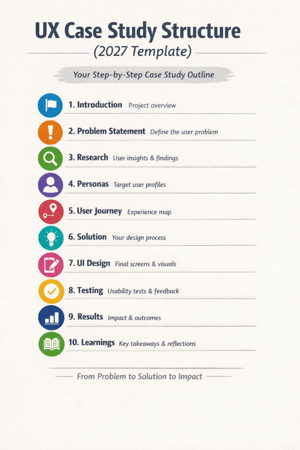
(2027) UX Case Study Format

Use this template:

  • Introduction
  • Problem Statement
  • Research
  • Personas
  • User Journey
  • Solution
  • UI Design
  • Testing
  • Results
  • Learnings

Latest Trends in UX Case Studies (2027):

1. AI-Assisted Research Designers now utilize AI tools for:

  • Analyzing user behavior
  • Generating insights more quickly

2. Storytelling Format:

Case studies are composed like a narrative instead of reports.

👉Beginning → Problem → Journey → Solution → Outcome

3. Short & Visual Content

Recruiters prefer documents that consist of:

  • Concise paragraphs
  • Visual explanations
  • Clean layouts

4. Real Metrics vs. Fancy Designs

Actual impact is more influential than how visually pleasing the project is.

Avoid Mistakes

  1. More UI than process.
  2. No clear problem.
  3. Not doing research.
  4. No measurable results.
  5. Over length.

Maintain clarity, structure, and focus.

Advice for Novices to Help Them Build Their First UX Case Study:

1. Start with 1-2 great case studies.

2. Work on your ability to express clarity versus working towards perfection.

3. Use simple terminology.

4. Display your thought process.

5. Consistently enhance the content of your case study.

Final Thoughts

In 2027, ideally, when creating a UX case study, you will be able to portray a compelling narrative that conveys your ability to communicate your findings via logic, research, and results.

A large-scale project does not have to be utilized for an individual to present himself/herself as an effective designer. If someone were to perform a straightforward redesign of an existing product or service and do it well, this redesign could be a strong case study.

Good Design Shows Visuals. Great Design Shows Thought Process.

Create your case study today. Thank you!

Frequently Ask Questions

What is a case study in user experience (UX) in 2027?

A case study in user experience (UX) is a document that details how a designer uses research, design thinking, and testing to resolve a user’s problem. In 2027, UX case studies are less reliant on visual representation and more focused on data, storytelling, and impactful results.


How much content should a case study contain?

An acceptable length of a case study in user experience is between 800 and 1500 words or five to ten scrollable sections. It needs to present enough information about your process to describe it adequately, and still be concise enough to hold the reader’s attention.


What should someone new to user experience design include in their case studies?

Someone new to user experience design should provide the following information in their case study:
A problem statement,
User research,
A persona,
The user journey,
The solution
Measurable results


Optimized with PageSpeed Ninja