How to Create a UX Case Study in 2027 (Step-by-Step Guide for Beginners & Designers)

How to Create a UX Case Study in 2027 (Step-by-Step Guide for Beginners & Designers)

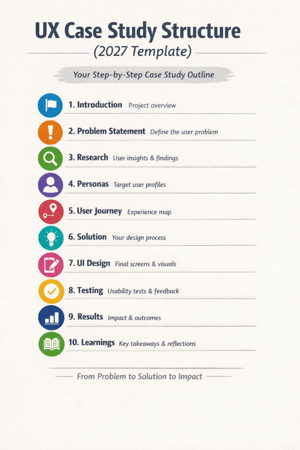
How to Create a UX Case Study in 2027 (Step-by-Step Guide for Beginners & Designers) To create a powerful case study, you need to tell the story behind your design decisions, not just showcase your passion for creating aesthetically pleasing user experiences in 2027. A strong UX case study can be an effective way to differentiate yourself from other user experience designers when building a portfolio, seeking employment, or developing a personal brand. This guide will teach you the steps to create a UX case study in 2027 using current trends, including AI tools, storytelling, and data-driven design. What does a UX case study involve? A UX case study tells the story of how you approached solving a user issue and how design thinking contributed to that process. It includes: When considering UI design, remember that it is only part of the equation. Your reasoning and decision-making processes are equally important as the final design. Why UX Case Studies Matter in 2027 By 2027, employers and clients will expect to see more than just a UI design; they will be looking for evidence of: An actual case study demonstrates how you think strategically rather than just being a designer. Step 1: Select the Correct Project to Work On. Start by working on a project that demonstrates the following: Examples of Good Projects: 👉 Tip: Even a personal or student project works if explained well. Step 2: Write a Clear Problem Statement. Your case study should begin with a strong problem. Make it: Step 3: Research will be a requirement in 2027. Use the following methods when performing your research: You will need to include the following in your case study: 👉 Pro Tip: Utilize charts and/or bullet points to easily convey your research information. Step 4: Write User Personas User personas will help you to build an experience based on actual users. Details of a user persona should include the following: 👉 Simple is better, so don’t over-design a persona. Create a Map of the Users’ Journey in Step 5. Your users’ journeys show what they do when they access your product. You’ll want to include the following within the map or diagram of the user journey: This information will demonstrate: Define Your Solution in Step 6. You will now describe your design method. Your design method should answer the following: 👉 Use various items to support your explanation. Showcase user interface design, but Avoid Concentrating on it in Step 7. The user interface is very important; however, it is only a part of the overall user experience. For your UI, please show the following: 👉 Please keep your explanation brief and concentrate on user usability. Add Usability Testing in Step 8. The only way to guarantee success is to perform testing on your designs. Your testing data will include the following: Type of Test 👉 This will demonstrate that you incorporated real user feedback into your design. Step 9: Present Outcomes and Effects. This is a pivotal section of the project. Document results in some way: For example, the percentage of users completing the entire checkout process improved by 35% after a redesign. 👉 If there is no real data: List hypothetical effects or reasonable assumptions as to how it will impact the business. Step 10: List Learnings & Reflection. You will stand out here. Include: 👉 Employers find the designers who reflect and learn from what they have created, have better value. (2027) UX Case Study Format Use this template: Latest Trends in UX Case Studies (2027): 1. AI-Assisted Research Designers now utilize AI tools for: 2. Storytelling Format: Case studies are composed like a narrative instead of reports. 👉Beginning → Problem → Journey → Solution → Outcome 3. Short & Visual Content Recruiters prefer documents that consist of: 4. Real Metrics vs. Fancy Designs Actual impact is more influential than how visually pleasing the project is. Avoid Mistakes Maintain clarity, structure, and focus. Advice for Novices to Help Them Build Their First UX Case Study: 1. Start with 1-2 great case studies. 2. Work on your ability to express clarity versus working towards perfection. 3. Use simple terminology. 4. Display your thought process. 5. Consistently enhance the content of your case study. Final Thoughts In 2027, ideally, when creating a UX case study, you will be able to portray a compelling narrative that conveys your ability to communicate your findings via logic, research, and results. A large-scale project does not have to be utilized for an individual to present himself/herself as an effective designer. If someone were to perform a straightforward redesign of an existing product or service and do it well, this redesign could be a strong case study. Good Design Shows Visuals. Great Design Shows Thought Process. Create your case study today. Thank you! Frequently Ask Questions

How to Develop Design Skills: 12 Strategies for 2025

How to Develop Design Skills: 12 Strategies for 2025

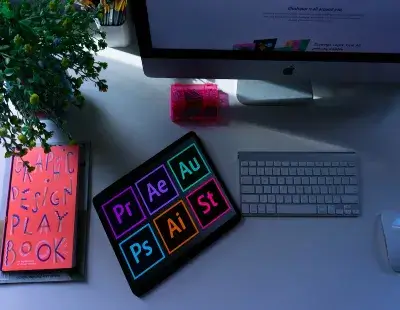
How to Develop Design Skills: 12 Strategies for 2025 Design skills are increasingly important in today’s fast-paced digital landscape. If you’re into UX/UI design, graphic design, video editing, or animation, working on your craft requires learning to stay ahead of trends, using the best tools, and honing your creative process. Still wondering how you can elevate your design skills in 2025? In this article, you’ll learn practical ways to improve your skills, create opportunities, and make your design work pop. 1. Understand the Fundamental Principles of Design. 🔹 Action Tip: Take a look at your favorite websites, apps, and brand logos. Pay attention to how they implement contrast, white space, and typography for visual flow. 2. Learn from the Real World 🔹 Action Tip: Make a “Design Inspiration” folder on Pinterest, Notion, or Figma to share and collect ideas you like. 3. Get Hands-On with Real Projects. 🔹 Pro Tip: Use design tools like Figma, Adobe XD, or Canva to recreate a design from scratch. This is very useful as you will learn the process and decision-making behind a design. 4. Understand UX/UI Design Principles 🔹 Action Tip: Read Nielsen Norman’s 10 Usability Heuristics and be sure to utilize them in design projects. 5. Become familiar with the Tools. 🔹 Action tip: Set aside 30 minutes a day to watch YouTube tutorials made for specific design tools or read instructional content on Skillshare. 6. Get Feedback Early and Often. 🔹 Pro Tip: Once you finish a project, get constructive feedback by publishing your designs to Dribbble, Behance, or the r/design_critiques section on Reddit. 7. Be Aware of Trends 🔹 Action Tip: Look for design blogs like Smashing Magazine, UX Collective, and Creative Bloq. 8. Understand Color Theory & Typography. 🔹 Pro Tip: You can use tools like Coolors.co to find color palettes, and Google Fonts offers a wide range of great options for accessible and beautiful typography. 9. Collaborate with Other Creatives. 🔹 Action Tip: Join creative communities like Discord design groups or Facebook creator communities. 10. Build Your Portfolio and Share It. 🔹 Pro Tip: You can use Behance, Dribbble, or your website to host your projects. Sharing redesigns from before-and-after pairs can highlight your improvement in design. 11. Master the Building Blocks. 🔹Quick Exercise: Take any of your old designs and try to make it better by only using these five principles. You will be amazed at how much cleaner and more powerful it looks. 12. Use AI as a Creative Collaborator. AI does not replace creativity; it releases you to think about design at a broader level Additionally: Take Advantage of AI in Design. AI is not replacing designers; it is a convenient assistant. Programs like MidJourney, ChatGPT, and Adobe Firefly can be good assistants in ideation, mock-ups, and automating tasks. Final Thoughts: Practicing your design skills is a repetitive process that engages you to learn from the best, stay curious, and continue to design. You should now feel much better prepared to roll out designs that will generate clicks, aid engagement, and fulfill your audience. Frequently Ask Questions

🎬 What Is a Short Film in 2025? A Complete Guide for Creators and Storytellers.

What Is a Short Film in 2025?

🎬 What Is a Short Film in 2025? A Complete Guide for Creators and Storytellers. In a world where short-form content is king, short films in 2025 are more prevalent and valuable now than ever before. Whether you are an inexperienced filmmaker, a blogger in need of a creative flair, or a content creator who wants to connect with an audience, short films can be a way for you to tell a story with reasonable expectations and none of the financial pressures associated with creating a blockbuster. But what is a short film? What the heck is a successful short film? How do you make a short film that allures, becomes viral, or even starts winning festivals? Don’t worry, that’s what this lengthy blog will explain. 🎥 What is a Short Film? A short film is a motion picture with a shorter duration than a feature-length film. Typically, a short film is under 40 minutes (including credits). It’s a story with characters, complications, and resolution. It may not get attention from the big screen, but it is creative, has small budgets, and other messages. In 2025, short films are no longer just student films. They are: 🕒 Short Film vs. Feature Film Feature Film Short Film 90-180 minutes 1-40 minutes Often big budget, big crew Usually low-budget and independent Distributed in theaters on big streaming platforms Typically released on YouTube, Vimeo, and at festivals More complex character arcs Tight focus on storytelling Months, sometimes years to complete Completed in weeks, sometimes days. 🎯 Why Do We See Short Films Coming Back in Trend for 2025? Short films are trending right now for many reasons 1. Algorithm Friendly 2. Film Festivals Are Accessible. 3. Cost-Efficient Storytelling: 🧡 What is a good short film? It takes more than just hitting record to create a short film that is scroll-stopping and share-worthy, so let’s dive into the main elements: 🛠️ How to produce a short film in 2025 (Step by step) Here you are with a basic roadmap of production. 📈 How the Short Films Improve SEO and Blog Traffic: 💡 Blog + Short Film Power Couple in 2025 Use short films to: 🎬 For example, a blog titled “How to Freelance as a Video Editor” can include a 2-minute short film showing an invented video editor struggling to land their first client. 🏆 Examples of Great Short Films to Study (2025) Final Thoughts: More Reasons to Start Making Short Films Now. Short films in 2025 are: You do not need a film degree or Hollywood budget to make a big impact. Just start with what you have, tell the story you are uniquely able to tell, and then share it with the world. Frequently Ask Questations

What is Non-Linear Editing? A 2025 Guide to Smarter Video Creation.

What is Non-Linear Editing? A 2025

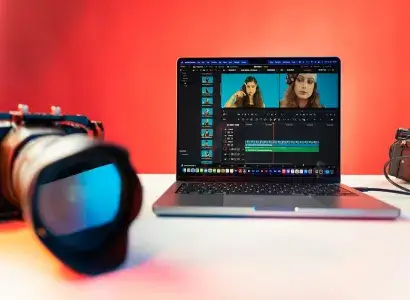
What is Non-Linear Editing? A 2025 Guide to Smarter Video Creation. In 2025, video content is more dominant than ever, and content creators—ranging from vloggers and bloggers, to educators and brands—are utilizing high-quality video editing like never before. Whether you’re putting together a travel log or making a tutorial, the way you edit your footage will be the difference. Non-linear editing (NLE) is one of the most game-changing introductions to video editing that has taken it by storm. Non-linear editing is not just another buzzword. This is the new standard in video editing. In this blog, we will explain: Now, let’s get into it! 🧠 What is Non-Linear Editing (NLE)? Non-linear editing (NLE) is a style of editing video or audio digitally, where you can order, cut, change, or embellish clips without changing any of the original files. One way to think about it is, you are using a digital “timeline” to edit, where you can drag-and-drop, delete, add effects, or undo changes, and not destroy your source. Instead of having to edit in a linear fashion (one unit after another, like old VHS tapes), you can move around as you please. Do you want to take a scene from the end of the film and move it to the beginning – easy. Do you want to change or add a transition or color correction to only minimal parts of the film, done in seconds? 🆚 Non-Linear vs. Linear Editing: What’s the Difference? Feature Linear Editing Non-Linear Editing Editing Order Sequential Any order (non-destructive) Flexibility Limited Extremely flexible Source Material Can overwrite Stays intact Tools Analog hardware Digital software Common Today? Rare Standard Analog to linear editing is very different compared to the ease of editing with all the digital NLE suites today. When you were editing with a physical tape in the 70s-90s. There was no chance to change your mind, your cut was final unless you re-recorded it. Today, you can easily try something new or different because of the digital NLE editing tools, like Adobe Premiere Pro, Final Cut Pro, and DaVinci Resolve. 🔧 How Non-Linear Editing Works (2025 Workflow) Here is a typical NLE workflow that creators are using in 2025: As 2025 NLE is established and solidified, AI integrators will automate aspects of NLE workflow (the inclusion of performance-specific edits from AI, like automatically suggesting moments to cut, auto-detecting bad takes, and separating B-roll from your video)–so it will be different moving forward. 📹 Non-Linear Editing (NLE) Tools for 2025. These are some of the best and most popular NLE tools currently available: 📈 Reasons Bloggers & Content Creators Should Embrace NLE in 2025 🎯 SEO Tip: Insert Video Content in Blogs using Non-Linear Editing. Adding video content into blog posts (particularly well-edited, optimized video content) reduces bounce rate and improves time on page—both SEO signals that matter in 2025. Here are examples of adding video: Plus, sites like YouTube index captions and keywords, giving you improved organic discovery opportunities. 🚀 Final Thoughts: Adopt NLE for Smarter, Faster, Better Videos. Non-linear editing is more than a technique—it’s the backbone of video making today. Whether you’re trying your hand at making an Instagram Reel, a blog-tutorial, or even a full-length documentary, knowing how to harness NLE can help you build content that is simple and simplistic in today’s vast digital world. And in 2025—and beyond—when “content” is consumed in milliseconds, quality and speed are everything! Frequently Ask Questations

Enhancing Your Blog’s Visuals with UI Tools (2025)

Enhancing Your Blog's Visuals with UI Tools (2025), digitalanivipractice

Enhancing Your Blog’s Visuals with UI Tools (2025) In 2025, your blog is not only expected to be informational but also visually appealing. Users are looking for visual engagement, and that is where UI tools come into play. It does not matter if you are a lone blogger or a brand content creator using a team of bloggers — with the right UI tools, you can change your blog from “just another website” to a click-tastic, scroll-stopping experience. In this guide, we are going to show you how to use these top UI tools to build a visually engaging blog that is also going to improve SEO and keep readers coming back. Reasons Visual Design is Important in Blogging You have about 3 seconds to capture a visitor’s attention. Good visuals can: A visually appealing blog merges typography, layout, color, whitespace, images, and interactivity into a single experience. 🧰 1. Use a visual layout tool, started as Figma or XD. Why does this matter? You should always prototype how you want the look and feel to be before you publish anything. Figma and XD allow you to: How to do it: Pro Tip: Use Figma’s Auto Layout and Grid to position elements straight away and make them responsive. 🖼️ 2. Leverage Canva to Create Blog Images & Post Graphics. Every blog post is going to need visual elements — whether that’s: Canva gives you an easy option, especially if you’re not a designer. What to make with Canva: You want the same colors, fonts, and templates to retain your blog identity. 🎨 3. Optimize Your Blog UI with Colors and Fonts. Visual UI is more than images; it’s about color psychology and typography that contribute to readability and user sentiment. UI Recommendations: Helpful tools: 🧩 4. Use Interactive Elements with UI Widgets. Adding interactive elements keeps readers engaged longer and helps with UX. You may embed: Tools: – UI UX Tip: Do not go overboard with animations – they should be subtle, quick, and have a purpose. 📷 5. Incorporate quality visuals and a B-roll. Visual storytelling goes beyond just static images. Videos, GIFs, and B-rolls can bring your blog to life. What You Can Add: Get started here: Embedding Note: Use image compression programs like TinyPNG or Squoosh to help maintain site speed by compressing visuals. 📱 6. Mobile First – Use Responsive UI Frameworks. Your blog needs to look good on mobile, where over 70% of your traffic is likely originating. How to be responsive: Tools: 7. Understand What Works Using Visual UX Tools Now that you’ve added some engaging UI, track what’s working. Tools for Assessing UI Interaction: Use this engagement to inform your design, and get users to read more! 💡 Bonus UI (User Interface) Tips for Bloggers Final Thoughts: Great UI = More Clicks, More Time Spent, More Traffic. Your blog isn’t just a collection of articles—it’s an experience. With the right selection of UI tools, you can: Whether you’re designing a new homepage in Figma or creating an infographic in Canva, always be mindful of the user’s visual experience. Frequently Ask Questions

Figma Variants 2025: Simplifying Design Systems

Figma Responsive Design 2025

Figma Variants 2025: Simplifying Design Systems The fast-moving UI/UX design world always seems to evolve, which makes it important to stay on top of trends. Figma, one of the premier design tools, has always been at the forefront of releasing one innovative feature after another that aids designers in creating, collaborating, and nurturing clever ideas. Among these incredible tools is Figma Variants evolving tool for changing the paradigm of design systems to bring greater efficiency to the workflow. In this blog, we delve into how Figma Variants in 2025 could bring effectiveness to your design process and work wonders on your productivity. What Are Figma Variants? Figma Variants are special features that allow designers to work on different variants of one component. Be it buttons in different states hover, active, disabled product cards with various attributes, Variants pull relevant components together in a single, well-structured, and easy-to-use group. In 2025, Figma Variants will upgrade with an intuitive and more sophisticated control set, as well as automation and AI that can make designing faster and smarter. AI-Powered Variant Creation With the integration of AI tools, Figma would now allow you to generate any number of variants in a blink provided you guided the system. For example, once you have designed a button in a state. AI will generate states for you like hover, active, and disabled, thus giving you a hand in designing but simultaneously cutting down the time and effort to be spent by you. Nested Variants Tame complex design systems by nesting variants within others. Such a sub-type is perfect for elaborate interfaces such as dashboards or multi-tier menus that require components to have an overriding sense. Dynamic Variant Switching Figma 2025 dynamic variant switching lets components switch automatically based on user-defined triggers or states. For example, this could allow a button to switch from “loading” to “success” to “error” states automatically in real-time while previewing interactions. Rules For Conditions of a Variant Designers could syntax variant conditional rules. For example, when a drop-down option is selected by a user, this particular component updates automatically. This enables context-aware designs and eliminates the need for the designer to make every transition available manually. Global Variants Library Share variants across teams and projects without breaking a sweat. With Global Libraries in the cloud, design systems stay in sync across multiple teams, making scaling UI/UX work easier within larger organizations. 3D Variant Integration Figma took the concept of Variants one step further with 3D design capabilities. A designer can now create 3D objects as Variants, especially for immersive interfaces in Augmented Reality (AR) and Virtual Reality (VR) projects. This opens new doors in gaming, VR applications, and e-commerce product displays. Figma Variants – Why Are They Important in 2025? The complexity of user interfaces has never been greater in the age of AR/VR and voice-enabled systems, which makes design systems even more difficult to manage. In that regard, Figma Variants are providing: How to Get To Work on Figma Variants in 2025 Figma Variants in Real Life: Use Cases E-commerce Application Interface Gaming UI Dashboard Design The Future of Figma Variants Final Thought Whether a freelance designer or a big enterprise team, Figma Variants in 2025 offers flexibility, efficiency, and further modalities necessary. For the fast-moving place of today’s intersecting demands for digital innovation. Use these tools to transform your design completely; stay on the leading edge. Frequently Ask Questions

Content Ideas for 2025: Leading the Digital Space

Content Ideas for 2025 digitalanivioracticeb

Content Ideas for 2025: Leading the Digital Space In a world fraught with the rapid paces of digital marketing and online content, being in the loop about trends and innovations is one of the most important aspects of relevance to an individual. Going into 2025, content creation processes have changed regarding technology and platform, and audience expectation has a significant impact. Whether you have been in the game or are just getting into it, you will benefit from new and fresh innovative ideas and strategies to help propel you above the competition. Here in this blog, we’re going to dive into avant-garde content creation ideas for 2025 to get you traffic, clicks, and engagement. 1. Interactive Video Contents In this way, it can be said that interactive videos have gone way above content marketing. Such engagement can, for example, allow viewers to pick outcomes, solve questions, or explore clickable objects, thus creating a more personalized and immersive experience. Ideas: 2. AI-Generated Content: No less than this AI does much more amazing magic in creating quality, customized content in no time. Ideas: 3. Short-format content is the king today. Be it TikTok YouTube Shorts or even Instagram Reels, short-form content continues to thrive. Flash, and catch camera the intent gets rewarded, and everything becomes inundated in viral campaigns. Ideas: 4. AR and VR Integration Augmented Reality (AR) and Virtual Reality (VR) content have ceased to be futuristic and have entered mainstream lifestyles. Their use gives truly immersive experiences that captivate audiences more than ever before. Ideas: 5. Sustainability Content at its Best In 2025, the audiences are extremely expressed towards eco-consciousness; therefore, the relevance of content matters regarding sustainability becomes high. This demonstrates that this is one way of earning goodwill for your brand by showing concern for environmental issues while resonating with the value of modern-age consumers. Ideas: 6. User-Generated Content (UGC) Campaigns UGC is still among the most common and well-known ways to build trust and engagement. UGC involves producing that kind of media that your audience creates, adding authenticity to your brand image and sometimes community involvement. Ideas: 7. Education And Skill Related Content More popular continues to be online learning in the year 2025. With it, providing “education” to the audience that makes his life value-added makes one an authority in their niche. Ideas: 8. Voice Search Optimized Content Through smart assistants such as Alexa and Google Assistant, voice search is changing the form of content consumption. Optimizing your content against voice queries will ensure its access by the viewer for it to retain relevancy. Ideas: 9. Voice Search Optimized Content The new generation of smart assistants such as Alexa and Google Assistant is currently influencing how we consume content. Specific to the audience of voice queries, the accessibility and relevance of your material would be greatly increased. Ideas: 10. Gamified Content Gamified content makes the experience fun and exciting. It draws users’ attention to interact and share with others; hence, making it possible to maximize clicks and traffic. Ideas: 11. Personalized Content with Data Insights Data-driven personalization transforms your content from beyond just being read to being experienced by specific users. Ideas: 12. Live streaming and Real-Time Content Live works best in case of engaging the audiences. It’s most interactive and trusting and energizes your audience. Ideas: 13. Evergreen Content Repurposed Producing new things takes a lot of time which can otherwise wasted on quality content. Heaving high-performing content never before used-collected-from-new-sources-another-angle-by which behavior gives the output some refreshing feel. Ideas: 14. 360-Degree Videos and Photos 360-degree content is a fresh, novel approach to enveloping audiences in your world. Perfect locations, events, and experiences will show well here. Ideas: Final Thoughts By the year 2025, the content landscape will be in a dynamic and continually changing space. Adoption of such next-age content creation ideas will ensure that you’re always ahead of the curve, make your audience listen or read, and even draw more traffic or clicks. But remember: combining creativity with strategy, tapping into emerging technologies, and putting your audience first are the keys. Content creation can help create all-possibilities-where opportunities are endless, from augmented-reality experiences to short video snippets and customized campaigns. This is the starting point for positive actions that will boost your online visibility in 2025. Frequently Ask Questions

Blue Microphones

Blue Microphones. digitalanivipracticeb

Blue Microphones is a well-known name in the audio world. For making wonderful microphones that serve different purposes from professional studio recording. And different types of podcasting to gaming and home studio setups. The company produces various styles of mic’s each crafted with some unique characteristics required by various types of audio recording needs. Famous Microphones Models from Blue The Blue Yeti: Blue Yeti X: The Blue Snowball: Snowball iCE: Spark SL: Blue Ember: Blue Microphones Wireless Why Choose Blue Microphones? Applications of Blue Microphones Final Thoughts As a reliable audio manufacturer. Blue Microphones provides several kinds of microphones for individuals at different levels from novices to professionals. A simple USB microphone can meet casual requirements. While Blue’s high-end studio-quality XLR microphone suits you best. Frequently Ask Questions

About Website, digitalanivipractice

Quick Links

Contact Us

Copyright © 2026 Digital Ani Vi Practice. All rights reserved.

Optimized with PageSpeed Ninja